Connect 4
屏風式四子棋(Connect Four),簡稱四子棋,是Howard Wexler在1974年推出的連棋類遊戲。
[TOC]
0. 本章重點
- 怎樣用演算法去製這一個會捉棋的AI。
1. 建立spot class, gameBoard class和遊戲畫面
connectFour.pyde:
from spot import *
from gameBoard import *

gameBoard = 0

def setup():
    global grids, gameBoard

    size(700, 600)
    ellipseMode(CENTER)
    frameRate(10)

    gameBoard = GameBoard()

def draw():
    background(200)
gameBoard.display()gameBoard.py:
from spot import *

class GameBoard(object):
    def __init__(self ):
        self.grids = []
        for i in range(6):
            temp = []
            for j in range(7):
                temp.append(Spot(i, j, width/7*(j+.5),height/6*(i+.5), ''))
            self.grids.append(temp)

    def display(self):
        for i in range(6):
            for j in range(7):
self.grids[i][j].display()spot.py:
class Spot(object):
    def __init__(self, _i, _j, _x, _y, _value):
        self.i = _i
        self.j = _j
        self.x = _x
        self.y = _y
        self.value = ''

    def display(self):
        stroke('#000000')
        strokeWeight(2)
        fill(self.matchColor(self.value))
        ellipse(self.x, self.y, 80, 80)

    def matchColor(self, _value):
        if _value == '':
            return '#FFFFFF'
        elif _value == 'R':
            return '#FF5641'
        elif _value == 'Y':
            return '#FFDF37'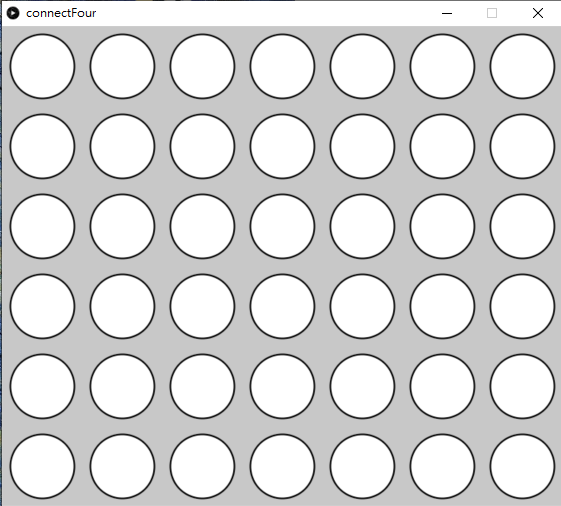
跟之前的俄羅斯方塊一樣,我們用一個叫GameBoard的class來裝起整個遊戲。之後要寫人工智能去跟玩家遊玩的話會容易後多。
class Spot(object):
    def __init__(self, _i, _j, _x, _y, _value):
        self.i = _i
        self.j = _j
        self.x = _x
        self.y = _y
self.value = ''在Spot這個class中,i和j是用來紀錄畫面的col和row的,而x和y則是其座標,方便直接顯示;而value則是用來紀錄其內容,沒有填入任任何顏色時就是'',填入黃色和紅色的話則分別是Y和R,用字符去紀錄。
2. 加入mouse操控
connect.pyde:
from spot import *
from gameBoard import *

gameBoard = 0


def setup():
    global grids, gameBoard

    size(700, 600)
    ellipseMode(CENTER)
    frameRate(10)

    gameBoard = GameBoard()


def draw():
    background(200)
    gameBoard.display()


def mousePressed():
    global gameBoard
    for i in range(7):
        if (mouseX > width/7*i and mouseX < width/7*(i+1)):
            if gameBoard.colHeight[i] < 6:
                gameBoard.colHeight[i] += 1
                gameBoard.currentCol = i
                gameBoard.currentRow = 0

print(gameBoard.colHeight)gameBoard.py:
from spot import *


class GameBoard(object):

    def __init__(self):
        self.grids = []
        for i in range(6):
            temp = []
            for j in range(7):
                temp.append(Spot(i, j, width/7*(j+.5), height/6*(i+.5), ''))
            self.grids.append(temp)

        self.currentRow = 0
        self.currnetCol = 0
        self.colHeight = [0, 0, 0, 0, 0, 0, 0]

    def display(self):
        for i in range(6):
            for j in range(7):
self.grids[i][j].display()spot.py沒有改變。
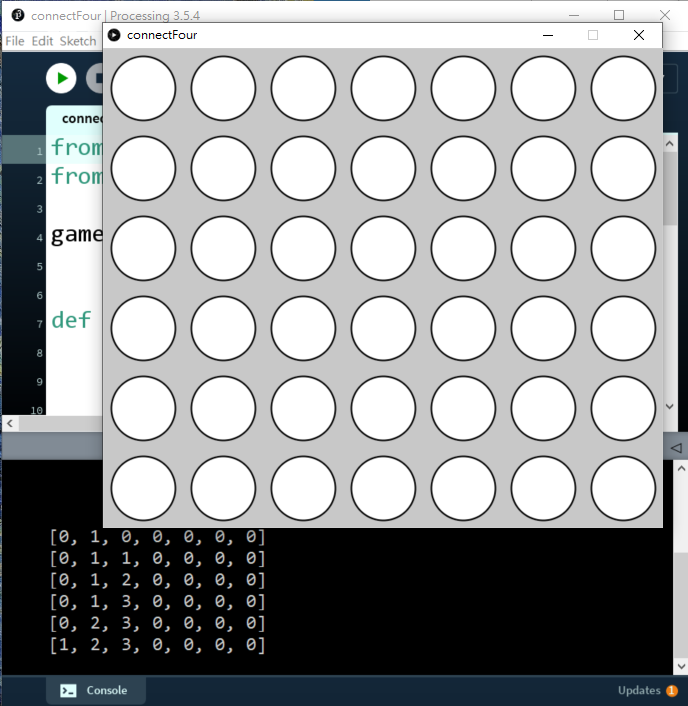
首先在gameBoard中,
class GameBoard(object):
    def __init__(self):
        #===============other codes==============
        self.currentRow = 0
        self.currnetCol = 0
self.colHeight = [0, 0, 0, 0, 0, 0, 0]加入3個變數,currnetCol為用來紀錄之後選擇要入棋的欄,而currentRow是用來紀錄該疊高到哪一個格,colHeight則用來紀錄每一欄的高度,每填一粒棋的話該行的高度就加一。
在主程式中,
def mousePressed():
    global gameBoard
    for i in range(7):
        if (mouseX > width/7*i and mouseX < width/7*(i+1)):
            if gameBoard.colHeight[i] < 6:
                gameBoard.colHeight[i] += 1
                gameBoard.currentCol = i
                gameBoard.currentRow = 0

print(gameBoard.colHeight)加入一個滑鼠函數,如果滑鼠在相對應的位置按下按鍵,則將currentCol設為i,即你按下的欄數,currentRow暫時設定為0,而colHeight則將相對應的欄加1。之後print colHeight出來debug。
3. 測試落子
connectFour.pyde:
from spot import *
from gameBoard import *

gameBoard = 0


def setup():
    global grids, gameBoard

    size(700, 600)
    ellipseMode(CENTER)
    frameRate(10)

    gameBoard = GameBoard()


def draw():
    background(200)
    gameBoard.display()


def mousePressed():
    global gameBoard
    for i in range(7):
        if (mouseX > width/7*i and mouseX < width/7*(i+1)):
gameBoard.trigger(i)gameBoard.py:
from spot import *


class GameBoard(object):

    def __init__(self):
        self.grids = []
        for i in range(6):
            temp = []
            for j in range(7):
                temp.append(Spot(i, j, width/7*(j+.5), height/6*(i+.5), ''))
            self.grids.append(temp)

        self.currentRow = 0
        self.currentCol = 0
        self.colHeight = [0, 0, 0, 0, 0, 0, 0]
        self.currentPlayer = 'R'

    def display(self):
        for i in range(6):
            for j in range(7):
                self.grids[i][j].display()

    def swapPlayer(self):
        if self.currentPlayer == 'R':
            self.currentPlayer = 'Y'
        elif self.currentPlayer == 'Y':
            self.currentPlayer = 'R'

    def trigger(self, i):
        if self.colHeight[i] < 6:
                self.colHeight[i] += 1
                self.currentCol = i
                self.currentRow = 6 - self.colHeight[i]
                self.grids[self.currentRow][self.currentCol].value = self.currentPlayer
self.swapPlayer()spot.py沒有改變。
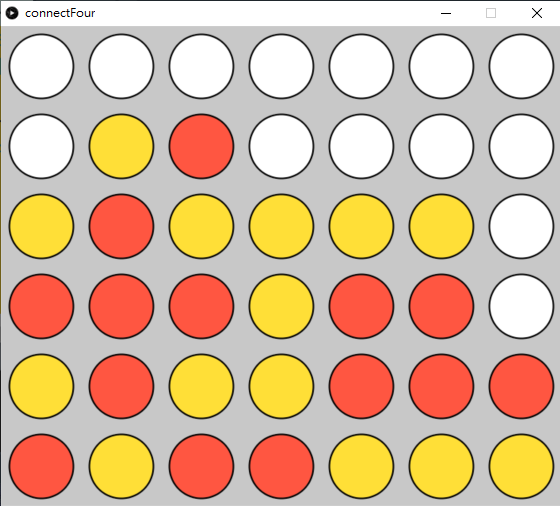
在主程式中,
def mousePressed():
    global gameBoard
    for i in range(7):
        if (mouseX > width/7*i and mouseX < width/7*(i+1)):
gameBoard.trigger(i)將原本直接測試colHeight是否能夠相加堆疊的功能,轉成一個gameBoard class的函數,方便之後跟電腦對玩時電腦操作。
在gameBoard.py中,先看看最下面的trigger()函數,
def trigger(self, i):
    if self.colHeight[i] < 6:
        self.colHeight[i] += 1
        self.currentCol = i
        self.currentRow = 6 - self.colHeight[i]
        self.grids[self.currentRow][self.currentCol].value = self.currentPlayer
self.swapPlayer()承上面主程式的gameBoard.trigger(),在這個class中,開一個叫trigger()的函數,就是落棋落在哪一欄。如果該欄未滿(if self.colHeight[i] < 6:),就將該欄的高度self.colHeight[i]加一,currentCol指定在這一行,currentRow直接指定為6-colHeight[i],即該欄堆疊的高度,之後就將該個格填成currentPlayer,這個變數只有R和Y兩個值,用來紀錄現在的回合是哪個顏色,最後就用swapPlayer()交換顏色。
def swapPlayer(self):
    if self.currentPlayer == 'R':
        self.currentPlayer = 'Y'
    elif self.currentPlayer == 'Y':
self.currentPlayer = 'R'而上面的swapPlayer()函數,則是用來交換R和Y兩個值。
最後記得在最上面的__init()__中,加入self.currentPlayer = 'R'紅子先下棋。原本我的設計中,是有動畫做落子動作,模擬現實情況棋子會一步一步落下的,但為簡潔起見,這次的遊戲重點並不在此,就不做這個功能了,如果你有與趣做到一步一步落棋的效果,可以參考上一章Tetris 遊戲。
4. 檢查是否勝出
connectFour.pyde:
from spot import *
from gameBoard import *

gameBoard = 0


def setup():
    global grids, gameBoard

    size(700, 600)
    ellipseMode(CENTER)
    frameRate(10)

    gameBoard = GameBoard()


def draw():
    background(200)
    gameBoard.display()


def mousePressed():
    global gameBoard
    for i in range(7):
        if (mouseX > width/7*i and mouseX < width/7*(i+1)):
            gameBoard.trigger(i)
            winner = gameBoard.checkWin()
print(winner)gameBoard.py:
from spot import *


class GameBoard(object):

    def __init__(self):
        self.grids = []
        for i in range(6):
            temp = []
            for j in range(7):
                temp.append(Spot(i, j, width/7*(j+.5), height/6*(i+.5), ''))
            self.grids.append(temp)

        self.currentRow = 0
        self.currentCol = 0
        self.colHeight = [0, 0, 0, 0, 0, 0, 0]
        self.currentPlayer = 'R'

    def display(self):
        for i in range(6):
            for j in range(7):
                self.grids[i][j].display()

    def swapPlayer(self):
        if self.currentPlayer == 'R':
            self.currentPlayer = 'Y'
        elif self.currentPlayer == 'Y':
            self.currentPlayer = 'R'

    def trigger(self, i):
        if self.colHeight[i] < 6:
            self.colHeight[i] += 1
            self.currentCol = i
            self.currentRow = 6 - self.colHeight[i]
            self.grids[self.currentRow][self.currentCol].value = self.currentPlayer
            self.swapPlayer()

    def checkWin(self):
        gs = self.grids

        # check horizontal
        for i in range(6):
            for j in range(4):
                if gs[i][j].value == gs[i][j+1].value == gs[i][j+2].value == gs[i][j+3].value\
                        and gs[i][j].value != '':
                    return gs[i][j].value

        # check vertical
        for i in range(3):
            for j in range(7):
                if gs[i][j].value == gs[i+1][j].value == gs[i+2][j].value == gs[i+3][j].value\
                        and gs[i][j].value != '':
                    return gs[i][j].value

        # check right cross
        for i in range(3):
            for j in range(4):
                if gs[i][j].value == gs[i+1][j+1].value == gs[i+2][j+2].value == gs[i+3][j+3].value\
                        and gs[i][j].value != '':
                    return gs[i][j].value

        # check left cross
        for i in range(3):
            for j in range(3, 7):
                if gs[i][j].value == gs[i+1][j-1].value == gs[i+2][j-2].value == gs[i+3][j-3].value\
                        and gs[i][j].value != '':
return gs[i][j].valuespot.py沒有改變。
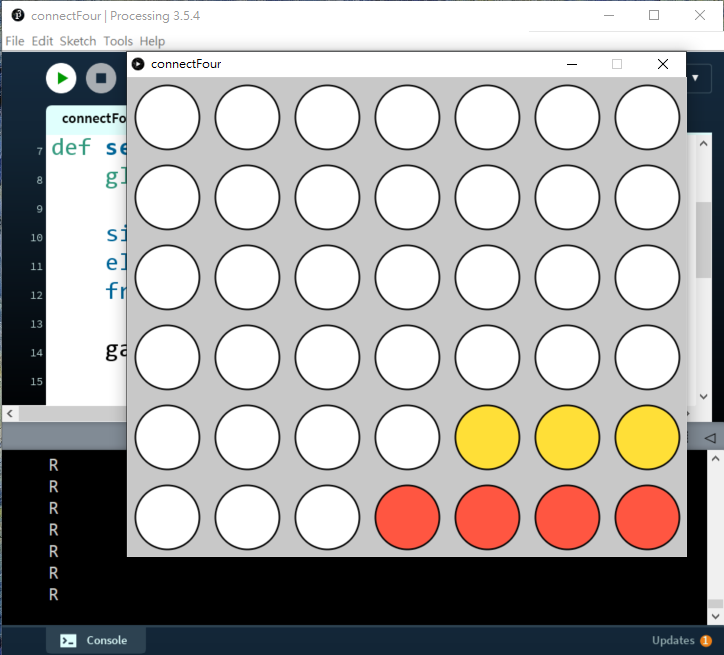
先看看gameBoard.py的class,主要是在最下方加入了checkWin()的函數,這部分我直接用圖片去說明:
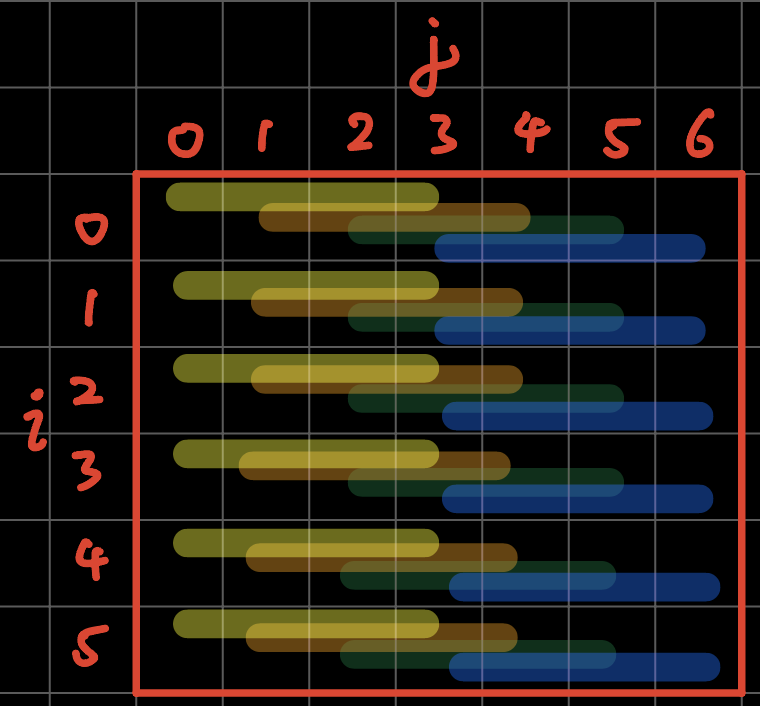
# check horizontal
for i in range(6):
    for j in range(4):
        if gs[i][j].value == gs[i][j+1].value == gs[i][j+2].value == gs[i][j+3].value\
                and gs[i][j].value != '':
return gs[i][j].value如圖所示,我們首先檢查打橫是否有四個連續一樣,但又不是''空內容的格,由於打橫只有7欄,我們又連續檢查到j+3(即當格後的第4格),所以j只需要for j in range(4),例如上圖藍色的檢查條,只由j=3出發,去到j=6。
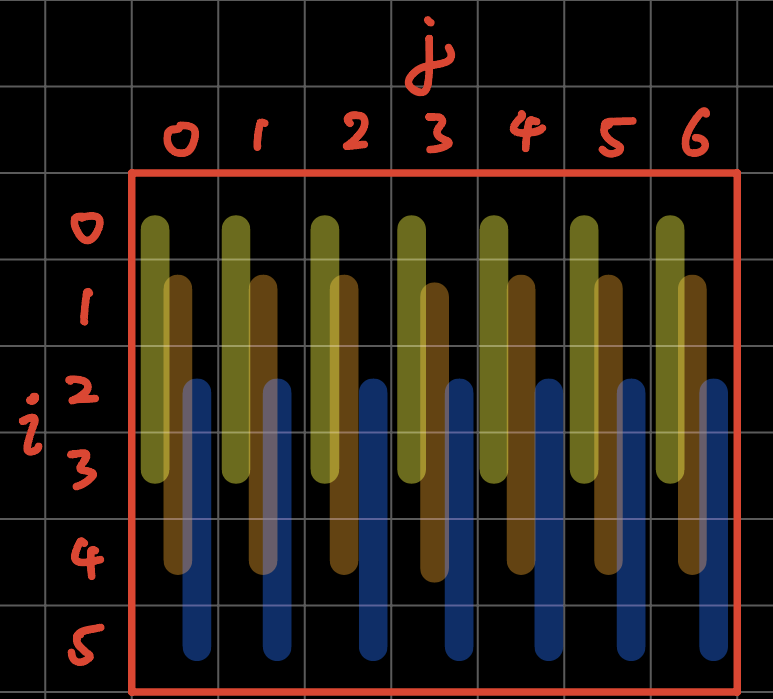
# check vertical
for i in range(3):
    for j in range(7):
        if gs[i][j].value == gs[i+1][j].value == gs[i+2][j].value == gs[i+3][j].value\
                and gs[i][j].value != '':
return gs[i][j].value同理,最後藍色的檢查條只有i=2到i=5,所以i只需要for i in range(3)就夠了。
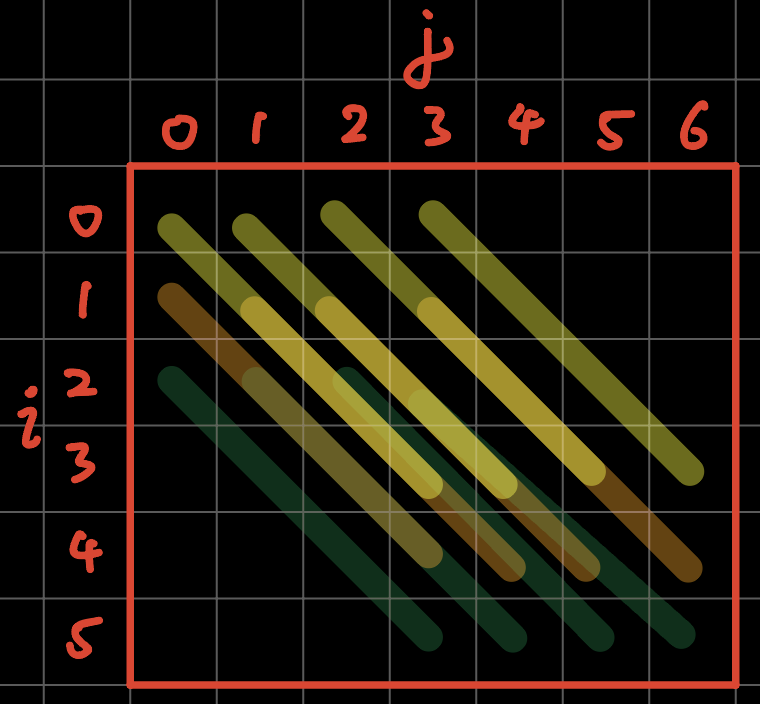
# check right cross
for i in range(3):
    for j in range(4):
        if gs[i][j].value == gs[i+1][j+1].value == gs[i+2][j+2].value == gs[i+3][j+3].value\
                and gs[i][j].value != '':
            return gs[i][j].value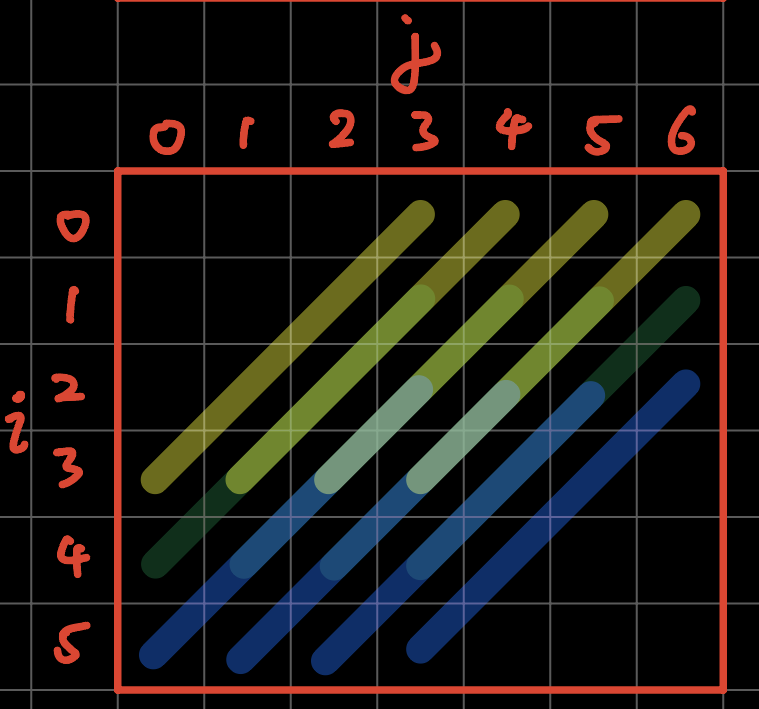
# check left cross
for i in range(3):
    for j in range(3, 7):
        if gs[i][j].value == gs[i+1][j-1].value == gs[i+2][j-2].value == gs[i+3][j-3].value\
                and gs[i][j].value != '':
return gs[i][j].value其他我就不再冗述了。當然,我做我方法是分開4次for loop,分別檢查打橫、打直和兩個打斜。你也可以只用一個for loop,同時檢查4個分向。又或者,栱子是由最底部開始堆疊的,所以由最下方檢查到最上方,會比較快找出贏家,減少運算時間。
5. 加入game over和you win
connectFour.pyde:
from spot import *
from gameBoard import *

gameBoard = 0


def setup():
    global grids, gameBoard

    size(700, 600)
    ellipseMode(CENTER)
    frameRate(10)

    gameBoard = GameBoard()


def draw():
    background(200)
    gameBoard.display()


def mousePressed():
    global gameBoard
    for i in range(7):
        if (mouseX > width/7*i and mouseX < width/7*(i+1)):
gameBoard.trigger(i)gameBoard.py:
from spot import *


class GameBoard(object):

    def __init__(self):
        self.grids = []
        for i in range(6):
            temp = []
            for j in range(7):
                temp.append(Spot(i, j, width/7*(j+.5), height/6*(i+.5), ''))
            self.grids.append(temp)

        self.currentRow = 0
        self.currentCol = 0
        self.colHeight = [0, 0, 0, 0, 0, 0, 0]
        self.currentPlayer = 'R'
        self.gameOver = False
        self.winner = None

	def display(self):
        for i in range(6):
                for j in range(7):
                    self.grids[i][j].display()
        if self.gameOver == True:
            textAlign(CENTER, CENTER)
            textSize(100)
            fill('#0000FF')
            if self.winner == 'R':
                text('YOU WIN!!!!', width/2, height/2)
            elif self.winner == 'Y':
                text('GAME OVER', width/2, height/2)


    def swapPlayer(self):
        if self.currentPlayer == 'R':
            self.currentPlayer = 'Y'
        elif self.currentPlayer == 'Y':
            self.currentPlayer = 'R'

    def trigger(self, i):
        if self.gameOver == False:
            if self.colHeight[i] < 6:
                self.colHeight[i] += 1
                self.currentCol = i
                self.currentRow = 6 - self.colHeight[i]
                self.grids[self.currentRow][self.currentCol].value = self.currentPlayer
                self.winner = self.checkWin()
                if self.winner != None:
                    self.gameOver = True
                    return
                self.swapPlayer()

    def checkWin(self):
        gs = self.grids

        # check horizontal
        for i in range(6):
            for j in range(4):
                if gs[i][j].value == gs[i][j+1].value == gs[i][j+2].value == gs[i][j+3].value\
                        and gs[i][j].value != '':
                    return gs[i][j].value

        # check vertical
        for i in range(3):
            for j in range(7):
                if gs[i][j].value == gs[i+1][j].value == gs[i+2][j].value == gs[i+3][j].value\
                        and gs[i][j].value != '':
                    return gs[i][j].value

        # check right cross
        for i in range(3):
            for j in range(4):
                if gs[i][j].value == gs[i+1][j+1].value == gs[i+2][j+2].value == gs[i+3][j+3].value\
                        and gs[i][j].value != '':
                    return gs[i][j].value

        # check left cross
        for i in range(3):
            for j in range(3, 7):
                if gs[i][j].value == gs[i+1][j-1].value == gs[i+2][j-2].value == gs[i+3][j-3].value\
                        and gs[i][j].value != '':
return gs[i][j].valuespot.py沒有改變。
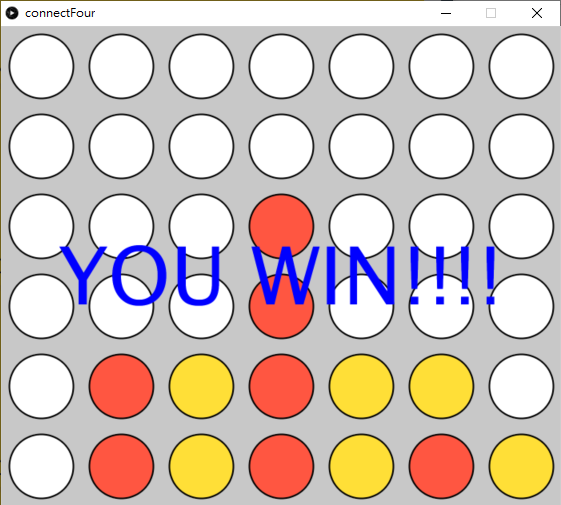
主要改變都是在gameBoard的class,但先說明一下主程式:
def mousePressed():
    global gameBoard
    for i in range(7):
        if (mouseX > width/7*i and mouseX < width/7*(i+1)):
gameBoard.trigger(i)將原本 winner = gameBoard.checkWin()和print(winner)都刪除,一會兒gameBoard的class中,因我們要紀錄誰是贏家做出對應的反應。
在gameBoard.py中,
 def __init__(self):
    #====other codes======
    self.currentPlayer = 'R'
    self.gameOver = False
self.winner = None在初始化的最下,加入gameOver和winner兩個變數。
def display(self):
    for i in range(6):
            for j in range(7):
                self.grids[i][j].display()
    if self.gameOver == True:
        textAlign(CENTER, CENTER)
        textSize(100)
        fill('#0000FF')
        if self.winner == 'R':
            text('YOU WIN!!!!', width/2, height/2)
        elif self.winner == 'Y':
text('GAME OVER', width/2, height/2)在顯示函數中,加入,如果gameOver的話,就看看winner是誰,是R的話即我方贏,如Y的話即電腦贏。
def trigger(self, i):
    if self.gameOver == False:
        if self.colHeight[i] < 6:
            self.colHeight[i] += 1
            self.currentCol = i
            self.currentRow = 6 - self.colHeight[i]
            self.grids[self.currentRow][self.currentCol].value = self.currentPlayer
            self.winner = self.checkWin()
            if self.winner != None:
                self.gameOver = True
                return
self.swapPlayer()下棋的函數中,首先要加入一個限制,只有在self.gameOver == False的情況下才會下棋。其次,將原本在主程式的self.winner = self.checkWin()搬過來,同時保留winner變數,如果winner有內容的話,就將gameOver變成True。
到這裡,今次的遊戲,手動版就暫時作結,因遊戲規則和畫面都十分簡單,而且為聚焦於遊戲本身,我也刻意地減少了動畫效果和美化。下一節會首先介紹一下遊戲AI的演算法,之後就會教大家用minmax演算法製造一個AI跟玩家對奕。