Tetris
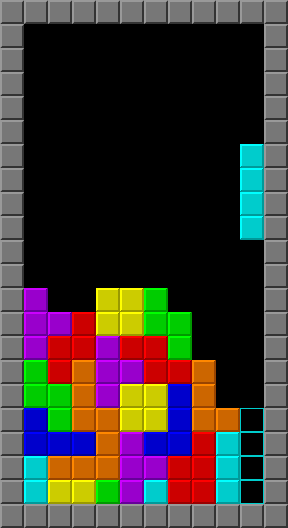
《俄羅斯方塊》(俄語:Тетрис,英語:Tetris),是1980年末期至1990年代初期風靡全世界的電腦遊戲,是落下型益智遊戲的始祖,為蘇聯首個在美國發佈的娛樂軟件。此遊戲最初由阿列克謝·帕基特諾夫在蘇聯設計和編寫,於1984年6月6日首次發佈,當時他正在蘇聯科學院電算中心工作。此遊戲的名稱是由希臘語數字「四」的前綴「tetra-」(因所有落下方塊皆由四塊組成)和帕基特諾夫最喜歡的運動網球(「tennis」)拼接而成,華語地區則因遊戲為俄羅斯人發明普遍稱為「俄羅斯方塊」。
[TOC]
0. 本章重點
- 熟習class的用法
frameRate()外控制速度的方法
1. 準備畫面和class Spot用來裝起所有格
tetris.pyde:
from spot import *
from gameBoard import *

gridSize = 40
gameBoard = 0

def setup():
    global gameBoard
    size(gridSize*(12+7), gridSize*22)
    gameBoard = GameBoard(gridSize)

def draw():
    drawBackground()
    gameBoard.show()

def drawBackground():
    fill('#777777')
    for i in range(12+7):
        for j in range(22):
rect(i*gridSize, j*gridSize, gridSize, gridSize)gameBoard.py:
from spot import *

class GameBoard(object):

    def __init__(self, _gridSize):
        self.grids = []
        for x in range(10):
            tempGrids = []
            for y in range(20):
                tempGrids.append(Spot(x, y, x*_gridSize+_gridSize, y*_gridSize+_gridSize, _gridSize, _gridSize))
            self.grids.append(tempGrids)

    def show(self):
        for x in range(10):
            for y in range(20):
self.grids[x][y].show('#000000')spot.py:
class Spot(object):
    def __init__(self, _i, _j, _x, _y, _w, _h):
        self.i = _i
        self.j = _j
        self.x = _x
        self.y = _y
        self.w = _w
        self.h = _h

    def show(self, _color):
        fill(_color)
        stroke(200)
        rect(self.x, self.y, self.w, self.h)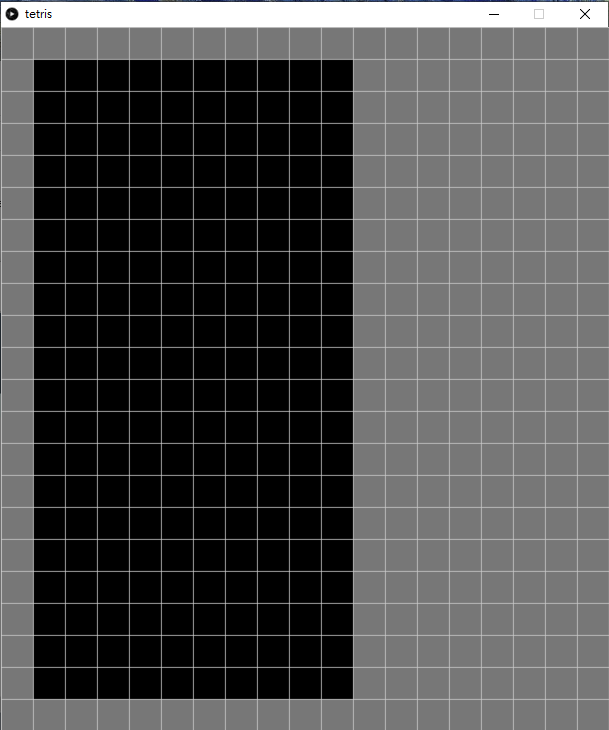
新增兩個class,首先是 spot是用來裝起每一個格的變數,這個class包含i和j是格的行列,x和y是其顯示座標,w和h則是格的大小。
另一個class GameBoard用來真正裝起整個game的畫面,之所以要用一個class去包起,而不直接在draw()中直接去畫,一來是為了簡潔,二來是為了擴展需要,寫好之後可以同一時間加多另一個gameboard,可以實玩雙打。
2. 俄羅斯方塊的元素
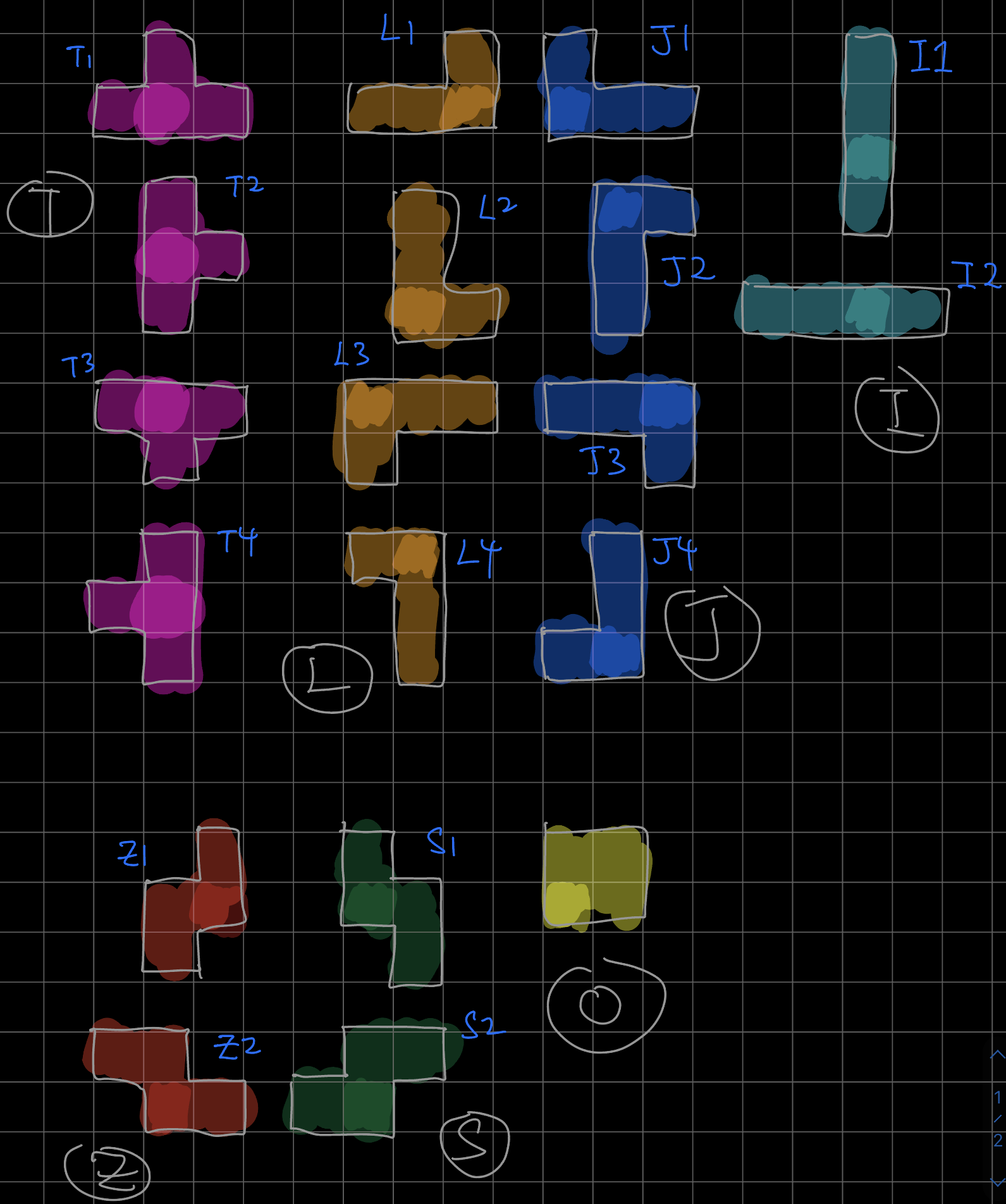
俄羅斯方塊共有7個元素,依次分別為T,L,J,I,Z,S和O。而這此元素亦可以旋轉,所以一共19個可能性。
tetris.pyde:
from spot import *
from gameBoard import *

gridSize = 40
gameBoard = 0

def setup():
    global gameBoard
    size(gridSize*(12+7), gridSize*22)
    gameBoard = GameBoard(gridSize)

def draw():
    drawBackground()
    gameBoard.show()
    gameBoard.grids[3][0].name ='T'
    gameBoard.grids[3][1].name ='L'
    gameBoard.grids[3][2].name ='J'
    gameBoard.grids[3][3].name ='I'
    gameBoard.grids[3][4].name ='Z'
    gameBoard.grids[3][5].name ='S'
    gameBoard.grids[3][6].name ='O'

def drawBackground():
    fill('#777777')
    for i in range(12+7):
        for j in range(22):
rect(i*gridSize, j*gridSize, gridSize, gridSize)spot.py:
from spot import *

class GameBoard(object):

    def __init__(self, _gridSize):
        self.grids = []
        for x in range(10):
            tempGrids = []
            for y in range(20):
                tempGrids.append(Spot(x, y, x*_gridSize+_gridSize, y*_gridSize+_gridSize, _gridSize, _gridSize))
            self.grids.append(tempGrids)

    def show(self):
        for x in range(10):
            for y in range(20):
self.grids[x][y].show()gameBoard.py:
class Spot(object):
    def __init__(self, _i, _j, _x, _y, _w, _h):
        self.i = _i
        self.j = _j
        self.x = _x
        self.y = _y
        self.w = _w
        self.h = _h
        self.name = ''

    def show(self):
        if self.name == '':
            fill(0)
        elif self.name == 'T':
            fill('#FF55FF')
        elif self.name == 'L':
            fill('#C4A484')
        elif self.name == 'J':
            fill('#5555FF')
        elif self.name == 'I':
            fill('#52BAA2')
        elif self.name == 'Z':
            fill('#FF5555')
        elif self.name == 'S':
            fill('#55FF55')
        elif self.name == 'O':
            fill('#FFFF55')
        stroke(200)
        rect(self.x, self.y, self.w, self.h)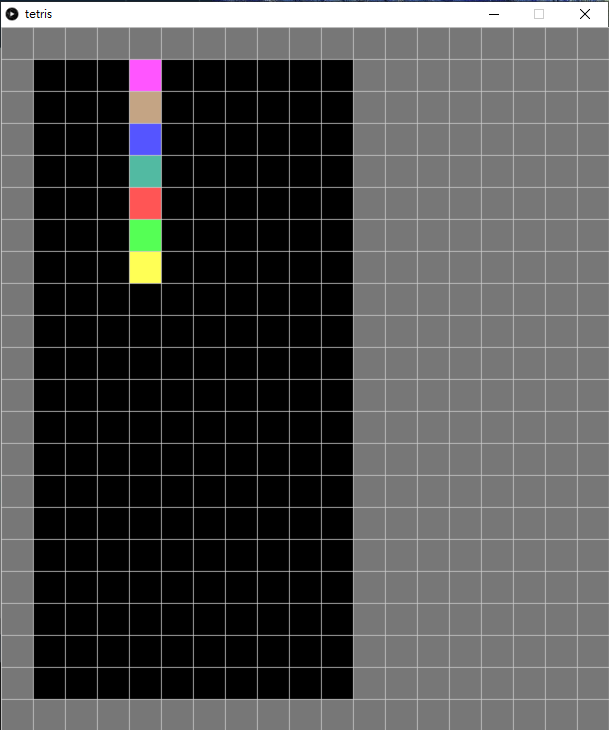
在上一個版本中,grids的show()是根據輸入的顏色,用來測試和效果。接著今次的版本,我們要根據上述俄羅斯方塊的元素去填顏色。
在class Spot中,
def show(self):
    if self.name == '':
        fill(0)
    elif self.name == 'T':
        fill('#FF55FF')
    elif self.name == 'L':
        fill('#C4A484')
    elif self.name == 'J':
        fill('#5555FF')
    elif self.name == 'I':
        fill('#52BAA2')
    elif self.name == 'Z':
        fill('#FF5555')
    elif self.name == 'S':
        fill('#55FF55')
    elif self.name == 'O':
        fill('#FFFF55')
    stroke(200)
rect(self.x, self.y, self.w, self.h)將之前的show()加入不同元素顯示不同顏色。
之後在主頁的中,
def draw():
    drawBackground()
    gameBoard.show()
    gameBoard.grids[3][0].name ='T'
    gameBoard.grids[3][1].name ='L'
    gameBoard.grids[3][2].name ='J'
    gameBoard.grids[3][3].name ='I'
    gameBoard.grids[3][4].name ='Z'
    gameBoard.grids[3][5].name ='S'
gameBoard.grids[3][6].name ='O'測試一下不同的元素是否有對應相對的顏色。
3. 新增鄰居
tetris.pyde:
from spot import *
from gameBoard import *

gridSize = 40
gameBoard = 0

def setup():
    global gameBoard
    size(gridSize*(12+7), gridSize*22)
    gameBoard = GameBoard(gridSize)
    gameBoard.addNeighbors()
    gameBoard.grids[5][8].name = 'L'
    println(gameBoard.grids[5][8].neighbors)
    gameBoard.grids[5][8].neighbors[0].name = 'J'
    gameBoard.grids[5][8].neighbors[1].name = 'S'
    gameBoard.grids[5][8].neighbors[2].name = 'Z'
    gameBoard.grids[5][8].neighbors[3].name = 'O'

def draw():
    drawBackground()
    gameBoard.show()

def drawBackground():
    fill('#777777')
    for i in range(12+7):
        for j in range(22):
rect(i*gridSize, j*gridSize, gridSize, gridSize)spot.py:
class Spot(object):
    def __init__(self, _i, _j, _x, _y, _w, _h):
        self.i = _i
        self.j = _j
        self.x = _x
        self.y = _y
        self.w = _w
        self.h = _h
        self.name = ''
        self.neighbors = []
        for i in range(4):
            self.neighbors.append('')

    def show(self):
        if self.name == '':
            fill(0)
        elif self.name == 'T':
            fill('#FF55FF')
        elif self.name == 'L':
            fill('#C4A484')
        elif self.name == 'J':
            fill('#5555FF')
        elif self.name == 'I':
            fill('#52BAA2')
        elif self.name == 'Z':
            fill('#FF5555')
        elif self.name == 'S':
            fill('#55FF55')
        elif self.name == 'O':
            fill('#FFFF55')
        stroke(200)
        rect(self.x, self.y, self.w, self.h)

    def addNeighbors(self, _grid):
        if self.j > 0:
            self.neighbors[0] = _grid[self.i][self.j-1]  #UP
        if self.i < 9:
            self.neighbors[1] = _grid[self.i+1][self.j]  #RIGHT
        if self.j < 19:
            self.neighbors[2] = _grid[self.i][self.j+1]  #DOWN
        if self.i > 0:
self.neighbors[3] = _grid[self.i-1][self.j] #LEFTgameBoard.py:
from spot import *

class GameBoard(object):

    def __init__(self, _gridSize):
        self.grids = []
        for x in range(10):
            tempGrids = []
            for y in range(20):
                tempGrids.append(Spot(x, y, x*_gridSize+_gridSize, y*_gridSize+_gridSize, _gridSize, _gridSize))
            self.grids.append(tempGrids)

    def addNeighbors(self):
        for i in range(10):
            for j in range(20):
                self.grids[i][j].addNeighbors(self.grids)

    def show(self):
        for x in range(10):
            for y in range(20):
                self.grids[x][y].show()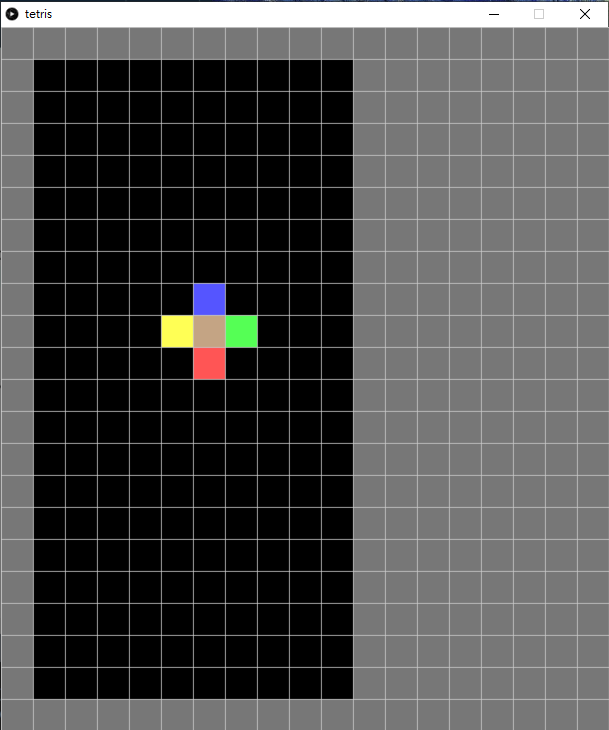
在class Spot中,
def addNeighbors(self, _grid):
    if self.j > 0:
        self.neighbors[0] = _grid[self.i][self.j-1]  #UP
    if self.i < 9:
        self.neighbors[1] = _grid[self.i+1][self.j]  #RIGHT
    if self.j < 19:
        self.neighbors[2] = _grid[self.i][self.j+1]  #DOWN
    if self.i > 0:
self.neighbors[3] = _grid[self.i-1][self.j] #LEFT加入addNeighbors()的函數,跟之前一樣,四個鄰居的次序分別是上、右、下、左順時針方向。
def addNeighbors(self):
        for i in range(10):
            for j in range(20):
self.grids[i][j].addNeighbors(self.grids)之後在GameBoardclass中,將10x20個spot都執行addNeighbors()。
def setup():
    global gameBoard
    size(gridSize*(12+7), gridSize*22)
    gameBoard = GameBoard(gridSize)
    gameBoard.addNeighbors()
    gameBoard.grids[5][8].name = 'L'
    println(gameBoard.grids[5][8].neighbors)
    gameBoard.grids[5][8].neighbors[0].name = 'J'
    gameBoard.grids[5][8].neighbors[1].name = 'S'
    gameBoard.grids[5][8].neighbors[2].name = 'Z'
gameBoard.grids[5][8].neighbors[3].name = 'O'最後就可以在主程式中,執行addNeighbors(),為了測試是否正確加入鄰居,可以將四個鄰居都設定成不同的元素來測試看看顏色。
4. 新增Tetromino Block
tetris.pyde:
from spot import *
from gameBoard import *

gridSize = 40

gameBoard = 0

def setup():
    global gameBoard
    size(gridSize*(12+7), gridSize*22)
    gameBoard = GameBoard(gridSize)
    gameBoard.addNeighbors()

def draw():
    drawBackground()
    gameBoard.show()

def drawBackground():
    fill('#777777')
    for i in range(12+7):
        for j in range(22):
rect(i*gridSize, j*gridSize, gridSize, gridSize)gameBoard.py:
from spot import *
from block import *

class GameBoard(object):
    def __init__(self, _gridSize):
        self.grids = []
        self.block = Block(3,0,'T', self.grids)
        for x in range(10):
            tempGrids = []
            for y in range(20):
                tempGrids.append(Spot(x, y, x*_gridSize+_gridSize, y*_gridSize+_gridSize, _gridSize, _gridSize))
            self.grids.append(tempGrids)

    def addNeighbors(self):
        for i in range(10):
            for j in range(20):
                self.grids[i][j].addNeighbors(self.grids)

    def show(self):
        self.block.setType()
        for x in range(10):
            for y in range(20):
self.grids[x][y].show()spot.py:
class Spot(object):
    def __init__(self, _i, _j, _x, _y, _w, _h):
        self.i = _i
        self.j = _j
        self.x = _x
        self.y = _y
        self.w = _w
        self.h = _h
        self.name = ''
        self.neighbors = []
        for i in range(4):
            self.neighbors.append('')

    def show(self):
        if self.name == '':
            fill(0)
        elif self.name == 'T':
            fill('#FF55FF')
        elif self.name == 'L':
            fill('#DD6800')
        elif self.name == 'J':
            fill('#004ADD')
        elif self.name == 'I':
            fill('#0DCCCC')
        elif self.name == 'Z':
            fill('#FF5555')
        elif self.name == 'S':
            fill('#00DD26')
        elif self.name == 'O':
            fill('#DDDD00')
        stroke(200)
        rect(self.x, self.y, self.w, self.h)

    def addNeighbors(self, _grid):
        if self.j > 0:
            self.neighbors[0] = _grid[self.i][self.j-1]  #UP
        if self.i < 9:
            self.neighbors[1] = _grid[self.i+1][self.j]  #RIGHT
        if self.j < 19:
            self.neighbors[2] = _grid[self.i][self.j+1]  #DOWN
        if self.i > 0:
self.neighbors[3] = _grid[self.i-1][self.j] #LEFTblock.py:
from spot import *

class Block(object):

    shapeIndex = ['I', 'Z', 'S', 'J', 'L', 'T', 'O']

    # Shapes of the blocks
    shapes = [
        [[1, 5, 9, 13], [4, 5, 6, 7]], #type 'I'
        [[4, 5, 9, 10], [2, 6, 5, 9]], #type 'Z'
        [[6, 7, 9, 10], [1, 5, 6, 10]], #type 'S'
        [[1, 2, 5, 9], [0, 4, 5, 6], [1, 5, 9, 8], [4, 5, 6, 10]], #type 'J'
        [[1, 2, 6, 10], [5, 6, 7, 9], [2, 6, 10, 11], [3, 5, 6, 7]], #type 'L'
        [[1, 4, 5, 6], [1, 4, 5, 9], [4, 5, 6, 9], [1, 5, 6, 9]], #type 'T'
        [[1, 2, 5, 6]], #type 'O'
    ]

    def __init__(self, _x, _y, _type, _grid):
        self.x = _x
        self.y = _y
        self.type = _type
        self.grid = _grid

        self.rotation = 0
        self.index = self.shapeIndex.index(self.type)

    def shape(self):
        return self.shapes[self.index][self.rotation]

    def rotate(self):
        self.rotation = (self.rotation + 1) % len(self.shapes[self.index])

    def setType(self):
        for i in range(4):
            for j in range(4):
                _index = i*4+j
                if _index in self.shape():
                    self.grid[self.x+j][self.y+i].name = self.type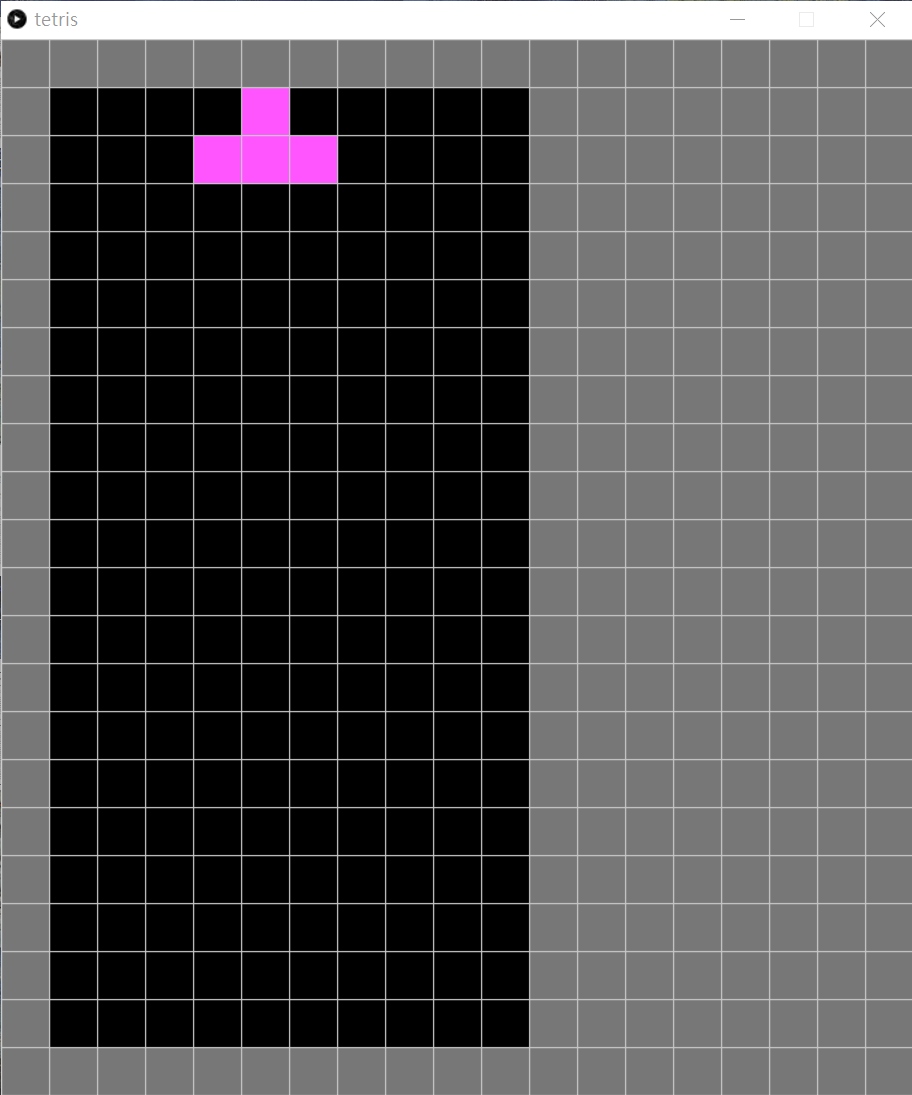
在主程式 tetris.pyde,將之前用來debug的內容刪除。 spot.py沒有變化,貼出來只是方便大家對一對整個program,看看有否錯漏。
shapeIndex = ['I', 'Z', 'S', 'J', 'L', 'T', 'O']

# Shapes of the blocks
shapes = [
    [[1, 5, 9, 13], [4, 5, 6, 7]], #type 'I'
    [[4, 5, 9, 10], [2, 6, 5, 9]], #type 'Z'
    [[6, 7, 9, 10], [1, 5, 6, 10]], #type 'S'
    [[1, 2, 5, 9], [0, 4, 5, 6], [1, 5, 9, 8], [4, 5, 6, 10]], #type 'J'
    [[1, 2, 6, 10], [5, 6, 7, 9], [2, 6, 10, 11], [3, 5, 6, 7]], #type 'L'
    [[1, 4, 5, 6], [1, 4, 5, 9], [4, 5, 6, 9], [1, 5, 6, 9]], #type 'T'
    [[1, 2, 5, 6]], #type 'O'
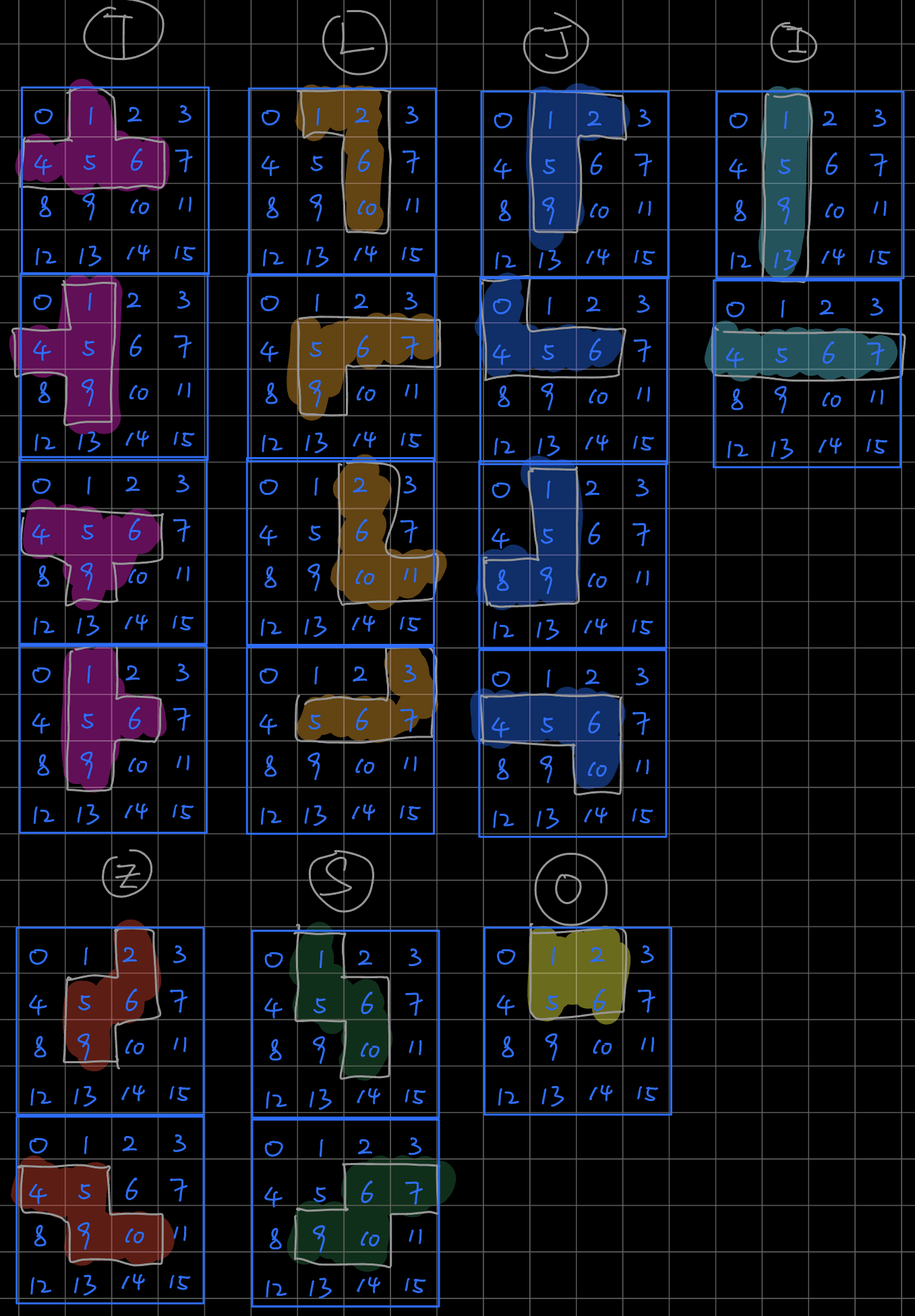
]新增一個class叫Block,這個block是就是俄羅斯方塊的方塊,俄羅斯方塊的元素有7個,其有19個可能性,要實現的話,比較容易的方法是將所有block統一變成4x4的格,再在對應的格中增色,如上圖。
def __init__(self, _x, _y, _type, _grid):
    self.x = _x
    self.y = _y
    self.type = _type
    self.grid = _grid

    self.rotation = 0
self.index = self.shapeIndex.index(self.type)這個Block class有自己的座標,這個x和y是指4x4格中的最左上角。type是block的元素,就是'I', 'Z', 'S', 'J', 'L', 'T', 'O'中的一個。grid是gameBoard中的grids。由於shapeIndex = ['I', 'Z', 'S', 'J', 'L', 'T', 'O']是用文字去表達方便去閱讀,所以要將其變成數字,方便之後在shapes中查找對應的格,所以要用到index()指令,index()指令就是查找你輸入的內容,再輸出list中的位置索引。
def shape(self):
    return self.shapes[self.index][self.rotation]

def rotate(self):
    self.rotation = (self.rotation + 1) % len(self.shapes[self.index])

def setType(self):
    for i in range(4):
        for j in range(4):
            _index = i*4+j
            if _index in self.shape():
self.grid[self.x+j][self.y+i].name = self.typeshape()函數: 用來裝起shape list (純粹是因為原名字太長太多self)。
rotate()函數: 每次call這個函數,self.rotation就加1。如此上面的shape list中的self.shapes[self.index][self.rotation]後面的rotation就會變下一個,但因這個list中內容各有長短,所以要除以len(self.shapes[self.index])的餘數,這裡的len()是長度的意思。
setType()函數: _index = i*4+j就是重現上圖的0-15,如果這個數字是上圖shape中的內容,就將對應格的name設成這個block的type。
class GameBoard(object):
    def __init__(self, _gridSize):
        self.grids = []
        self.block = Block(3,0,'T', self.grids)
        for x in range(10):
            tempGrids = []
            for y in range(20):
                tempGrids.append(Spot(x, y, x*_gridSize+_gridSize, y*_gridSize+_gridSize, _gridSize, _gridSize))
            self.grids.append(tempGrids)
	#other codes
	def show(self):
        self.block.setType()
        for x in range(10):
            for y in range(20):
self.grids[x][y].show()最後在GameBoard class中,加入self.block = Block(3,0,'T', self.grids)新的block,座標在(3, 0),元素是'T'。而在下面的show()中,在顯示之前,先將block的內容都設定好。
5. 令Tetromino Block向下
tetris.pyde:
from spot import *
from gameBoard import *

gridSize = 40

gameBoard = 0

def setup():
    global gameBoard, timer
    size(gridSize*(12+7), gridSize*22)
    gameBoard = GameBoard(gridSize)
    gameBoard.addNeighbors()

def draw():
    drawBackground()
    gameBoard.update()
    gameBoard.show()

def drawBackground():
    fill('#777777')
    for i in range(12+7):
        for j in range(22):
rect(i*gridSize, j*gridSize, gridSize, gridSize)gameBoard.py:
from spot import *
from block import *

class GameBoard(object):

    def __init__(self, _gridSize):
        self.grids = []
        self.block = Block(3,0,'T', self.grids)
        for x in range(10):
            tempGrids = []
            for y in range(20):
                tempGrids.append(Spot(x, y, x*_gridSize+_gridSize, y*_gridSize+_gridSize, _gridSize, _gridSize))
            self.grids.append(tempGrids)
        self.timer = millis()

    def addNeighbors(self):
        for i in range(10):
            for j in range(20):
                self.grids[i][j].addNeighbors(self.grids)

    def update(self):
        if millis() - self.timer > 200:
            self.timer = millis()
            self.clearGrid()
            self.block.goDown()
            if self.block.isWall(2):
                self.block.setLock()

    def show(self):
        self.block.setType()
        for x in range(10):
            for y in range(20):
                self.grids[x][y].show()

    def clearGrid(self):
         for x in range(10):
            for y in range(20):
                if self.grids[x][y].isLock == False:
self.grids[x][y].name = ''spot.py:
class Spot(object):
    def __init__(self, _i, _j, _x, _y, _w, _h):
        self.i = _i
        self.j = _j
        self.x = _x
        self.y = _y
        self.w = _w
        self.h = _h
        self.name = ''
        self.isLock = False
        self.neighbors = []
        for i in range(4):
            self.neighbors.append('')

    def show(self):
        if self.name == '':
            fill(0)
        elif self.name == 'T':
            fill('#FF55FF')
        elif self.name == 'L':
            fill('#DD6800')
        elif self.name == 'J':
            fill('#004ADD')
        elif self.name == 'I':
            fill('#0DCCCC')
        elif self.name == 'Z':
            fill('#FF5555')
        elif self.name == 'S':
            fill('#00DD26')
        elif self.name == 'O':
            fill('#DDDD00')
        stroke(200)
        rect(self.x, self.y, self.w, self.h)

    def addNeighbors(self, _grid):
        if self.j > 0:
            self.neighbors[0] = _grid[self.i][self.j-1]  #UP
        if self.i < 9:
            self.neighbors[1] = _grid[self.i+1][self.j]  #RIGHT
        if self.j < 19:
            self.neighbors[2] = _grid[self.i][self.j+1]  #DOWN
        if self.i > 0:
self.neighbors[3] = _grid[self.i-1][self.j] #LEFTblock.py:
from spot import *

class Block(object):

    shapeIndex = ['I', 'Z', 'S', 'J', 'L', 'T', 'O']

    # Shapes of the blocks
    shapes = [
        [[1, 5, 9, 13], [4, 5, 6, 7]], #type 'I'
        [[4, 5, 9, 10], [2, 6, 5, 9]], #type 'Z'
        [[6, 7, 9, 10], [1, 5, 6, 10]], #type 'S'
        [[1, 2, 5, 9], [0, 4, 5, 6], [1, 5, 9, 8], [4, 5, 6, 10]], #type 'J'
        [[1, 2, 6, 10], [5, 6, 7, 9], [2, 6, 10, 11], [3, 5, 6, 7]], #type 'L'
        [[1, 4, 5, 6], [1, 4, 5, 9], [4, 5, 6, 9], [1, 5, 6, 9]], #type 'T'
        [[1, 2, 5, 6]], #type 'O'
    ]

    def __init__(self, _x, _y, _type, _grid):
        self.x = _x
        self.y = _y
        self.type = _type
        self.grid = _grid

        self.rotation = 0
        self.index = self.shapeIndex.index(self.type)

    def shape(self):
        return self.shapes[self.index][self.rotation]

    def rotate(self):
        self.rotation = (self.rotation + 1) % len(self.shapes[self.index])

    def setType(self):
        for i in range(4):
            for j in range(4):
                _index = i*4+j
                if _index in self.shape():
                    self.grid[self.x+j][self.y+i].name = self.type

    def isWall(self, _direction):
        isWall = False
        for i in range(4):
            for j in range(4):
                _index = i*4+j
                if _index in self.shape():
                    if _direction == 2:
                        if i+self.y>=19:
                            isWall = True
                    elif _direction == 3:
                        if self.x+j<=0:
                            isWall = True
                    elif _direction == 1:
                        if self.x+j>=9 :
                            isWall = True
        return isWall

    def isBlocked(self, _direction):
        isBlocked = False
        for i in range(4):
            for j in range(4):
                _index = i*4+j
                if _index in self.shape():
                    if self.grid[self.x+j][self.y+i].neighbors[_direction].isLock == True:
                        isBlocked = True
        return isBlocked

    def setLock(self):
        for i in range(4):
            for j in range(4):
                _index = i*4+j
                if _index in self.shape():
                    self.grid[self.x+j][self.y+i].isLock = True

    def goDown(self):
        if not self.isWall(2) and not self.isBlocked(2):
            self.y += 1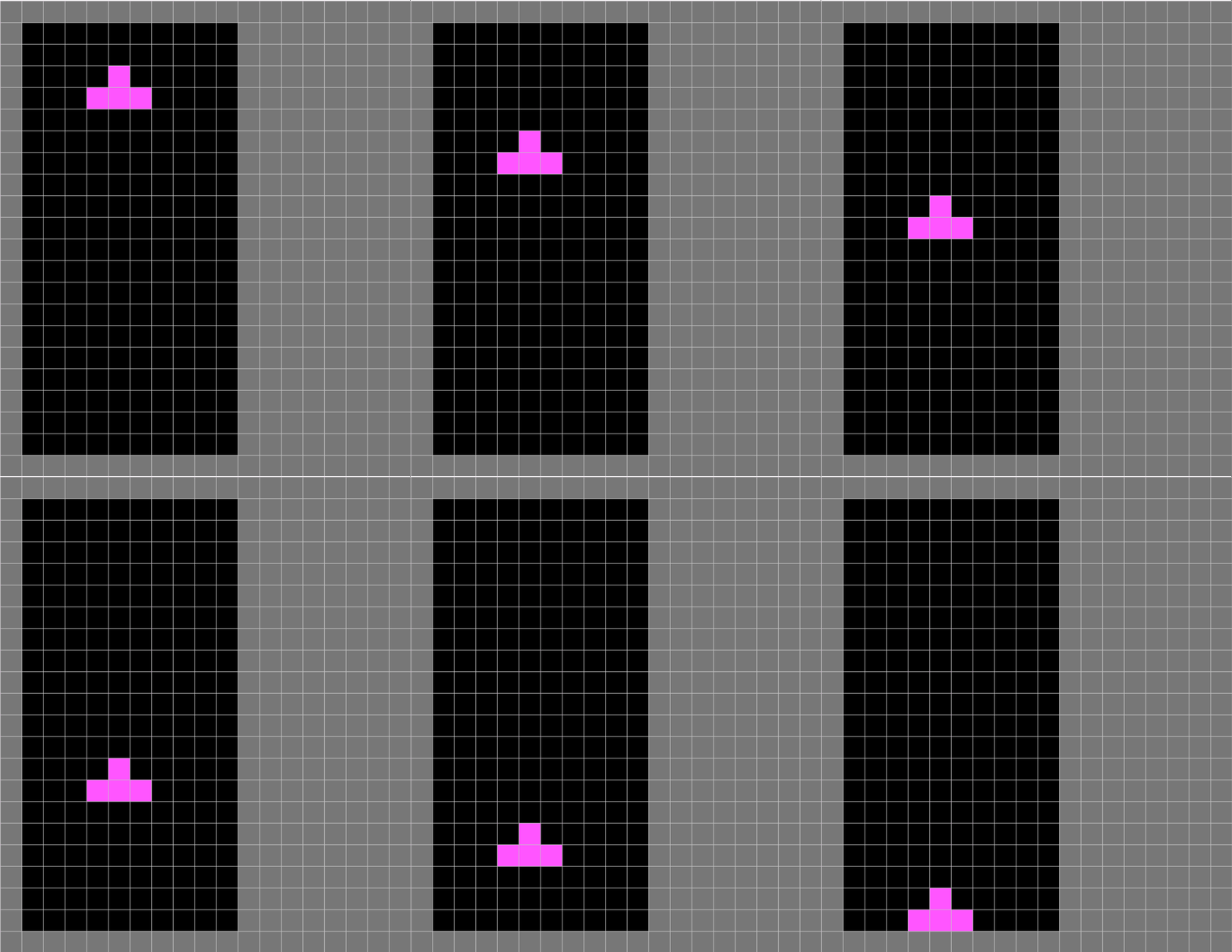
spot.py沒有變化。
主程式tetris.pyde中,亦只有在draw()中加多了一句gameBoard.update(),其他都沒有變化。
先解說gameBoard.py:
 def update(self):
        if millis() - self.timer > 200:
            self.timer = millis()
            self.clearGrid()
            self.block.goDown()
            if self.block.isWall(2):
self.block.setLock()在GameBoard class中,加入函數update()。if millis() - self.timer > 200:配合self.timer = millis()是一個常用的格式,在arduino或processing這類本身就預設有forever loop的程式中,要想同一時間執行幾個delay,就需要用到這個格式。
每隔200ms,先將全部沒有鎖起的格都清空,指著將block向下一格,如果block到了最底,就將這個block的內容鎖起來。isWall(2)中的2是指之前addNeighbors()中的次序,上,右,下,左分別是0,1,2,3。
至於上面block的函數怎樣實現,就要看看Block class中怎樣做。
def isWall(self, _direction):
    isWall = False
    for i in range(4):
        for j in range(4):
            _index = i*4+j
            if _index in self.shape():
                if _direction == 2:
                    if i+self.y>=19:
                        isWall = True
                elif _direction == 3:
                    if self.x+j<=0:
                        isWall = True
                elif _direction == 1:
                    if self.x+j>=9 :
                        isWall = True
return isWallblock的16個格都掃一次,如果是對應shape的內容,就看看方向,_direction == 2即下方,如果i+self.y>=19(即block的內容)到達19或以上,即已經到達最後一格,所以到底了,同理,其他左方( _direction == 3)和右方(_direction == 1)也是一樣。
def isBlocked(self, _direction):
    isBlocked = False
    for i in range(4):
        for j in range(4):
            _index = i*4+j
            if _index in self.shape():
                if self.grid[self.x+j][self.y+i].neighbors[_direction].isLock == True:
                    isBlocked = True
return isBlockedisBlock()函數跟上面的isWall()函數十分相似,分別是我們之前在GameBoard class中已經做了addNeighbors(),所以直接查詢對應方向的鄰居是否已經鎖上,就知道有沒有其他的block阻擋了移動方向。
def setLock(self):
    for i in range(4):
        for j in range(4):
            _index = i*4+j
            if _index in self.shape():
                self.grid[self.x+j][self.y+i].isLock = True

def goDown(self):
    if not self.isWall(2) and not self.isBlocked(2):
self.y += 1setLock(): 比較簡單就掃瞄16個格,將對應的格鎖上。
goDown(): 如果下方不是牆而且下方沒有阻擋,就將座標y加1。
6. 令Tetromino Block懂得堆疊
gameBoard.py:
from spot import *
from block import *

class GameBoard(object):

    def __init__(self, _gridSize):
        self.grids = []
        self.block = Block(3,0,'T', self.grids)
        for x in range(10):
            tempGrids = []
            for y in range(20):
                tempGrids.append(Spot(x, y, x*_gridSize+_gridSize, y*_gridSize+_gridSize, _gridSize, _gridSize))
            self.grids.append(tempGrids)
        self.timer = millis()

    def addNeighbors(self):
        for i in range(10):
            for j in range(20):
                self.grids[i][j].addNeighbors(self.grids)

    def update(self):
        if millis() - self.timer > 200:
            self.timer = millis()
            self.clearGrid()
            self.block.goDown()

            if self.block.isWall(2) or self.block.isBlocked(2):
                self.block.setType()
                self.block.setLock()
                self.block = Block(3,0,'T', self.grids)

    def show(self):
        self.block.setType()
        for x in range(10):
            for y in range(20):
                self.grids[x][y].show()

    def clearGrid(self):
        for x in range(10):
            for y in range(20):
                if self.grids[x][y].isLock == False:
                    self.grids[x][y].name = ''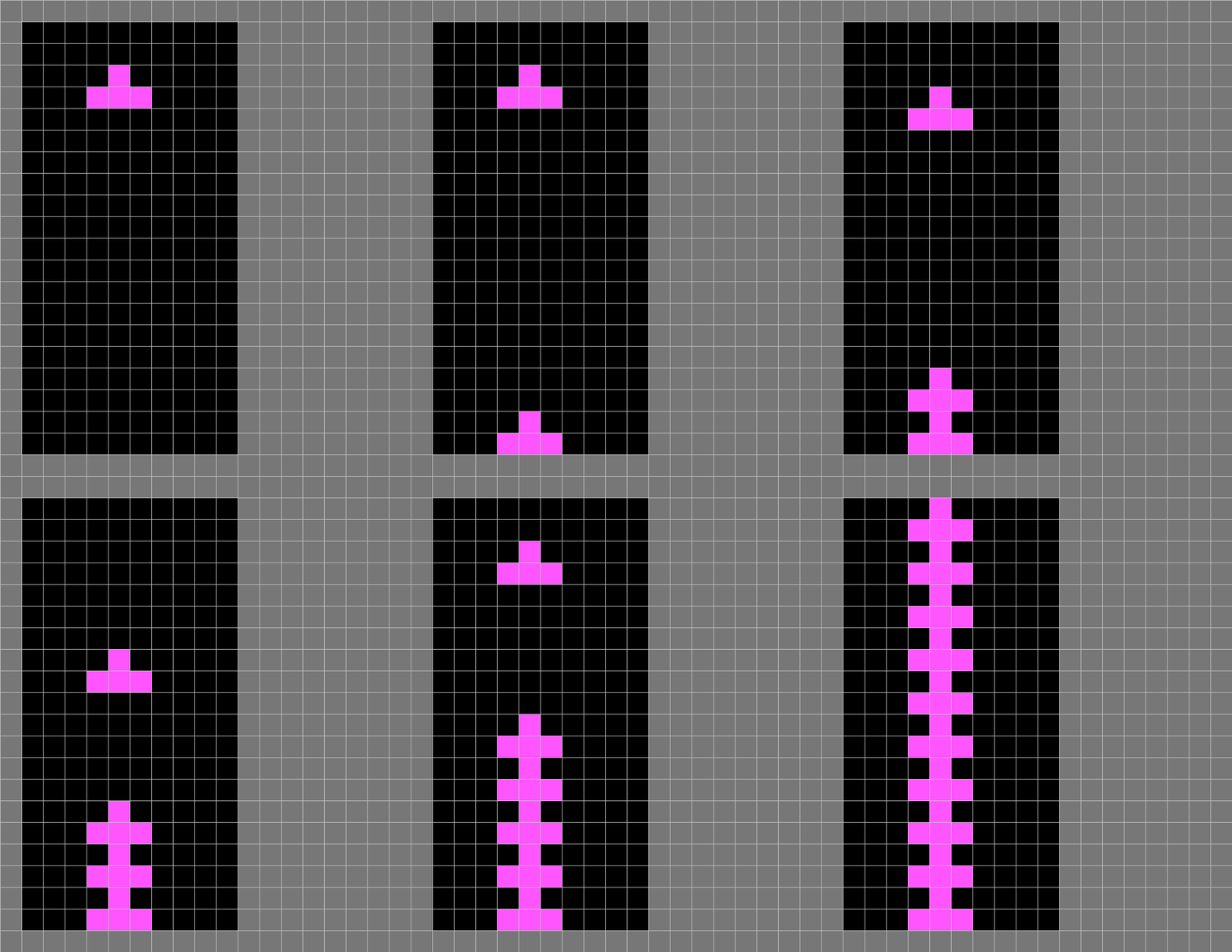
今次這個步驟比較簡單,只有gameBoard.py有變化,其他3個我就不再貼出來了。
def update(self):
    if millis() - self.timer > 200:
        self.timer = millis()
        self.clearGrid()
        self.block.goDown()

        if self.block.isWall(2) or self.block.isBlocked(2):
            self.block.setType()
            self.block.setLock()
self.block = Block(3,0,'T', self.grids)主要更改的是update(),除了要檢視block是否已經到底之外,也要檢查block的下面是否有其他已鎖定的格阻擋了去路,如果有的話,就將block的內容設定成自己的type,鎖定後,再重新在座標(3, 0)開另一個block。
7. 令Tetromino Block左右移動
block.py:
from spot import *

class Block(object):

    shapeIndex = ['I', 'Z', 'S', 'J', 'L', 'T', 'O']

    # Shapes of the blocks
    shapes = [
        [[1, 5, 9, 13], [4, 5, 6, 7]], #type 'I'
        [[4, 5, 9, 10], [2, 6, 5, 9]], #type 'Z'
        [[6, 7, 9, 10], [1, 5, 6, 10]], #type 'S'
        [[1, 2, 5, 9], [0, 4, 5, 6], [1, 5, 9, 8], [4, 5, 6, 10]], #type 'J'
        [[1, 2, 6, 10], [5, 6, 7, 9], [2, 6, 10, 11], [3, 5, 6, 7]], #type 'L'
        [[1, 4, 5, 6], [1, 4, 5, 9], [4, 5, 6, 9], [1, 5, 6, 9]], #type 'T'
        [[1, 2, 5, 6]], #type 'O'
    ]

    def __init__(self, _x, _y, _type, _grid):
        self.x = _x
        self.y = _y
        self.type = _type
        self.grid = _grid

        self.rotation = 0
        self.index = self.shapeIndex.index(self.type)

    def shape(self):
        return self.shapes[self.index][self.rotation]

    def rotate(self):
        self.rotation = (self.rotation + 1) % len(self.shapes[self.index])

    def setType(self):
        for i in range(4):
            for j in range(4):
                _index = i*4+j
                if _index in self.shape():
                    self.grid[self.x+j][self.y+i].name = self.type

    def isWall(self, _direction):
        isWall = False
        for i in range(4):
            for j in range(4):
                _index = i*4+j
                if _index in self.shape():
                    if _direction == 2:
                        if i+self.y>=19:
                            isWall = True
                    elif _direction == 3:
                        if self.x+j<=0:
                            isWall = True
                    elif _direction == 1:
                        if self.x+j>=9 :
                            isWall = True
        return isWall

    def isBlocked(self, _direction):
        isBlocked = False
        for i in range(4):
            for j in range(4):
                _index = i*4+j
                if _index in self.shape():
                    if self.grid[self.x+j][self.y+i].neighbors[_direction].isLock == True:
                        isBlocked = True
        return isBlocked

    def setLock(self):
        for i in range(4):
            for j in range(4):
                _index = i*4+j
                if _index in self.shape():
                    self.grid[self.x+j][self.y+i].isLock = True

    def goDown(self):
        if not self.isWall(2) and not self.isBlocked(2):
            self.y += 1

    def goLeft(self):
        if not self.isWall(3) and not self.isBlocked(3):
            self.x -= 1

    def goRight(self):
        if not self.isWall(1) and not self.isBlocked(1):
self.x += 1tetris.pyde:
from spot import *
from gameBoard import *

gridSize = 40

gameBoard = 0

def setup():
    global gameBoard, timer
    size(gridSize*(12+7), gridSize*22)
    gameBoard = GameBoard(gridSize)
    gameBoard.addNeighbors()

def draw():
    drawBackground()
    gameBoard.update()
    gameBoard.show()

def drawBackground():
    fill('#777777')
    for i in range(12+7):
        for j in range(22):
            rect(i*gridSize, j*gridSize, gridSize, gridSize)

def keyPressed():
    if (key == CODED):
        if keyCode == LEFT:
            gameBoard.clearGrid()
            gameBoard.block.goLeft()
        if keyCode == RIGHT:
            gameBoard.clearGrid()
            gameBoard.block.goRight()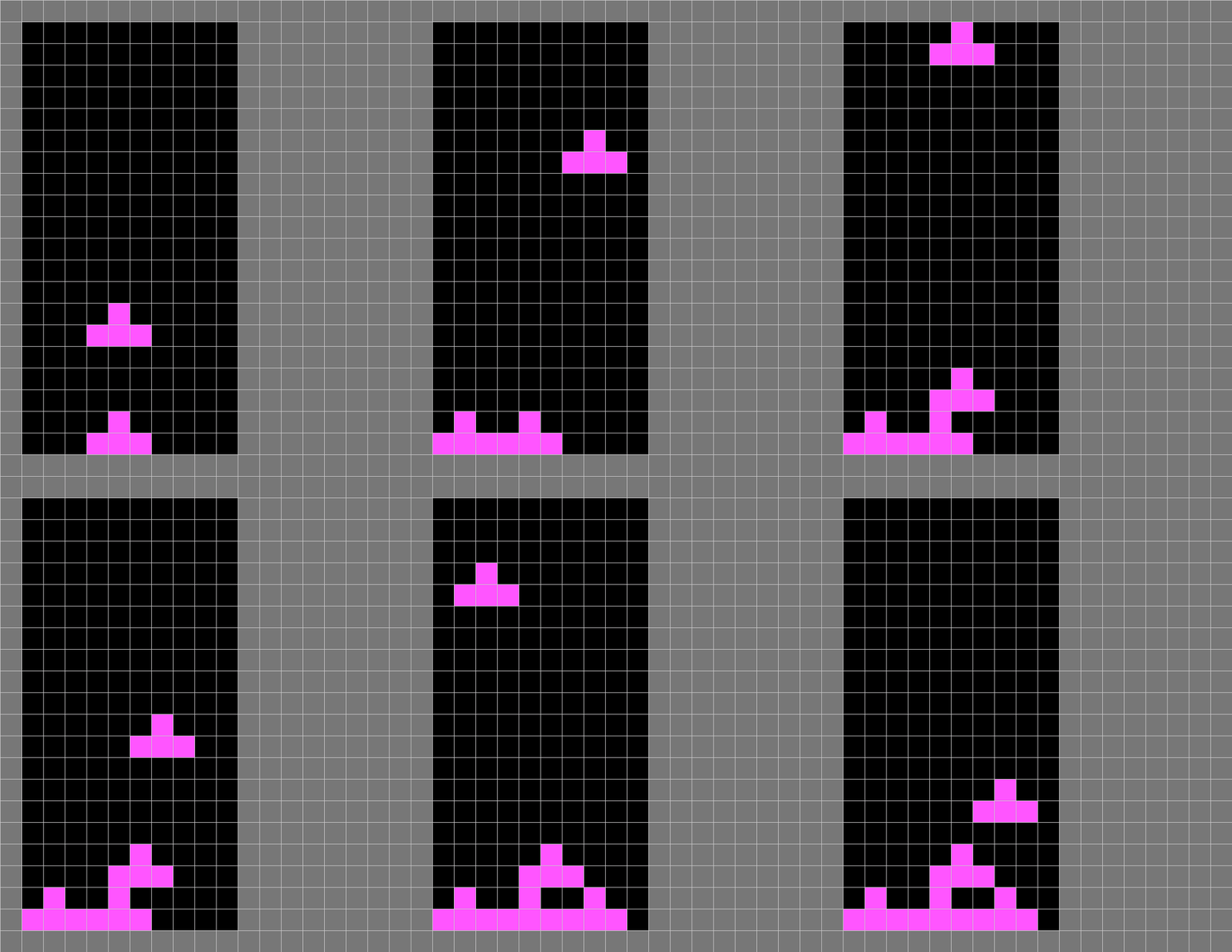
只有block.py和主程式有變化,其他的我就不貼出來了。
在block.py中,
def goDown(self):
    if not self.isWall(2) and not self.isBlocked(2):
        self.y += 1

def goLeft(self):
    if not self.isWall(3) and not self.isBlocked(3):
        self.x -= 1

def goRight(self):
    if not self.isWall(1) and not self.isBlocked(1):
self.x += 1除了之前已有的goDown()外,再加入goLeft()和goRight(),內容跟goDown()十分相似,只是方向改變了。
返回主程式,在setup()和draw()之外,加入keyPressed()函數,加入左、右方向鍵的控制。
def keyPressed():
    if (key == CODED):
        if keyCode == LEFT:
            gameBoard.clearGrid()
            gameBoard.block.goLeft()
        if keyCode == RIGHT:
            gameBoard.clearGrid()
gameBoard.block.goRight()8. Tetromino Block旋轉和快速到底
from spot import *
from gameBoard import *

gridSize = 40

gameBoard = 0

def setup():
    global gameBoard, timer
    size(gridSize*(12+7), gridSize*22)
    gameBoard = GameBoard(gridSize)
    gameBoard.addNeighbors()

def draw():
    drawBackground()
    gameBoard.update()
    gameBoard.show()

def drawBackground():
    fill('#777777')
    for i in range(12+7):
        for j in range(22):
            rect(i*gridSize, j*gridSize, gridSize, gridSize)

def keyPressed():
    if (key == CODED):
        if keyCode == LEFT:
            gameBoard.clearGrid()
            gameBoard.block.goLeft()
        if keyCode == RIGHT:
            gameBoard.clearGrid()
            gameBoard.block.goRight()
        if keyCode == UP:
            gameBoard.clearGrid()
            gameBoard.block.rotate()
        if keyCode == DOWN:
            while not (gameBoard.block.isWall(2) or gameBoard.block.isBlocked(2)):
                gameBoard.clearGrid()
                gameBoard.block.goDown()
            gameBoard.block.setType()
            gameBoard.block.setLock()
            gameBoard.block = Block(3,0,'T', gameBoard.grids)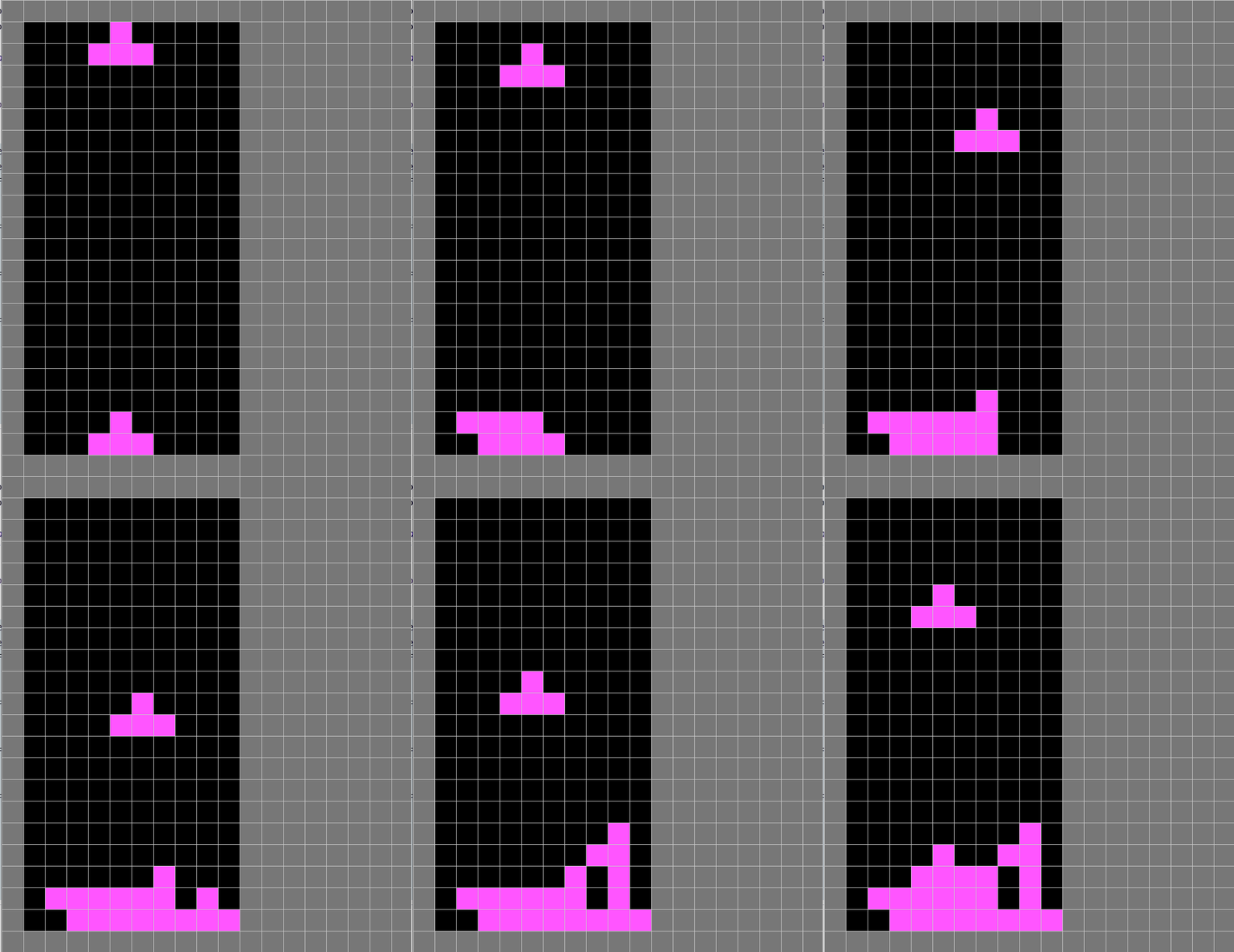
在上面的基礎下,在keyPressed()中,加入上和下方向鍵的控制。
if keyCode == UP:
    gameBoard.clearGrid()
    gameBoard.block.rotate()
if keyCode == DOWN:
    while not (gameBoard.block.isWall(2) or gameBoard.block.isBlocked(2)):
        gameBoard.clearGrid()
        gameBoard.block.goDown()
    gameBoard.block.setType()
    gameBoard.block.setLock()
gameBoard.block = Block(3,0,'T', gameBoard.grids)按上方向鍵就會清除沒有鎖定的內容,之後旋轉block。
下方向鍵就比較複雜,如果block未到最底下或block的下面沒有阻擋,就用while loop一直向下,相反while loop跳了出來即已經到底或有阻擋,就鎖定block,之後再將block變回座標(0,3)。
9. 每次新block都抽不同的元素
tetris.pyde:
from spot import *
from gameBoard import *

gridSize = 40

gameBoard = 0

def setup():
    global gameBoard, timer
    size(gridSize*(12+7), gridSize*22)
    gameBoard = GameBoard(gridSize)
    gameBoard.addNeighbors()

def draw():
    drawBackground()
    gameBoard.update()
    gameBoard.show()

def drawBackground():
    fill('#777777')
    for i in range(12+7):
        for j in range(22):
            rect(i*gridSize, j*gridSize, gridSize, gridSize)

def keyPressed():
    if (key == CODED):
        if keyCode == LEFT:
            gameBoard.clearGrid()
            gameBoard.block.goLeft()
        if keyCode == RIGHT:
            gameBoard.clearGrid()
            gameBoard.block.goRight()
        if keyCode == UP:
            gameBoard.clearGrid()
            gameBoard.block.rotate()
        if keyCode == DOWN:
            while  not (gameBoard.block.isWall(2) or gameBoard.block.isBlocked(2)):
                gameBoard.clearGrid()
                gameBoard.block.goDown()
            gameBoard.block.setType()
            gameBoard.block.setLock()
gameBoard.block = Block(3,0,gameBoard.shapeIndex[int(random(7))], gameBoard.grids)gameBoard.py:
from spot import *
from block import *

class GameBoard(object):

    def __init__(self, _gridSize):
        self.shapeIndex = ['I', 'Z', 'S', 'J', 'L', 'T', 'O']
        self.grids = []
        self.block = Block(3,0, self.shapeIndex[int(random(7))], self.grids)
        for x in range(10):
            tempGrids = []
            for y in range(20):
                tempGrids.append(Spot(x, y, x*_gridSize+_gridSize, y*_gridSize+_gridSize, _gridSize, _gridSize))
            self.grids.append(tempGrids)
        self.timer = millis()

    def addNeighbors(self):
        for i in range(10):
            for j in range(20):
                self.grids[i][j].addNeighbors(self.grids)

    def update(self):
        if millis() - self.timer > 200:
            self.timer = millis()
            self.clearGrid()
            self.block.goDown()

            if self.block.isWall(2) or self.block.isBlocked(2):
                self.block.setType()
                self.block.setLock()
                self.block = Block(3,0,self.shapeIndex[int(random(7))], self.grids)

    def show(self):
        self.block.setType()
        for x in range(10):
            for y in range(20):
                self.grids[x][y].show()

    def clearGrid(self):
        for x in range(10):
            for y in range(20):
                if self.grids[x][y].isLock == False:
self.grids[x][y].name = ''其他沒有變動的就不貼出來了。
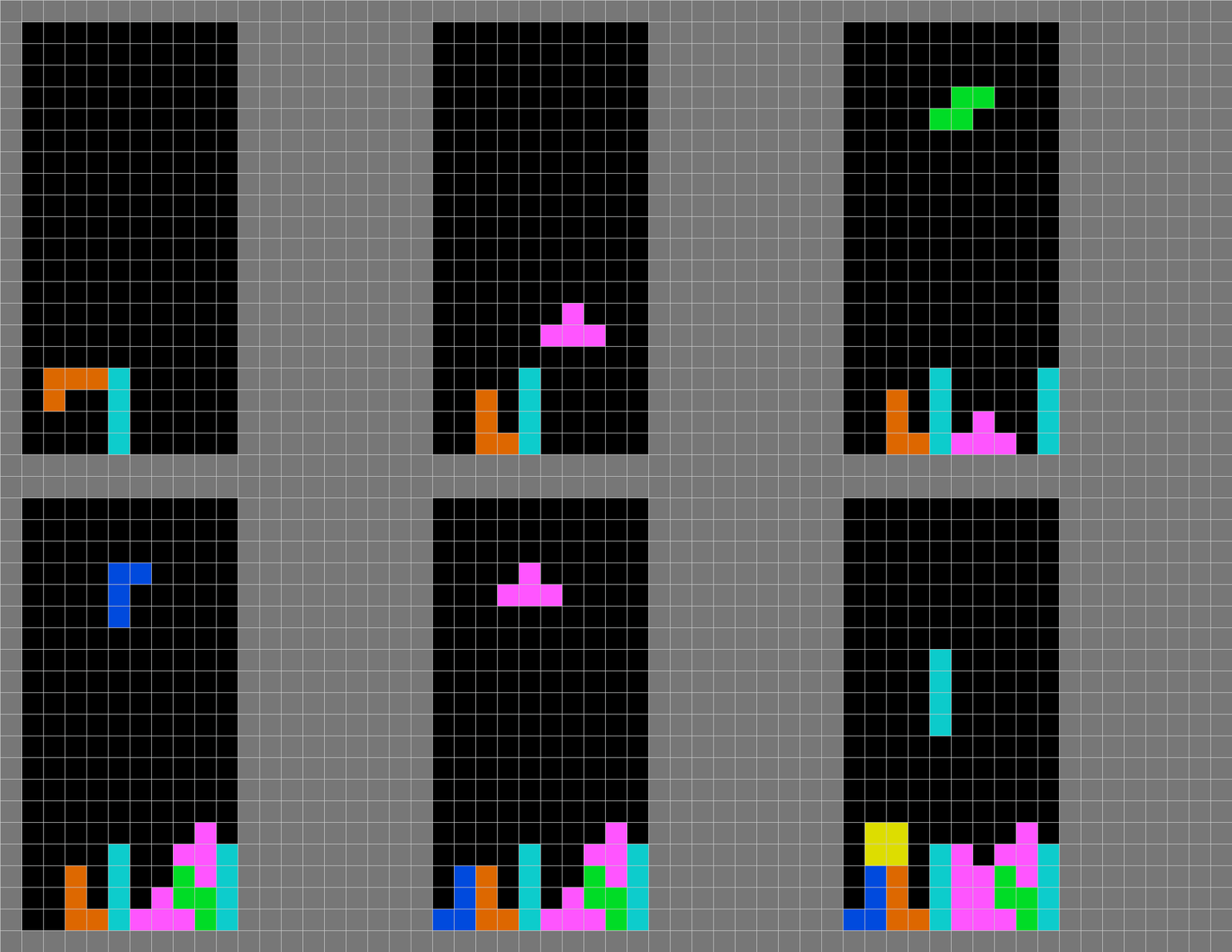
要每次都抽新的block其實很簡單,整個程式共有3處是重新更新block的,你可以搜尋gameBoard.block = Block(3,0,'T', gameBoard.grids),將這3處都變成gameBoard.block = Block(3,0,gameBoard.shapeIndex[int(random(7))], gameBoard.grids),就可以每次都抽新的block。
10. 考考你
- game over: 到這一步,這個game是沒有game over的,你可以在每次抽新的block之前,先檢查一下座標(0,3)的4x4=16格有沒有被佔用,如果被佔用了就game over。
- 遊戲得分:
- 在
gameBoardclass中,加入lineClear()功能。顧名思義,就是每次block鎖定時,都檢查一下有沒有橫行是已經被填滿,而清理全行,上面已經鎖定了的格全部移向下一行。 - 之後加入一個
line clear counter,和block counter。block counter用來紀錄遊戲開始後有多少block產生,line clear counter用來紀錄有多少行被清除,兩者都是用來為遊戲計分,你可以每一個block counter計10分,每個line clear counter計100分。
- 在
- (optional):
一次過清除一行,line counter加1,一次過清除二行,line counter加3(),一次過清除3行,line counter加6(),如此類推,一次過清除n行,line counter 就加
(optional)標準的tetris遊戲,除了現有的block供控制外,但有下一個block的內容在等候處,令玩家預先計劃的,你可以嘗試加入這個功能。