Snake
貪食蛇(Snake)是一個起源於1976年的大型電玩遊戲 Blockade。此類遊戲在1990年代由於一些具有小型螢幕的行動電話的引入而再度流行起來,在現在的手機上基本都可安裝此小遊戲。版本亦有所不同。
[toc]
1. 創建class和做準備
snake.pyde:
from spot import *

def setup():
    size(600,600)

def draw():
background(50)spot.py:
class Spot(object):
    def __init__(self, _x, _y):
        self.x = _x
        self.y = _y
2. 將畫面用spot分格
snake.pyde:
from spot import *

grids = []

def setup():
    global grids
    size(600,600)

    grids = []

    for x in range(20):
        tempGrids = []
        for y in range(20):
            tempGrids.append(Spot(x, y, width/20, height/20))
        grids.append(tempGrids)

def draw():
    background(50)
    for x in range(20):
        for y in range(20):
grids[x][y].show('#29A9FC')spot.py:
class Spot(object):

    def __init__(self, _x, _y, _w, _h):
        self.x = _x
        self.y = _y
        self.w = _w
        self.h = _h

    def show(self, _color):
        stroke(0)
        fill(_color)
        rect(self.x*width/20, self.y*height/20, self.w, self.h)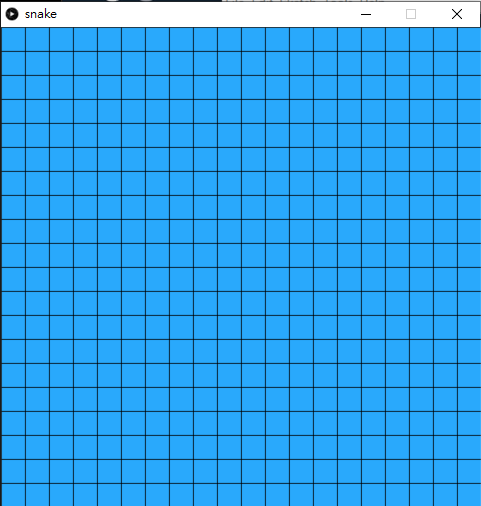
這個步驟主要是將整個畫面都分成20格x20格。
for i in range(20):
    tempGrids = []
    for j in range(20):
        tempGrids.append(Spot(i, j, width/20, height/20))
grids.append(tempGrids)在setup()中,加入2d array去儲起Spot class,這個格式在第二個遊戲breakout時有做過。
我們在Spot class的show()中,臨時加上框線來顯示,看看是否正常,debug後就可以不再畫框線,現在則暫時保留。
3. 為每個格加上鄰居
snake.pyde:
from spot import *

grids = []

def setup():
    global grids
    size(600,600)

    grids = []

    for x in range(20):
        tempGrids = []
        for y in range(20):
            tempGrids.append(Spot(x, y, width/20, height/20))
        grids.append(tempGrids)

def draw():
    background(50)
    for x in range(20):
        for y in range(20):
            grids[x][y].show('#29A9FC')

    grids[3][3].addNeighbors(grids)
    grids[3][3].neighbors[0].show('#FF0000')
    grids[3][3].neighbors[1].show('#00FF00')
    grids[3][3].neighbors[2].show('#0000FF')
grids[3][3].neighbors[3].show('#FFFF00')spot.py:
class Spot(object):

    def __init__(self, _x, _y, _w, _h):
        self.x = _x
        self.y = _y
        self.w = _w
        self.h = _h
        self.neighbors = []
        for i in range(4):
            self.neighbors.append(0)

    def show(self, _color):
        stroke(0)
        fill(_color)
        rect(self.x*width/20, self.y*height/20, self.w, self.h)

    def addNeighbors(self, _grid):
       #UP
        if (self.y > 0):
            self.neighbors[0] = _grid[self.x][self.y-1]
        # RIGHT
        if (self.x < 19):    # Total 20x20, so the max id is 19
            self.neighbors[1] = _grid[self.x+1][self.y]
        # DOWN
        if (self.y < 19):    # Total 20x20, so the max id is 19
            self.neighbors[2] = _grid[self.x][self.y+1]
        # LEFT
        if (self.x > 0):
            self.neighbors[3] = _grid[self.x-1][self.y]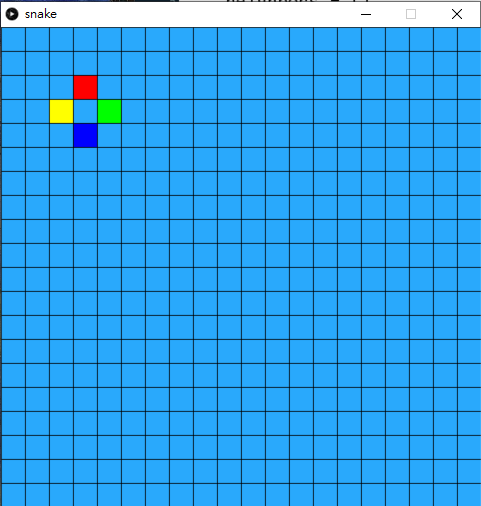
由於貪食蛇的蛇身是連著的,而且一定是格的上下左右鄰居的其中一個,要將蛇越拖越長而且記著蛇走過的路,我們首先為每個格都加入鄰居。這也是用class的好處,class自己是可以包含自己的,你剛開一個class,class入面的變數就可以是這個class的本身。
在spot.py中,
def addNeighbors(self, _grid):
    #UP
    if (self.y > 0):
        self.neighbors[0] = _grid[self.x][self.y-1]
    # RIGHT
    if (self.x < 19):    # Total 20x20, so the max id is 19
        self.neighbors[1] = _grid[self.x+1][self.y]
    # DOWN
    if (self.y < 19):    # Total 20x20, so the max id is 19
        self.neighbors[2] = _grid[self.x][self.y+1]
    # LEFT
    if (self.x > 0):
self.neighbors[3] = _grid[self.x-1][self.y]分別加入上、右、下和左四個鄰居,順序是按順時針的。但要留意,如果格剛好在邊介位置,例如最左。最右。最上和最下,就要加入限制,否則就會超出列表的範圍。
在主程式的draw()中,
grids[3][3].addNeighbors(grids)
grids[3][3].neighbors[0].show('#FF0000')
grids[3][3].neighbors[1].show('#00FF00')
grids[3][3].neighbors[2].show('#0000FF')
grids[3][3].neighbors[3].show('#FFFF00')特地為grid[3][3]為入鄰居,再將四個鄰居用不同顏色標記出來,用來debug檢查是否正確。值得留意的是,grid[3][3]中的3是array index,index是由0開始的,所以index 3,實際上不是第3格而是第4格。
3.1 特別處理邊介的鄰居
主程式沒有變,spot.py:
class Spot(object):

    def __init__(self, _x, _y, _w, _h):
        self.x = _x
        self.y = _y
        self.w = _w
        self.h = _h
        self.neighbors = []
        for i in range(4):
            self.neighbors.append(0)

    def show(self, _color):
        stroke(0)
        fill(_color)
        rect(self.x*width/20, self.y*height/20, self.w, self.h)

    def addNeighbors(self, _grid):
        #UP
        if (self.y > 0):
            self.neighbors[0] = _grid[self.x][self.y-1]
        # RIGHT
        if (self.x < 19):    # Total 20x20, so the max id is 19
            self.neighbors[1] = _grid[self.x+1][self.y]
        # DOWN
        if (self.y < 19):    # Total 20x20, so the max id is 19
            self.neighbors[2] = _grid[self.x][self.y+1]
        # LEFT
        if (self.x > 0):
            self.neighbors[3] = _grid[self.x-1][self.y]

        if (self.y == 0):
            self.neighbors[0] = _grid[self.x][19]
        if (self.x == 19):
            self.neighbors[1] = _grid[0][self.y]
        if (self.y == 19):
            self.neighbors[2] = _grid[self.x][0]
        if (self.x == 0):
            self.neighbors[3] = _grid[19][self.y]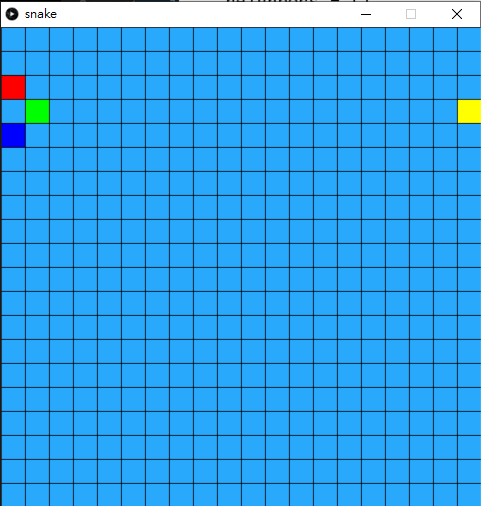
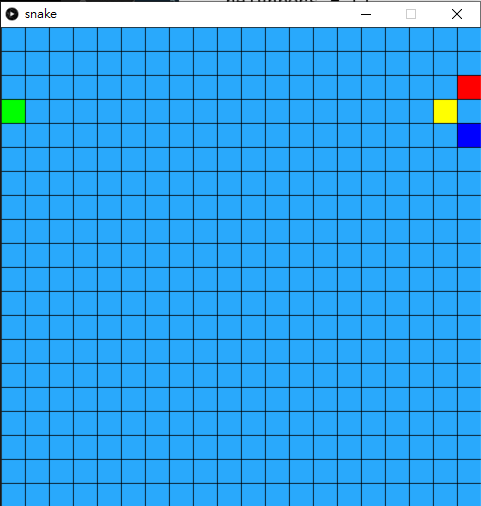
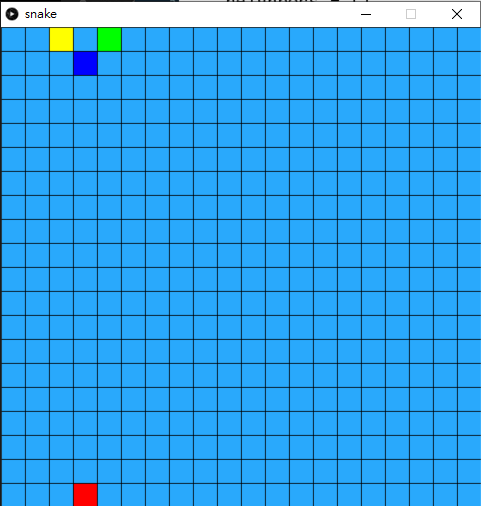
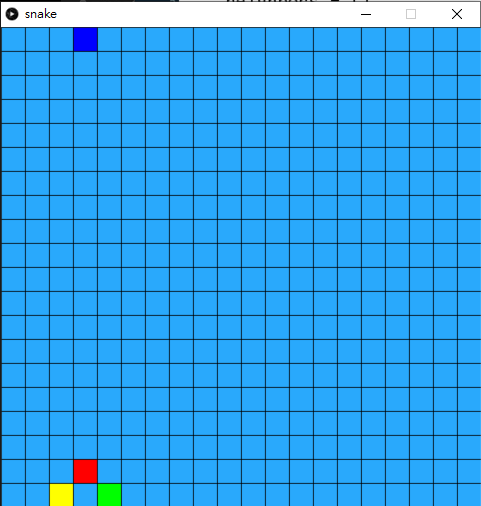
在spot class的addNeighbors()中,加入如果在邊位時的考量,由於貪食蛇是可以穿牆到畫面的另一邊,故此,邊位的鄰居就是另一邊的格。
 def addNeighbors(self, _grid):
    #UP
    if (self.y > 0):
        self.neighbors[0] = _grid[self.x][self.y-1]
    # RIGHT
    if (self.x < 19):    # Total 20x20, so the max id is 19
        self.neighbors[1] = _grid[self.x+1][self.y]
    # DOWN
    if (self.y < 19):    # Total 20x20, so the max id is 19
        self.neighbors[2] = _grid[self.x][self.y+1]
    # LEFT
    if (self.x > 0):
        self.neighbors[3] = _grid[self.x-1][self.y]

    if (self.y == 0):
        self.neighbors[0] = _grid[self.x][19]
    if (self.x == 19):
        self.neighbors[1] = _grid[0][self.y]
    if (self.y == 19):
        self.neighbors[2] = _grid[self.x][0]
    if (self.x == 0):
self.neighbors[3] = _grid[19][self.y]在addNeighbors()加入最底下的四個考量。之後去主頁,將之前測試的格座標改一改,試一試四個邊位是否正確。
3.2 測試完成後,為每個格加上鄰居
snake.pyde:
from spot import *

grids = []

def setup():
    global grids
    size(600,600)

    grids = []

    for x in range(20):
        tempGrids = []
        for y in range(20):
            tempGrids.append(Spot(x, y, width/20, height/20))
        grids.append(tempGrids)

    for x in range(20):
        for y in range(20):
            grids[x][y].addNeighbors(grids)

def draw():
    background(50)
    for x in range(20):
        for y in range(20):
grids[x][y].show('#29A9FC')spot.py:
class Spot(object):

    def __init__(self, _x, _y, _w, _h):
        self.x = _x
        self.y = _y
        self.w = _w
        self.h = _h
        self.neighbors = []
        for i in range(4):
            self.neighbors.append(0)

    def show(self, _color):
        stroke(0)
        fill(_color)
        rect(self.x*width/20, self.y*height/20, self.w, self.h)

    def addNeighbors(self, _grid):
        #UP
        if (self.y > 0):
            self.neighbors[0] = _grid[self.x][self.y-1]
        # RIGHT
        if (self.x < 19):    # Total 20x20, so the max id is 19
            self.neighbors[1] = _grid[self.x+1][self.y]
        # DOWN
        if (self.y < 19):    # Total 20x20, so the max id is 19
            self.neighbors[2] = _grid[self.x][self.y+1]
        # LEFT
        if (self.x > 0):
            self.neighbors[3] = _grid[self.x-1][self.y]

        if (self.y == 0):
            self.neighbors[0] = _grid[self.x][19]
        if (self.x == 19):
            self.neighbors[1] = _grid[0][self.y]
        if (self.y == 19):
            self.neighbors[2] = _grid[self.x][0]
        if (self.x == 0):
self.neighbors[3] = _grid[19][self.y]為方便大家,我將全部程式一次過貼出來。前一步測試完成後,就可以在setup()中,加入:
for x in range(20):
    for y in range(20):
grids[x][y].addNeighbors(grids)為每個格都加入4個鄰居,這個步驟只要做一次就可以了,所以在setup()中完成就可以。在主程式頁面,將原本draw()中的鄰居顯示刪去。
4. 製作貪食蛇的class
snake.pyde:
from spot import *
from snake import *

grids = []
snake = 0

def setup():
    global grids, snake, currentSpot, snake
    size(600,600)

    grids = []

    for x in range(20):
        tempGrids = []
        for y in range(20):
            tempGrids.append(Spot(x, y, width/20, height/20))
        grids.append(tempGrids)

    for x in range(20):
        for y in range(20):
            grids[x][y].addNeighbors(grids)

    snake = Snake(grids)

def draw():
    global grids, snake, currentSpot

    background(50)

    for x in range(20):
        for y in range(20):
            grids[x][y].show('#29A9FC')

snake.show()snake.py
class Snake(object):

    def __init__(self, _grids):
		self.grids = _grids
        self.snakeHead = self.grids[10][10]
        self.snakeBody = []
        for i in range(3,0,-1):
            self.snakeBody.append(self.grids[10+i][10])

    def show(self):
        for i in range(len(self.snakeBody)):
            self.snakeBody[i].show('#00FF00')
self.snakeHead.show('#00AA00')spot.py沒有改變,則不再重覆了。
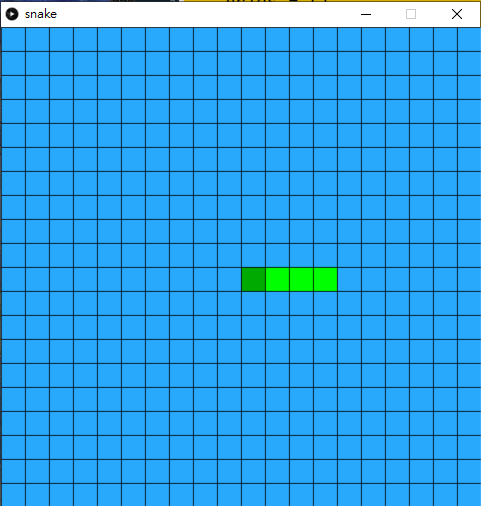
在snake.py的snake class中,
def __init__(self, _grids):
    self.grids = _grids
    self.snakeHead = self.grids[10][10]
    self.snakeBody = []
    for i in range(3,0,-1):
self.snakeBody.append(self.grids[10+i][10])將全個畫的的格匯入這個class中,所以開一個同樣叫grids的列表變數。蛇本身有body,而且會隨著吃蘋果越來越長,所有用列表snakeBody來裝起,最後就是蛇頭,只有一個,之後會用來裝起格仔的。
接著初始化,蛇頭預設在畫面中央,所以是grids[10][10],之後蛇身一開始時有3格(不計蛇頭,額外有3格)。==值得注意是: 今次的for是次序相反的==,for i in range(3,0,-1):的意思是,由3開始計到0,每次-1,之所以要這樣逆次序,是因為snakeBody是用來紀錄蛇經過的路徑的,snakeBody[0]是蛇尾,也是蛇最舊的路徑。
5. 令蛇懂得行走
snake.pyd
from spot import *
from snake import *

grids = []
snake = 0

def setup():
    global grids, snake, currentSpot, snake
    size(600,600)
    frameRate(10)

    grids = []

    for x in range(20):
        tempGrids = []
        for y in range(20):
            tempGrids.append(Spot(x, y, width/20, height/20))
        grids.append(tempGrids)

    for x in range(20):
        for y in range(20):
            grids[x][y].addNeighbors(grids)

    snake = Snake(grids)

def draw():
    global grids, snake, currentSpot

    background(50)

    for x in range(20):
        for y in range(20):
            grids[x][y].show('#29A9FC')

    snake.show()

def keyPressed():
    if (key == CODED and keyCode == UP):
        snake.dirID = 0
    if (key == CODED and keyCode == RIGHT):
        snake.dirID = 1
    if (key == CODED and keyCode == DOWN):
        snake.dirID = 2
    if (key == CODED and keyCode == LEFT):
snake.dirID = 3snake.py:
class Snake(object):

    def __init__(self, _grids):
        self.grids = _grids
        self.snakeHead = self.grids[10][10]

        self.dirID = 3  #[0:UP, 1:RIGHT, 2: DOWN, 3: LEFT]
        self.next = 0

        self.snakeBody = []
        for i in range(3,0,-1):
            self.snakeBody.append(self.grids[10+i][10])

    def show(self):
        for i in range(len(self.snakeBody)):
            self.snakeBody[i].show('#00FF00')
        self.snakeHead.show('#00AA00')

        self.next = self.snakeHead.neighbors[self.dirID]
        self.snakeBody.append(self.snakeHead)
        self.snakeHead = self.next
self.snakeBody.pop(0)spot.py`沒有變,不再重覆。
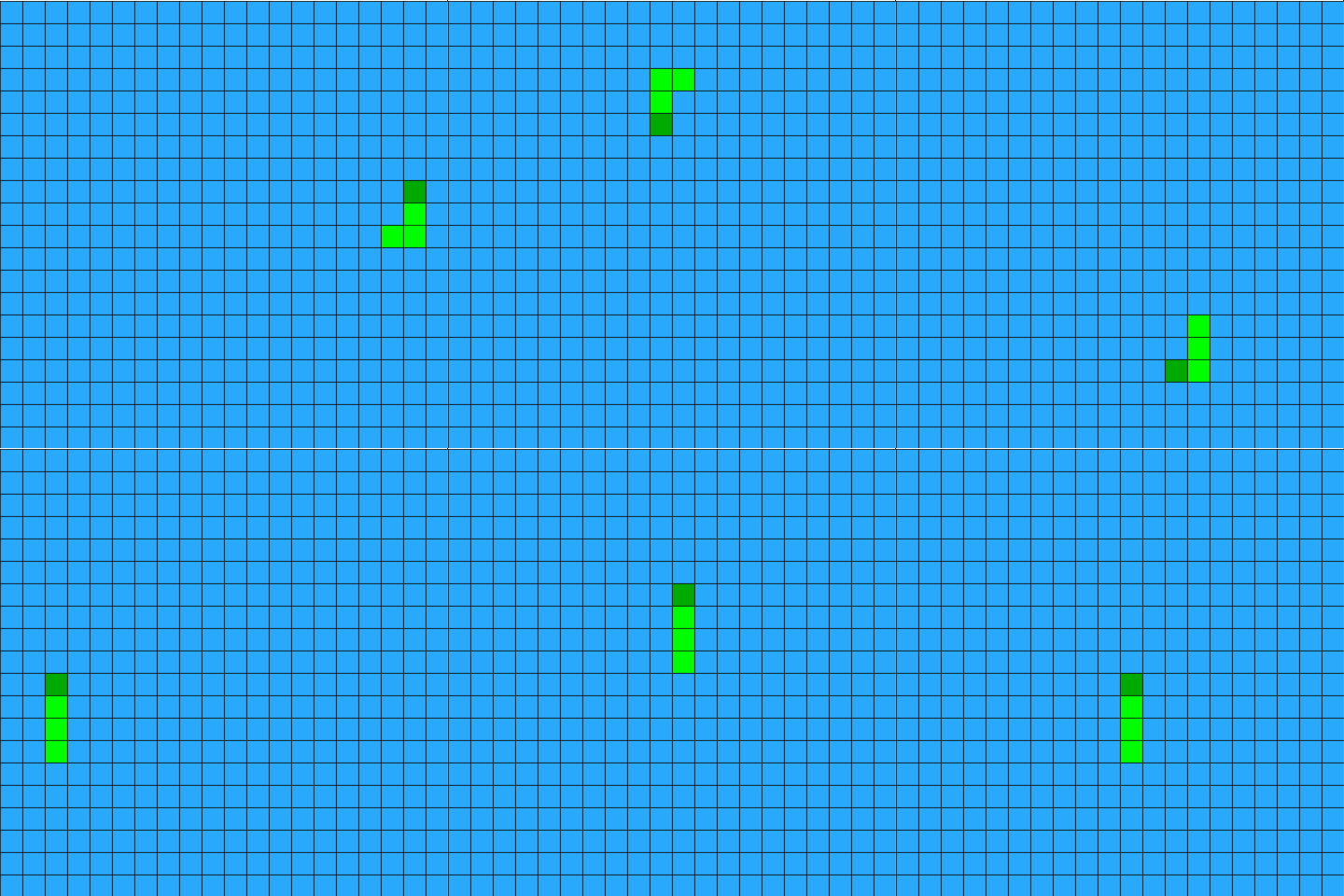
在snake class中,
def __init__(self, _grids):
    self.grids = _grids
    self.snakeHead = self.grids[10][10]

    self.dirID = 3  #[0:UP, 1:RIGHT, 2: DOWN, 3: LEFT]
    self.next = 0

    self.snakeBody = []
    for i in range(3,0,-1):
self.snakeBody.append(self.grids[10+i][10])加上兩個變數分別為dirID和next, dirID是neighbors的方向,跟之前一樣上、右、下和左四個鄰居,順序是按順時針。而next則是蛇將要行的下一格。
 def show(self):
    for i in range(len(self.snakeBody)):
        self.snakeBody[i].show('#00FF00')
    self.snakeHead.show('#00AA00')

    self.next = self.snakeHead.neighbors[self.dirID]
    self.snakeBody.append(self.snakeHead)
    self.snakeHead = self.next
self.snakeBody.pop(0)在下面的show()中,顯示完之後,按照前進方向更新下一個蛇頭位置,之後將現有的蛇頭加入到蛇身,再將現在的蛇頭更新成一下個蛇頭,最後就用pop(),移除蛇身第一個內容(即蛇尾,這就是為何我們一開始要逆次序。
返回在主程式中,
def setup():
    global grids, snake, currentSpot, snake
    size(600,600)
frameRate(10)在setup()之中加入frameRate(),設定動畫影格為10 frame per second。
def keyPressed():
    if (key == CODED and keyCode == UP):
        snake.dirID = 0
    if (key == CODED and keyCode == RIGHT):
        snake.dirID = 1
    if (key == CODED and keyCode == DOWN):
        snake.dirID = 2
    if (key == CODED and keyCode == LEFT):
snake.dirID = 3在程式最下,加上方向鍵控制,改變蛇的dirID就能改變其更新的方向。
6. 加入game over
snake.pyde:
from spot import *
from snake import *

grids = []
snake = 0

def setup():
    global grids, snake, currentSpot, snake
    size(600,600)
    frameRate(10)

    grids = []

    for x in range(20):
        tempGrids = []
        for y in range(20):
            tempGrids.append(Spot(x, y, width/20, height/20))
        grids.append(tempGrids)

    for x in range(20):
        for y in range(20):
            grids[x][y].addNeighbors(grids)

    snake = Snake(grids)

def draw():
    global grids, snake, currentSpot, gameOver

    if (snake.gameOver == False):
        background(50)

        for x in range(20):
            for y in range(20):
                grids[x][y].show('#29A9FC')

        snake.show()
        snake.check()
    else:
        textSize(128)
        textAlign(CENTER, CENTER)
        fill('#FF0000')
        text("GAME" + '\n' + "OVER", width/2, height/2)

def keyPressed():
    if (key == CODED and keyCode == UP):
        snake.dirID = 0
    if (key == CODED and keyCode == RIGHT):
        snake.dirID = 1
    if (key == CODED and keyCode == DOWN):
        snake.dirID = 2
    if (key == CODED and keyCode == LEFT):
        snake.dirID = 3

    if (key == 'r' or key == 'R'):
setup()snake.py:
class Snake(object):

    def __init__(self, _grids):
        self.grids = _grids
        self.snakeHead = self.grids[10][10]

        self.dirID = 3  #[0:UP, 1:RIGHT, 2: DOWN, 3: LEFT]
        self.next = 0

        self.snakeBody = []
        for i in range(3,0,-1):
            self.snakeBody.append(self.grids[10+i][10])

        self.gameOver = False

    def show(self):

        for i in range(len(self.snakeBody)):
            self.snakeBody[i].show('#00FF00')
        self.snakeHead.show('#00AA00')

        self.next = self.snakeHead.neighbors[self.dirID]
        self.snakeBody.append(self.snakeHead)
        self.snakeHead = self.next
        self.snakeBody.pop(0)

    def check(self):
        if self.next in self.snakeBody:
self.gameOver = True其他兩個分頁spot.py`沒有變。
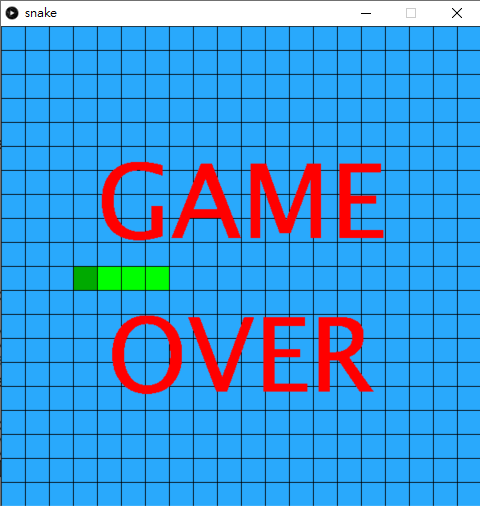
在snake class中,
def __init__(self, _grids):
	#other variables
self.gameOver = False最初始化的最下加入一個變數叫gameOver,設定成False。
def check(self):
    if self.next in self.snakeBody:
self.gameOver = True之後加入一個函數叫check(),用來檢查蛇是否撞到自己。由於我們蛇身都是用一個list去裝起的,所以只要蛇的下一步next包含在snakeBody的陣列中,即蛇撞到自己的蛇身,遊戲結束。
跟之前一樣,將原先draw()中的內容都用if (snake.gameOver == False):包裹,之後加入else:如果輸了就在畫面中央大大隻字顯示game over。
if (key == 'r' or key == 'R'):
setup()最後在keyPressed()中,加入按下r鍵就會重新遊戲。
7. 加入目標物蘋果
snake.pyde:
from spot import *
from snake import *

grids = []
snake = 0
apples = []

def setup():
    global grids, snake, currentSpot, snake, apples
    size(600,600)
    frameRate(10)

    grids = []

    for x in range(20):
        tempGrids = []
        for y in range(20):
            tempGrids.append(Spot(x, y, width/20, height/20))
        grids.append(tempGrids)

    for x in range(20):
        for y in range(20):
            grids[x][y].addNeighbors(grids)

    snake = Snake(grids)

    apples = []
    apples.append(addApple())


def draw():
    global grids, snake, currentSpot, gameOver

    if (snake.gameOver == False):
        background(50)

        for x in range(20):
            for y in range(20):
                grids[x][y].show('#29A9FC')

        for a in apples:
            a.show('#FF3939')

        snake.show()
        snake.check()
    else:
        textSize(128)
        textAlign(CENTER, CENTER)
        fill('#FF0000')
        text("GAME" + '\n' + "OVER", width/2, height/2)

def keyPressed():
    if (key == CODED and keyCode == UP):
        snake.dirID = 0
    if (key == CODED and keyCode == RIGHT):
        snake.dirID = 1
    if (key == CODED and keyCode == DOWN):
        snake.dirID = 2
    if (key == CODED and keyCode == LEFT):
        snake.dirID = 3

    if (key == 'r' or key == 'R'):
        setup()

def addApple():
    tempSpot = grids[int(random(20))][int(random(20))]

    if (tempSpot in snake.snakeBody or tempSpot == snake.snakeHead or tempSpot in apples):
        println("redraw")
        addApple()

return tempSpot其餘的程式沒有變。
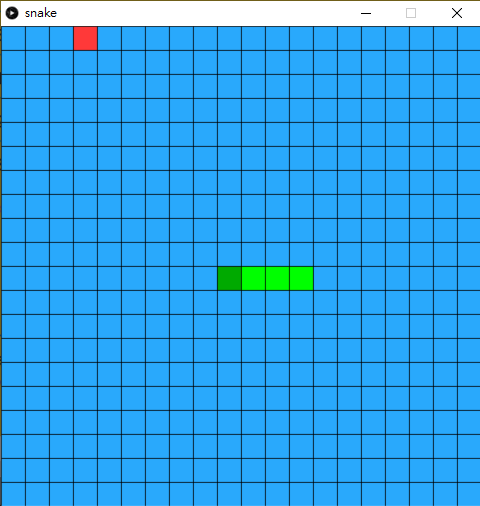
下一個步驟是加入貪食蛇的目標物蘋果。
apples = []

def setup():
    global grids, snake, currentSpot, snake, apples
    #other things
    apples = []
apples.append(addApple())一開始宣告一個列表變數叫apples,在setup()中,為其加入一個新的內容。加入新內容時用一個叫addApple()的函數去抽出新的蘋果,下文會詳述。
def addApple():
    tempSpot = grids[int(random(20))][int(random(20))]

    if (tempSpot in snake.snakeBody or tempSpot == snake.snakeHead or tempSpot in apples):
        println("redraw")
        addApple()

return tempSpot在主頁的最下,加入一個自訂函數叫addApple()。一開始抽出全部grids裡面全部格的一個,接著就要對比一下,這個抽出來的格不能是蛇身,不能不蛇頭,也不能是原本apples已經有的內容,遇到這情況直接call addApple()再抽多一次,否則就return抽到的格。
8. 食到蘋果後得分
snake.pyde:
from spot import *
from snake import *

grids = []
snake = 0
apples = []

def setup():
    global grids, snake, currentSpot, snake, apples
    size(600,600)
    frameRate(10)

    grids = []

    for x in range(20):
        tempGrids = []
        for y in range(20):
            tempGrids.append(Spot(x, y, width/20, height/20))
        grids.append(tempGrids)

    for x in range(20):
        for y in range(20):
            grids[x][y].addNeighbors(grids)

    snake = Snake(grids)

    apples = []
    apples.append(addApple())


def draw():
    global grids, snake, currentSpot, gameOver

    if (snake.gameOver == False):
        background(50)

        for x in range(20):
            for y in range(20):
                grids[x][y].show('#29A9FC')

        for a in apples:
            a.show('#FF3939')

        snake.show()
        snake.check()
        if snake.ate(apples):
            removeID = apples.index(snake.next)
            apples.pop(removeID)
            apples.append(addApple())

        textSize(40)
        textAlign(CENTER, CENTER)
        fill('#FFFFFF')
        text(snake.score, width/2, 12)
    else:
        textSize(128)
        textAlign(CENTER, CENTER)
        fill('#FF0000')
        text("GAME" + '\n' + "OVER", width/2, height/2)

def keyPressed():
    if (key == CODED and keyCode == UP):
        snake.dirID = 0
    if (key == CODED and keyCode == RIGHT):
        snake.dirID = 1
    if (key == CODED and keyCode == DOWN):
        snake.dirID = 2
    if (key == CODED and keyCode == LEFT):
        snake.dirID = 3

    if (key == 'r' or key == 'R'):
        setup()

def addApple():
    tempSpot = grids[int(random(20))][int(random(20))]

    if (tempSpot in snake.snakeBody or tempSpot == snake.snakeHead or tempSpot in apples):
        println("redraw")
        addApple()

return tempSpotsnake.py:
class Snake(object):

    def __init__(self, _grids):
        self.grids = _grids
        self.snakeHead = self.grids[10][10]

        self.dirID = 3  #[0:UP, 1:RIGHT, 2: DOWN, 3: LEFT]
        self.next = 0

        self.snakeBody = []
        for i in range(3,0,-1):
            self.snakeBody.append(self.grids[10+i][10])

        self.gameOver = False
        self.reward = False
        self.score = 0

    def show(self):

        for i in range(len(self.snakeBody)):
            self.snakeBody[i].show('#00FF00')
        self.snakeHead.show('#00AA00')

        self.next = self.snakeHead.neighbors[self.dirID]
        self.snakeBody.append(self.snakeHead)
        self.snakeHead = self.next
        if (not self.reward):
            self.snakeBody.pop(0)
        else:
            self.score += 1
            self.reward = False

    def check(self):
        if self.next in self.snakeBody:
            self.gameOver = True

    def ate(self, _apples):
        if (self.next in _apples):
            self.reward = True
            return True
        else:
            self.reward = False
            return False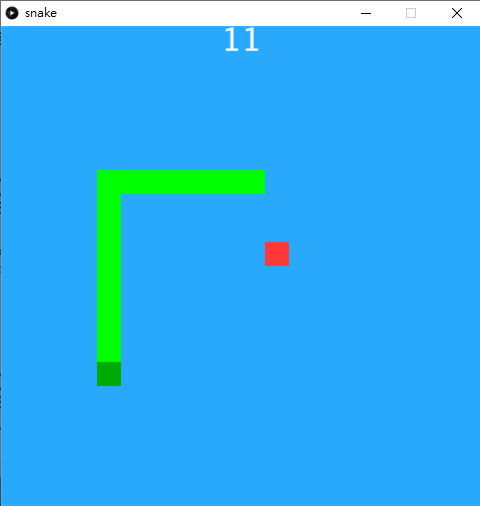
在主程式上,
def draw():
    global grids, snake, currentSpot, gameOver

	#another codes

        snake.show()
        snake.check()
        if snake.ate(apples):
            removeID = apples.index(snake.next)
            apples.pop(removeID)
            apples.append(addApple())

        textSize(40)
        textAlign(CENTER, CENTER)
        fill('#FFFFFF')
        text(snake.score, width/2, 12)
    else:
#another codes在遊戲的後,在snake.show()和snake.check()之後,加入snake.ate()的函數,這個函數會在另一版加入,但現在先做用,這個函數的功能就是告訴你蛇是否有食到蘋果,如果是的話就回傳True,所以如果吃到的話,我們就要找出那一個蘋果是蛇吃到的(初階段只會有一個蘋果,但遊戲之後可以加入多個蘋果)。
removeID = apples.index(snake.next)上句的功能,index()是用來找出snake.next的索引,之後就用 apples.pop(removeID)將該個索引的蘋果移除,再補一個新的。
之後再加上蛇的分數score,用來告訴蛇吃了多少蘋果。
在另一個分頁,snakeclass中,
 def __init__(self, _grids):
        self.grids = _grids
        self.snakeHead = self.grids[10][10]

        self.dirID = 3  #[0:UP, 1:RIGHT, 2: DOWN, 3: LEFT]
        self.next = 0

        self.snakeBody = []
        for i in range(3,0,-1):
            self.snakeBody.append(self.grids[10+i][10])

        self.gameOver = False
        self.reward = False
self.score = 0在gameOver外,再加入另外兩個變數,reward是一個boolean變數,用來蛇當下的收狀態是否正在吃蘋果,而score就是蛇吃了多少蘋果。
def show(self):

        for i in range(len(self.snakeBody)):
            self.snakeBody[i].show('#00FF00')
        self.snakeHead.show('#00AA00')

        self.next = self.snakeHead.neighbors[self.dirID]
        self.snakeBody.append(self.snakeHead)
        self.snakeHead = self.next
        if (not self.reward):
            self.snakeBody.pop(0)
        else:
            self.score += 1
self.reward = False在show()中,比較特別的是,在最後將蛇身長度減少的部分,之前每一次執行show()時,都會更新將蛇前進一格而扣減最後一格,但今次加入rewardboolean變數,如果是False的話,即現階段沒有吃到蘋果,所以照舊要移除最後一格,但如果是吃到蘋果的話,就不用移除最後一格,而且score加一,再將reward變回False,那這個動作就只會執行一次。(這個技術在第四章 Flappy Bird時都有介紹過)
 def ate(self, _apples):
        if (self.next in _apples):
            self.reward = True
            return True
        else:
            self.reward = False
return False在最後,加入另一個函數ate(),要將所有的apple匯入,所以中間要加入_apple,因為class是不能使用和招喚global變數的,所以要用這方法去匯入。內容方面,如果匯入的蘋果當中,包含蛇頭(或者next,show()之後兩者是同一格的),即蛇吃得到蘋果,就回傳True和將reward轉成True。(你也可以在這裡直接回傳需要刪除的蘋果,那在主程式就可以簡潔一點。)
9. 考考你
- 蛇的行走方向如果是左手邊的話,玩家按右鍵,就會即時game over,同樣情況也出現在其他 方向鍵,加入條件式,防止這個情況,蛇向左行,玩家按右鍵的話不會game over,只會甚麼都沒發生。
score是5的倍數的話,那5n+1關時同一時間就會出現兩顆蘋果,例如第6關, 第11關都會同一時間有2個蘋果。- 今次的程式是刻意將所有蛇的行為都包圍在
snakeclass中的,你可以試試增加多一條蛇,這條蛇由w,s,a,d鍵作為方向鍵來控制。之後有機會再教大家用AI同一時間有很多條蛇在爭蘋果。