Flappy Bird
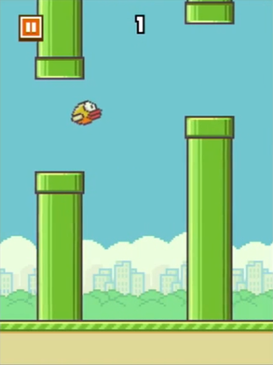
《Flappy Bird》是一款2013年鳥飛類遊戲,由越南河內獨立遊戲開發者阮河東(Dong Nguyen)開發,另一個獨立遊戲開發商GEARS Studios發佈。此遊戲原本於2013年5月發佈,平台為iPhone 5。同年9月,作者將遊戲更新至iOS 6。於2014年1月,此遊戲成為美國及中國iTunes最受歡迎免費應用軟件,並在同月被英國App Store描述為「新憤怒鳥」。此遊戲更成為1月下載次數最多的免費應用軟件。此遊戲的下載次數至今已超過5000萬次。
[TOC]
0. 本章重點
- 複習如何用歐拉方法模擬物理加速度
- ==物件導向, python class==
- Python
for的另一個列表語法 - 程式常用技巧: 只執行一次
1. 開始遊戲
birdPos = PVector()

def setup():
    global birdPos

    size(800, 600)
    birdPos = PVector(50, height/2)

def draw():
    background("#70C6D5")

    fill("#D5BB06")
    ellipse(birdPos.x, birdPos.y, 25, 25)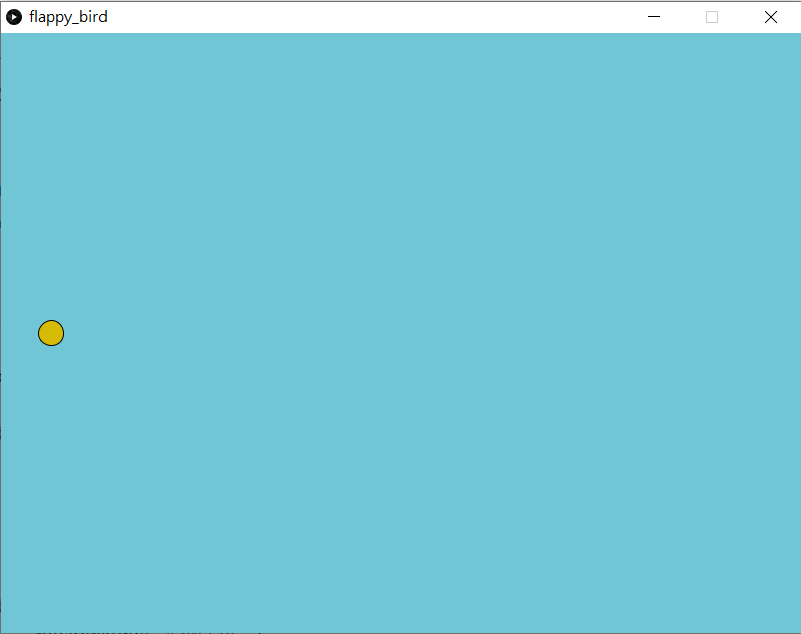
首先我們如常,一個processing.py的程式,基本包括了宣告區,setup()和draw()。開一個800x600的畫面,開一個鳥的位置(birdPos)的向量變數,在setup()區中設定初始值,之後在draw()區中繪畫。
2. 讓鳥自由落體
birdPos = PVector()     #鳥的位置
birdVec = PVector()     #鳥的速度
birdAccel = PVector(0, 0.3)   #鳥的向下加速度

def setup():
    global birdPos, birdVec

    size(800, 600)
    frameRate(60)
    birdPos = PVector(50, height/2)
    birdVec = PVector(0, 0)

def draw():
    global birdPos, birdVec

    background("#70C6D5")

    birdVec = birdVec.add(birdAccel)
    birdPos = birdPos.add(birdVec)

    fill("#D5BB06")
    ellipse(birdPos.x, birdPos.y, 25, 25)
跟上一章一樣,開兩個向量變數,分別是鳥的速度和加速度。在setup()區中設定初速為0,而加速度因為由始至終都不變,可以直接在宣告區中宣告其值。
birdVec = birdVec.add(birdAccel)
birdPos = birdPos.add(birdVec)在draw()中,每次更新時都將鳥的速度加上加速度,而位置則加上速度。你可以自行調整一下加速度和frameRate(),抄到一個不會出現殘影而又夠快的速度。
3. 讓鳥懂得飛起
birdPos = PVector()     #鳥的位置
birdVec = PVector()     #鳥的速度
birdAccel = PVector(0, 0.3)   #鳥的向下加速度

def setup():
    global birdPos, birdVec

    size(800, 600)
    frameRate(60)
    birdPos = PVector(50, height/2)
    birdVec = PVector(0, 0)

def draw():
    global birdPos, birdVec

    background("#70C6D5")

    birdVec = birdVec.add(birdAccel)
    birdPos = birdPos.add(birdVec)

    fill("#D5BB06")
    ellipse(birdPos.x, birdPos.y, 25, 25)


def keyPressed():
    if (key == ' '):
        birdVec.y = -8
def keyPressed():
    if (key == ' '):
birdVec.y = -8要令鳥懂得"飛"起來,其實只要每次按下控制按鍵時,將鳥速度的y方向變成一個常數,就可以做到類似突然升起的效果,但升起後又會因為加速度再次慢慢降下。
4. 製作水管
birdPos = PVector()  # 鳥的位置
birdVec = PVector()  # 鳥的速度
birdAccel = PVector(0, 0.3)  # 鳥的向下加速度

panSpeed = 5

myPipe = 0


def setup():
    global birdPos, birdVec, myPipe

    size(800, 600)
    frameRate(60)
    birdPos = PVector(50, height/2)
    birdVec = PVector(0, 0)

    myPipe = Pipe()


def draw():
    global birdPos, birdVec

    background("#70C6D5")

    birdVec = birdVec.add(birdAccel)
    birdPos = birdPos.add(birdVec)

    fill("#D5BB06")
    ellipse(birdPos.x, birdPos.y, 25, 25)

    myPipe.update()
    myPipe.show()


def keyPressed():
    if (key == ' '):
        birdVec.y = -8
    if (key == 'R' or key == 'r'):
        setup()

# =======================Pipe Object=======================================

class Pipe(object):
    x = 0
    y = 0
    w = 80  #水管的寬度
    h = 0   #水管的高度
    gap = 80 #兩水管中間的間隔

    def __init__(self):
        self.x = width + self.w  #令水管再後一點一點
        self.y = random(100, height - 100) #下水管的左上角位置
        self.h = height

    def update(self):
        self.x -= panSpeed

    def show(self):
        fill(0, 204, 0)
        rect(self.x, self.y, self.w, self.h) #上水管
        rect(self.x, self.y - self.gap, self.w, -self.h) #下水管
要製作水管,就要先討論一下本章最重點的學習內容:物件導向和class。
4.1 物件導向與class
詳見這裡。
class Pipe(object):
    x = 0
    y = 0
    w = 80  #水管的寬度
    h = 0   #水管的高度
    gap = 80 #兩水管中間的間隔

    def __init__(self):
        self.x = width + self.w  #令水管再後一點一點
        self.y = random(100, height - 100) #下水管的左上角位置
        self.h = height

    def update(self):
        self.x -= panSpeed

    def show(self):
        fill(0, 204, 0)
        rect(self.x, self.y, self.w, self.h) #上水管
rect(self.x, self.y - self.gap, self.w, -self.h) #下水管建立一個class來做水管的類別。水管包括有它的x位置,y位置,寬度和高度,還有上下水管的縫隙間距。設定水管一開始在畫面外的右側再多一點點,下水管我們用-self.h令劃水管時的方向不是向下而是向上。
5. 測試gameover
birdPos = PVector()  # 鳥的位置
birdVec = PVector()  # 鳥的速度
birdAccel = PVector(0, 0.3)  # 鳥的向下加速度

panSpeed = 5

myPipe = 0


def setup():
    global birdPos, birdVec, myPipe

    size(800, 600)
    frameRate(60)
    birdPos = PVector(50, height/2)
    birdVec = PVector(0, 0)

    myPipe = Pipe()


def draw():
    global birdPos, birdVec

    background("#70C6D5")

    birdVec = birdVec.add(birdAccel)
    birdPos = birdPos.add(birdVec)

    fill("#D5BB06")
    ellipse(birdPos.x, birdPos.y, 25, 25)

    myPipe.update()
    myPipe.show()

    if myPipe.collide(birdPos) == True or birdPos.y > height:
        GAMEOVER = True
        println("Game Over")


def keyPressed():
    if (key == ' '):
        birdVec.y = -8
    if (key == 'R' or key == 'r'):
        setup()

# =======================Pipe Object=======================================

class Pipe(object):
    x = 0
    y = 0
    w = 80  #水管的寬度
    h = 0   #水管的高度
    gap = 80 #兩水管中間的間隔

    def __init__(self):
        self.x = width + self.w  #令水管再後一點一點
        self.y = random(100, height - 100) #下水管的左上角位置
        self.h = height

    def update(self):
        self.x -= panSpeed

    def show(self):
        fill(0, 204, 0)
        rect(self.x, self.y, self.w, self.h) #上水管
        rect(self.x, self.y - self.gap, self.w, -self.h) #下水管

    def collide(self, _birdPos):
        if (_birdPos.x > self.x and _birdPos.x < self.x+self.w):
            if (_birdPos.y > self.y or _birdPos.y < self.y - self.gap):
                return True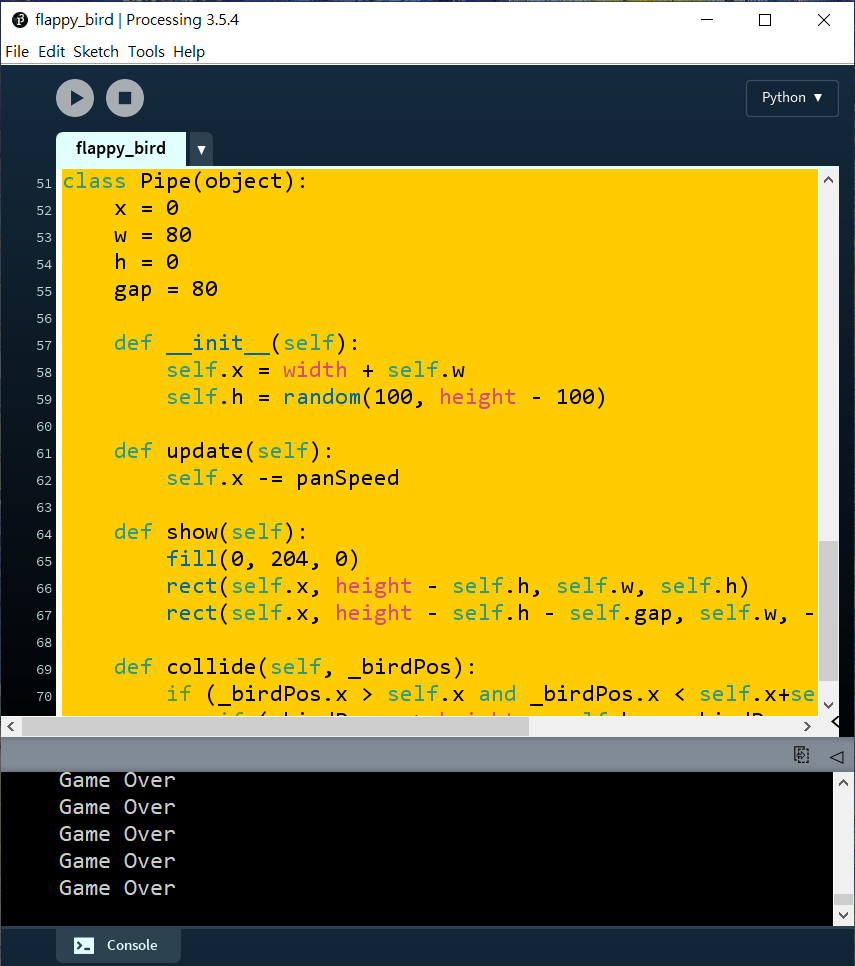
def collide(self, _birdPos):
    if (_birdPos.x > self.x and _birdPos.x < self.x+self.w):
        if (_birdPos.y > self.y or _birdPos.y < self.y - self.gap):
return True在Pipe的class中新增一個函數叫collide(),這個函數有1個輸入(self不是輸入是格式),輸入鳥的位置,如果鳥的位置和水管的範圍重疊,則return True。
if myPipe.collide(birdPos) == True or birdPos.y > height:
	GAMEOVER = True
println("Game Over")之後就可以去到draw()的最後,加入這句,如果鳥撞到柱或者y座標大於height就println("Game Over")。
6. 測試gameover(續)
birdPos = PVector()  # 鳥的位置
birdVec = PVector()  # 鳥的速度
birdAccel = PVector(0, 0.3)  # 鳥的向下加速度

panSpeed = 5

myPipe = 0

GAMEOVER = False

def setup():
    global birdPos, birdVec, myPipe, GAMEOVER

    size(800, 600)
    frameRate(60)
    birdPos = PVector(50, height/2)
    birdVec = PVector(0, 0)

    myPipe = Pipe()

    GAMEOVER = False


def draw():
    global GAMEOVER
    if (GAMEOVER == False):
        runGame()
    else:
        textSize(64)
        textAlign(CENTER, CENTER)
        fill(255, 255, 0)
        text("GAME OVER", width/2, height/2)

def runGame():
    global birdPos, birdVec, GAMEOVER

    background("#70C6D5")

    birdVec = birdVec.add(birdAccel)
    birdPos = birdPos.add(birdVec)

    fill("#D5BB06")
    ellipse(birdPos.x, birdPos.y, 25, 25)

    myPipe.update()
    myPipe.show()

    if myPipe.collide(birdPos) == True or birdPos.y > height:
        GAMEOVER = True
        println("Game Over")

def keyPressed():
    if (key == ' '):
        birdVec.y = -8
    if (key == 'R' or key == 'r'):
        setup()

# =======================Pipe Object=======================================

class Pipe(object):
    x = 0
    y = 0
    w = 80  #水管的寬度
    h = 0   #水管的高度
    gap = 80 #兩水管中間的間隔

    def __init__(self):
        self.x = width + self.w  #令水管再後一點一點
        self.y = random(100, height - 100) #下水管的左上角位置
        self.h = height

    def update(self):
        self.x -= panSpeed

    def show(self):
        fill(0, 204, 0)
        rect(self.x, self.y, self.w, self.h) #上水管
        rect(self.x, self.y - self.gap, self.w, -self.h) #下水管

    def collide(self, _birdPos):
        if (_birdPos.x > self.x and _birdPos.x < self.x+self.w):
            if (_birdPos.y > self.y or _birdPos.y < self.y - self.gap):
                return True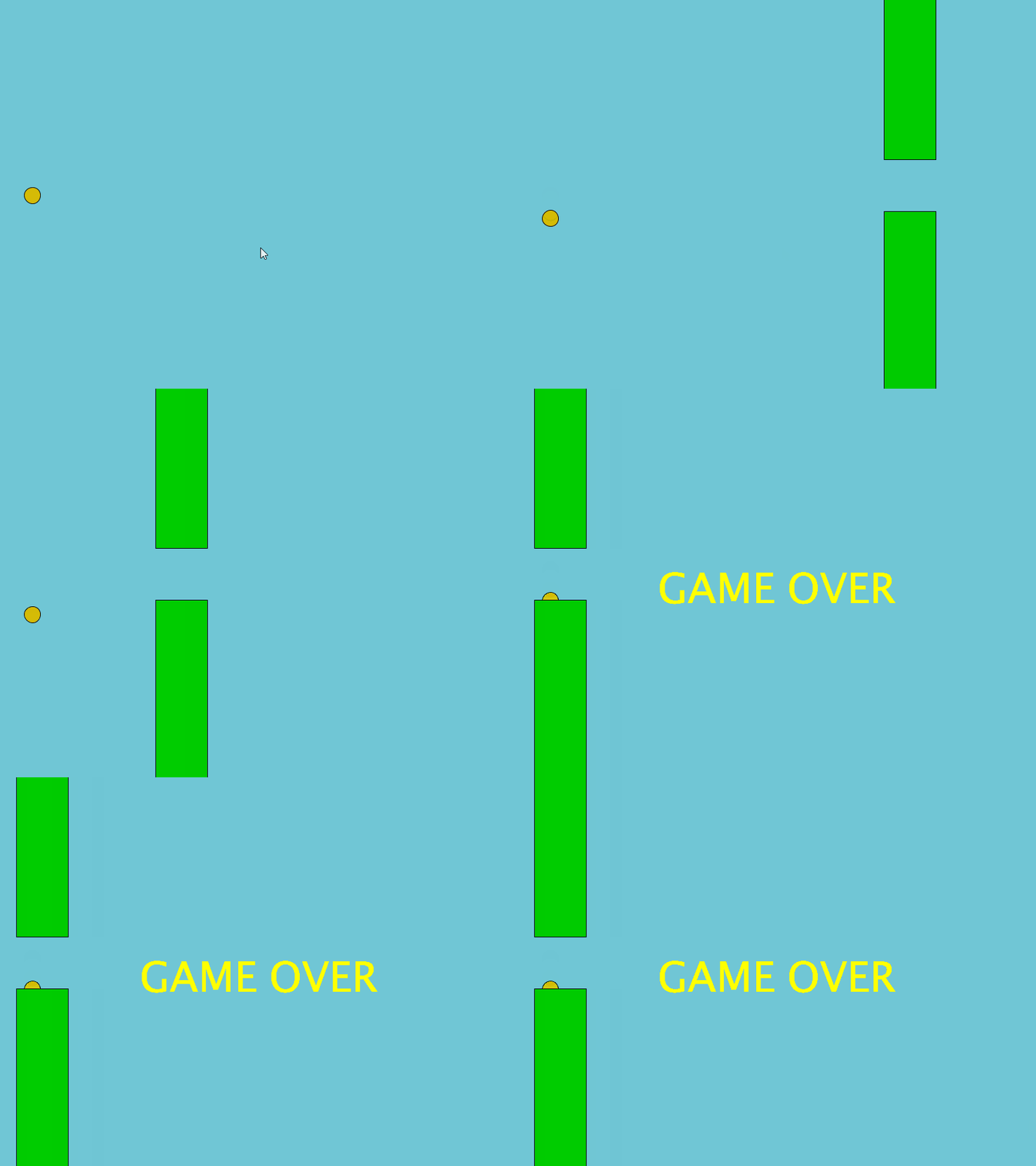
def runGame():
    global birdPos, birdVec, GAMEOVER

    background("#70C6D5")

    birdVec = birdVec.add(birdAccel)
    birdPos = birdPos.add(birdVec)

    fill("#D5BB06")
    ellipse(birdPos.x, birdPos.y, 25, 25)

    myPipe.update()
    myPipe.show()

    if myPipe.collide(birdPos) == True or birdPos.y > height:
        GAMEOVER = True
println("Game Over")接著,跟之前的教學一樣,開一個函數叫runGame(),將原本在draw()的內容複製到這個runGame()中。
def draw():
    if not GAMEOVER:
        runGame()
    else:
        textSize(64)
        textAlign(CENTER, CENTER)
        fill(255, 255, 0)
text("GAME OVER", width/2, height/2)而原本在draw()中,改寫為當GAMEOVER是False時遊戲才運行,否則gameover的話就在畫面上寫上文字。==記得在最上面開一個新的boolean變數為GAMEOVER,而且在每個需要更新GAMEOVER的函數都要加入global==
7. 新增多條水管
birdPos = PVector()  # 鳥的位置
birdVec = PVector()  # 鳥的速度
birdAccel = PVector(0, 0.3)  # 鳥的向下加速度

panSpeed = 5

myPipe = []

GAMEOVER = False

score = 0

def setup():
    global birdPos, birdVec, myPipe, GAMEOVER, score

    size(800, 600)
    frameRate(60)
    birdPos = PVector(50, height/2)
    birdVec = PVector(0, 0)

    myPipe.append(Pipe())

    GAMEOVER = False

    score = 0

def draw():
    global GAMEOVER
    if (GAMEOVER == False):
        runGame()
    else:
        textSize(64)
        textAlign(CENTER, CENTER)
        fill(255, 255, 0)
        text("GAME OVER", width/2, height/2)

def runGame():
    global birdPos, birdVec, GAMEOVER, score

    score += 1
    if (score % 100 == 0):
        myPipe.append(Pipe())

    background("#70C6D5")

    birdVec = birdVec.add(birdAccel)
    birdPos = birdPos.add(birdVec)

    fill("#D5BB06")
    ellipse(birdPos.x, birdPos.y, 25, 25)

    for p in myPipe:
        p.update()
        p.show()

        if p.collide(birdPos) == True or birdPos.y > height:
            GAMEOVER = True
            println("Game Over")

def keyPressed():
    if (key == ' '):
        birdVec.y = -8
    if (key == 'R' or key == 'r'):
        setup()

# =======================Pipe Object=======================================

class Pipe(object):
    x = 0
    y = 0
    w = 80  #水管的寬度
    h = 0   #水管的高度
    gap = 80 #兩水管中間的間隔

    def __init__(self):
        self.x = width + self.w  #令水管再後一點一點
        self.y = random(100, height - 100) #下水管的左上角位置
        self.h = height

    def update(self):
        self.x -= panSpeed

    def show(self):
        fill(0, 204, 0)
        rect(self.x, self.y, self.w, self.h) #上水管
        rect(self.x, self.y - self.gap, self.w, -self.h) #下水管

    def collide(self, _birdPos):
        if (_birdPos.x > self.x and _birdPos.x < self.x+self.w):
            if (_birdPos.y > self.y or _birdPos.y < self.y - self.gap):
                return True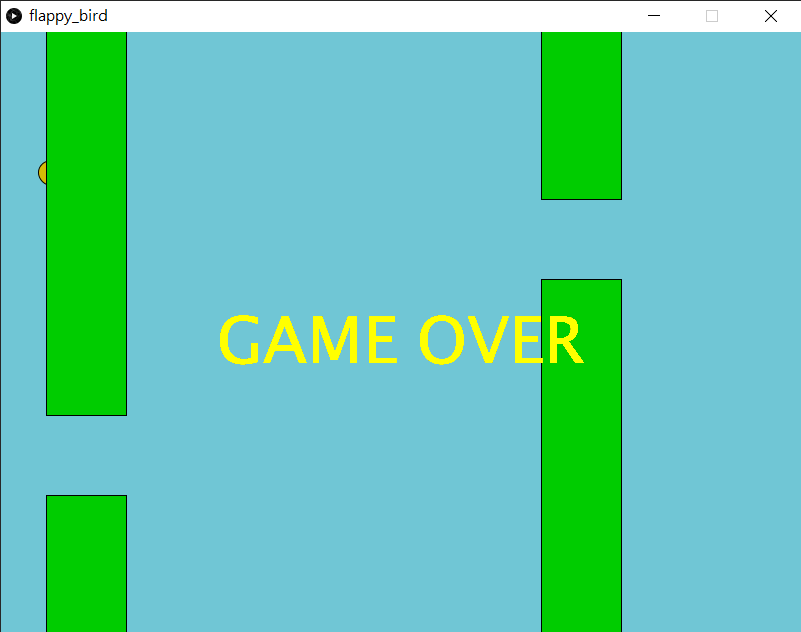
myPipe = []

GAMEOVER = False

score = 0將原本最上方宣告區的myPipe由原本宣告成整數,變成宣告成列表。另外新增一個變數叫score來紀錄鳥飛得有多遠。
def setup():
    global birdPos, birdVec, myPipe, GAMEOVER, score

    size(800, 600)
    frameRate(60)
    birdPos = PVector(50, height/2)
    birdVec = PVector(0, 0)

    myPipe.append(Pipe())

    GAMEOVER = False

score = 0在setup()區中,用 myPipe.append(Pipe())將新的Pipe()物件新增到列表中。另外初始化GAMEOVER和score。
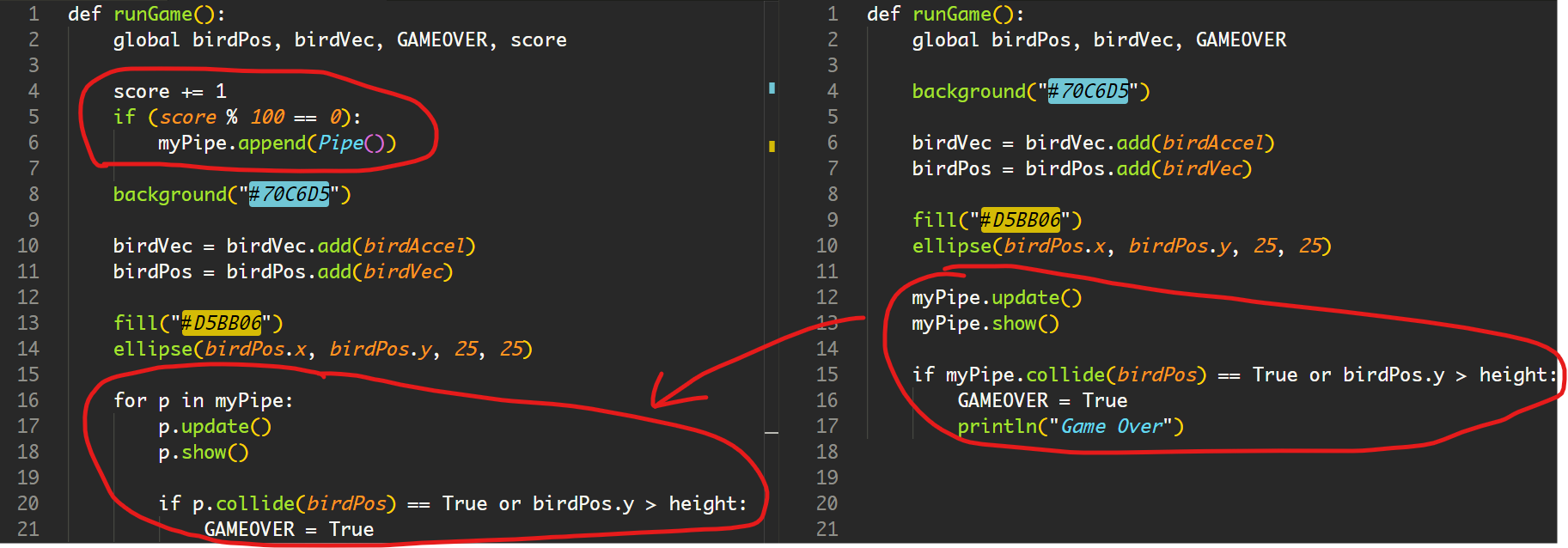
在runGame()中,新增每次運行時都將score加1,用來紀錄鳥飛行了多少影格。if (score % 100 == 0):的意思是score除以100,餘數為0時就執行。即每100影格就新增一條水管。
下面16-21行,跟之前幾乎是一樣的,但新增了一行for p in myPipe:。
for常見有兩種格式,一種是for i in range(n):,就是直接告訴程式將以下的程式重覆n次,每次重覆時都會將i加1。而另一種常見的格式是for obj in list:,就是直接重覆list的長度,每次重覆時,obj的內容就是對應的list[i]。

即,for obj in list:跟for i in range(len(list)):是一樣的。
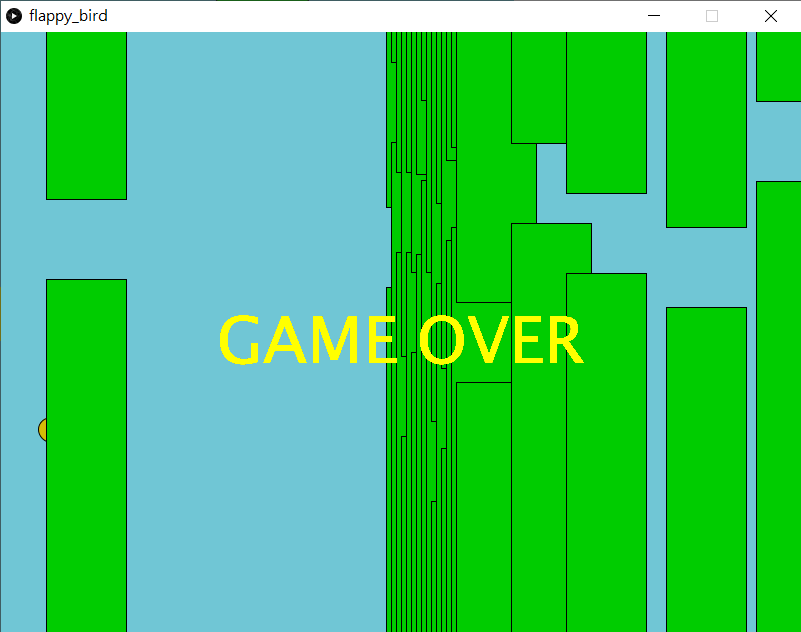
但如果你按下r鍵重設遊戲時,你會發現會有上面的bugs。原因是myPipe這個列表只有新增,沒有減少,也沒有清空。
8. 清空和減少水管列表
birdPos = PVector()  # 鳥的位置
birdVec = PVector()  # 鳥的速度
birdAccel = PVector(0, 0.3)  # 鳥的向下加速度

panSpeed = 5

myPipe = []

GAMEOVER = False

score = 0

def setup():
    global birdPos, birdVec, myPipe, GAMEOVER, score

    size(800, 600)
    frameRate(60)
    birdPos = PVector(50, height/2)
    birdVec = PVector(0, 0)

    myPipe = []
    myPipe.append(Pipe())

    GAMEOVER = False

    score = 0

def draw():
    global GAMEOVER
    if (GAMEOVER == False):
        runGame()
    else:
        textSize(64)
        textAlign(CENTER, CENTER)
        fill(255, 255, 0)
        text("GAME OVER", width/2, height/2)

def runGame():
    global birdPos, birdVec, GAMEOVER, score

    score += 1
    if (score % 100 == 0):
        myPipe.append(Pipe())

    background("#70C6D5")

    birdVec = birdVec.add(birdAccel)
    birdPos = birdPos.add(birdVec)

    fill("#D5BB06")
    ellipse(birdPos.x, birdPos.y, 25, 25)

    for p in myPipe:
        p.update()
        p.show()

        # if p.collide(birdPos) == True or birdPos.y > height:
        #     GAMEOVER = True
        #     println("Game Over")

        if (p.x < - p.w):
            myPipe.remove(p)

    # delete me after testing=============
    for p in myPipe:
        print(p)
    println(' ')
    #=====================================

def keyPressed():
    if (key == ' '):
        birdVec.y = -8
    if (key == 'R' or key == 'r'):
        setup()

# =======================Pipe Object=======================================

class Pipe(object):
    x = 0
    y = 0
    w = 80  #水管的寬度
    h = 0   #水管的高度
    gap = 80 #兩水管中間的間隔

    def __init__(self):
        self.x = width + self.w  #令水管再後一點一點
        self.y = random(100, height - 100) #下水管的左上角位置
        self.h = height

    def update(self):
        self.x -= panSpeed

    def show(self):
        fill(0, 204, 0)
        rect(self.x, self.y, self.w, self.h) #上水管
        rect(self.x, self.y - self.gap, self.w, -self.h) #下水管

    def collide(self, _birdPos):
        if (_birdPos.x > self.x and _birdPos.x < self.x+self.w):
            if (_birdPos.y > self.y or _birdPos.y < self.y - self.gap):
                return True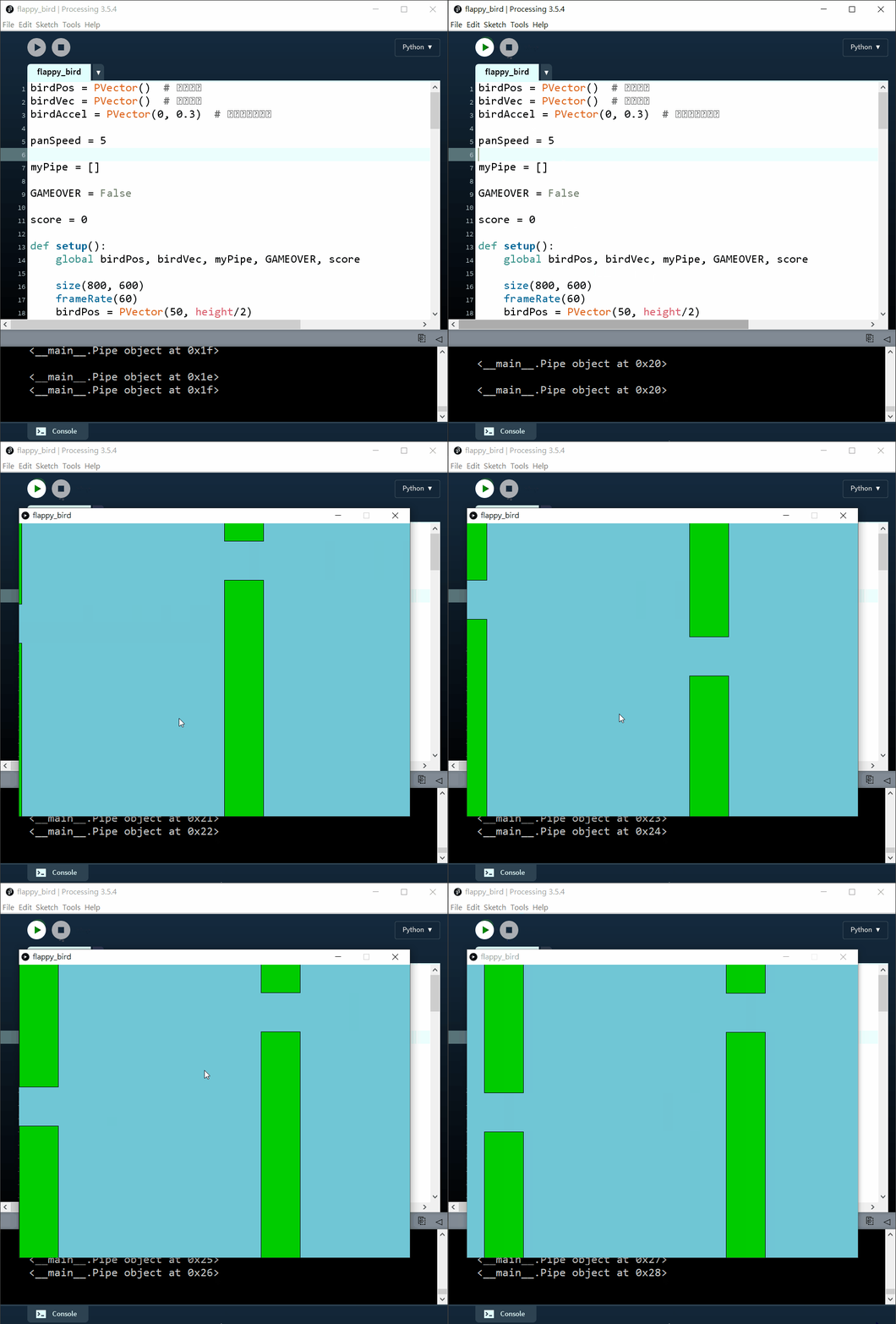
你可以留意一下console的位置,我將每次runGame()時將所有的myPipe物件的id都列印出來,然後每次都隔一行,你可以見到,每次列印出來時也只有2個id,證明程式現在懂得將超過畫面的Pipe()物件從myPipe列表中移除。
myPipe = []在setup()中新增了一句。每次初始化時,都將myPipe的內容清空變成空的列表。
def runGame():
    global birdPos, birdVec, GAMEOVER, score

    score += 1
    if (score % 100 == 0):
        myPipe.append(Pipe())

    background("#70C6D5")

    birdVec = birdVec.add(birdAccel)
    birdPos = birdPos.add(birdVec)

    fill("#D5BB06")
    ellipse(birdPos.x, birdPos.y, 25, 25)

    for p in myPipe:
        p.update()
        p.show()

        # if p.collide(birdPos) == True or birdPos.y > height:
        #     GAMEOVER = True
        #     println("Game Over")

        if (p.x < - p.w):
            myPipe.remove(p)

    # delete me after testing=============
    for p in myPipe:
        print(p)
    println(' ')
#=====================================**在runGame()中,20-22行,暫時停止gameover功能方便debug,**之後24-25行新增了當水管已經移出了畫面時,就在myPipe列表中移除當下這個物件。要注意的是,移除一定要在最後才執行,否則移除後下面繼續執行的都是針對下一個id)。
之後就在每次runGame()中,將所有myPipe列表的內容都列印出來,在python中列印一件物件,只會列印其id,這個id是電腦儲存這個物件的暫存記憶體地址。這一段是用來debug的,測試後沒有問題就可以刪掉。
9. 水管計分
birdPos = PVector()  # 鳥的位置
birdVec = PVector()  # 鳥的速度
birdAccel = PVector(0, 0.3)  # 鳥的向下加速度

panSpeed = 5

myPipe = []

GAMEOVER = False

score = 0
pipeCount = 0

def setup():
    global birdPos, birdVec, myPipe, GAMEOVER, score, pipeCount

    size(800, 600)
    frameRate(60)
    birdPos = PVector(50, height/2)
    birdVec = PVector(0, 0)

    myPipe = []
    myPipe.append(Pipe())

    GAMEOVER = False

    score = 0
    pipeCount= 0

def draw():
    global GAMEOVER
    if (GAMEOVER == False):
        runGame()
    else:
        textSize(64)
        textAlign(CENTER, CENTER)
        fill(255, 255, 0)
        text("GAME OVER", width/2, height/2)

def runGame():
    global birdPos, birdVec, GAMEOVER, score

    score += 1
    if (score % 100 == 0):
        myPipe.append(Pipe())

    background("#70C6D5")

    birdVec = birdVec.add(birdAccel)
    birdPos = birdPos.add(birdVec)

    fill("#D5BB06")
    ellipse(birdPos.x, birdPos.y, 25, 25)

    for p in myPipe:
        p.update(birdPos)
        p.show()

        # if p.collide(birdPos) == True or birdPos.y > height:
        #     GAMEOVER = True
        #     println("Game Over")

        if (p.x < - p.w):
            myPipe.remove(p)

    textSize(60)
    fill(255, 255, 0)
    textAlign(CENTER, CENTER)
    text(pipeCount, width/2, 50)

def keyPressed():
    if (key == ' '):
        birdVec.y = -8
    if (key == 'R' or key == 'r'):
        setup()

# =======================Pipe Object=======================================

class Pipe(object):
    x = 0
    y = 0
    w = 80  #水管的寬度
    h = 0   #水管的高度
    gap = 80 #兩水管中間的間隔
    isPass = False

    def __init__(self):
        self.x = width + self.w  #令水管再後一點一點
        self.y = random(100, height - 100) #下水管的左上角位置
        self.h = height

    def update(self, _birdPos):
        global pipeCount
        self.x -= panSpeed
        if (self.isPass == False and _birdPos.x > self.x+self.w):
            self.isPass = True
            pipeCount += 1

    def show(self):
        fill(0, 204, 0)
        rect(self.x, self.y, self.w, self.h) #上水管
        rect(self.x, self.y - self.gap, self.w, -self.h) #下水管

    def collide(self, _birdPos):
        if (_birdPos.x > self.x and _birdPos.x < self.x+self.w):
            if (_birdPos.y > self.y or _birdPos.y < self.y - self.gap):
                return True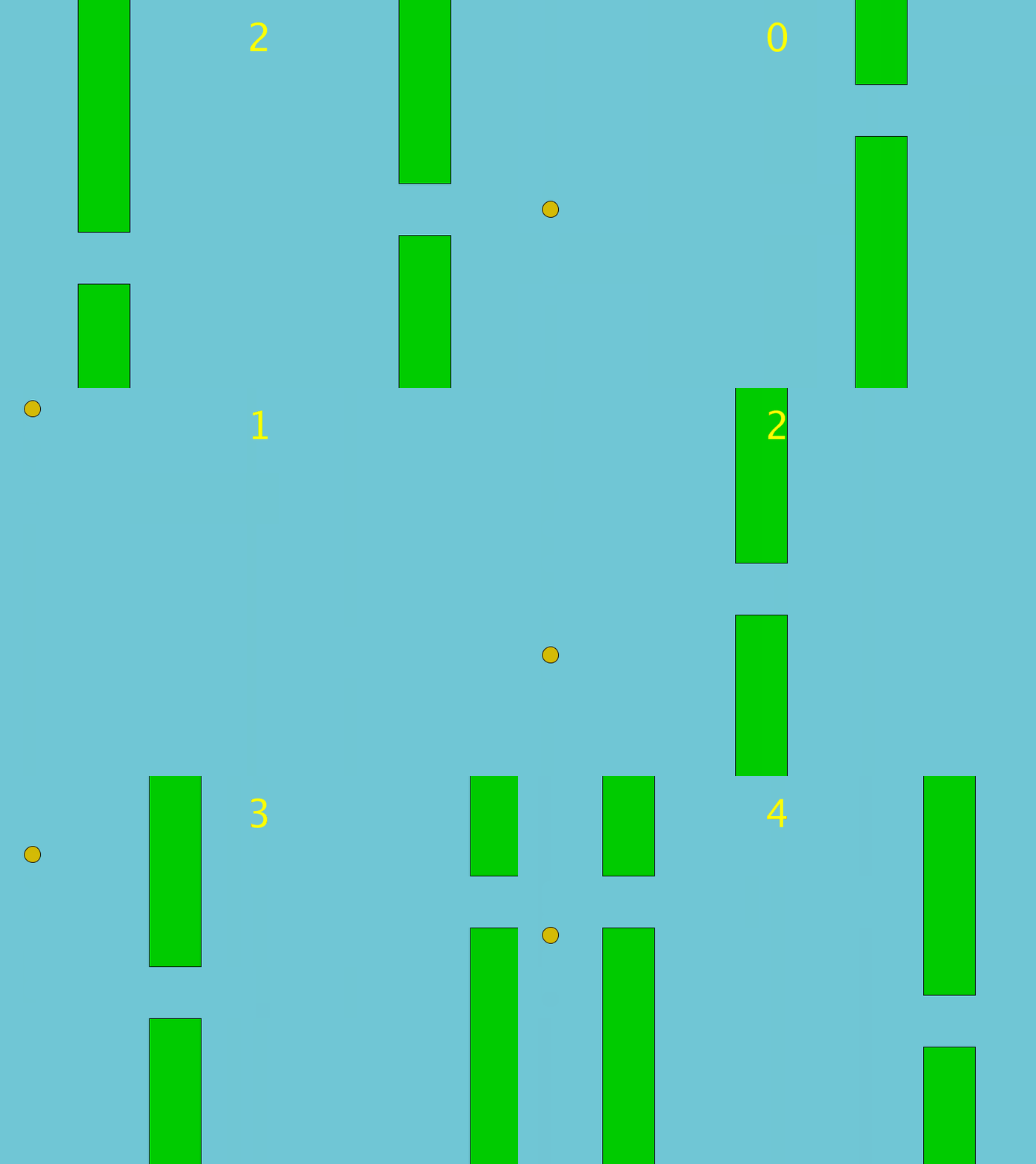
class Pipe(object):
    x = 0
    y = 0
    w = 80  #水管的寬度
    h = 0   #水管的高度
    gap = 80 #兩水管中間的間隔
    isPass = False

    def __init__(self):
        self.x = width + self.w  #令水管再後一點一點
        self.y = random(100, height - 100) #下水管的左上角位置
        self.h = height

    def update(self, _birdPos):
        global pipeCount
        self.x -= panSpeed
        if (self.isPass == False and _birdPos.x > self.x+self.w):
            self.isPass = True
            pipeCount += 1

    def show(self):
        fill(0, 204, 0)
        rect(self.x, self.y, self.w, self.h) #上水管
        rect(self.x, self.y - self.gap, self.w, -self.h) #下水管

    def collide(self, _birdPos):
        if (_birdPos.x > self.x and _birdPos.x < self.x+self.w):
            if (_birdPos.y > self.y or _birdPos.y < self.y - self.gap):
return True在水管的class當中,加入一個變數isPassed,顧名思義是判斷鳥有否通過了水管。在update()中,加入,如果isPassed是False而且鳥的x位置大於水管的x位置加水管寬度,就將isPassed設成True並且pipeCount加一。另外你可以留意到, update()函數中間,除了self外,今次多了一個輸入是_birdPos,所以在之後更新runGame(),也要記得更新這runGame()中的b.update()變成b.update(birdPos)
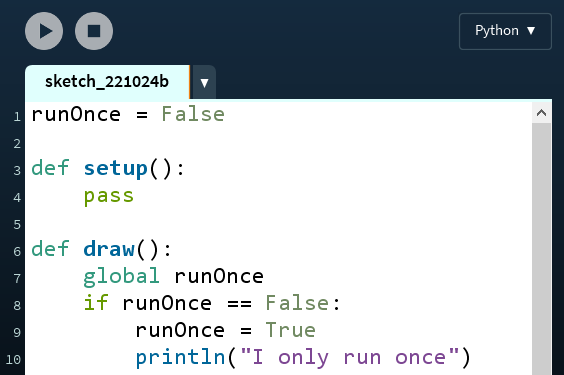
P.S. : 一個編程常用的小技巧,如果你只想某段程式只執行一次,那就可以設定一個boolean變數,例如今次是False,在if的條件中,加入判斷這個變數,當變數是False時而且有其他你想要的特定條件,就執行你想要的內容,並且將這個變數設成True,那麼下次程式再執行時,由於這個變數已經是True了,就不會再執行。例如下面的例子:
10. 考考你
# if p.collide(birdPos) == True or birdPos.y > height:
        #     GAMEOVER = True
# println("Game Over")現在你可以將runGame()中,原本暫停了的這兩句重新啟動,遊戲就可以運行了。
- 改變變數,遊戲一開始時,水管的縫隙寬一點容易玩一點,例如是
160,但當通過的水管數量越來越多,例如每通過5條水管,水管的縫隙就越來越窄,每次減少20,直到縫隙只有60 - 將所有有關鳥的變數和函數都打包變成一個class,跟水管的做法一樣,之後有機會教教大家用神經網絡和遺傳演算法,自製一個AI去自動玩這個遊戲。不過第一步,你可以嘗試同一時間有2隻鳥在玩,player1按spacebar來控制,player2按ENTER鍵來控制。