Artillery game
炮術遊戲(Artillery)是早期回合制策略電子遊戲的代名詞,坦克互相射擊,考慮彈道計算、地形、彈藥和風向等問題。
[TOC]
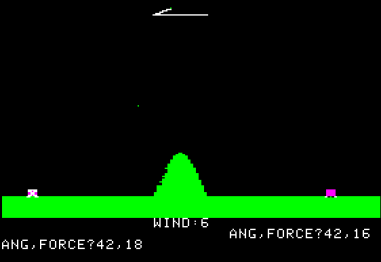
這類型的遊戲最早在1970年代中以demo遊戲出現,名叫Artillery(抱歉太舊的關係,我在維基也找不到相片),後來隨著顯卡的提升,到1980年代在Apple II中推出過Super Artillery和Artillery Simulator。
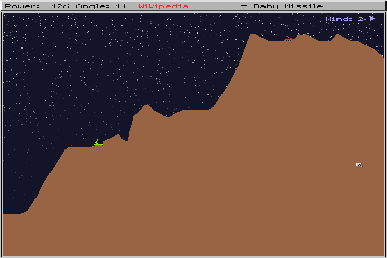
後來再到IBM電腦年代,推出過名叫Scorched Earth的遊戲。這款遊戲除了之前炮彈互射的遊戲功能外,當炮彈打到地後,也會留下一個洞,這就需要電腦的效能支援。
按著在1995年由Team17推出的Worms(蟲蟲大戰),就真正是經典遊戲。遊戲同樣是探用回合制,但今次蟲蟲是可以行走的,而且可以好似蜘蛛俠一樣盪來盪去(我自己玩過的版本就是,不知道1995年的初版是否可以),而且有不同的武器可以選擇,有些是威力強大到會留下大洞的炮彈,有些是手槍和地雷等等。後來這遊戲一直都有推出不同的版本,到今天你也可以在各大遊戲平台買得到這款遊戲,玩法也差不多。(不過我記得我玩過的版本並非回合制的,而是畫面分半一同操作的,兩個人在電腦面前按著同一個鍵盤,互相找出對方)
![Worms (1995) [MS-DOS] - YouTube](/media/game-coding/Artillery%20game/maxresdefault.jpg)
順帶一提,千禧年初,3A大作已經十分流行,當年網路剛興起,網站流行用flash制作動畫效果,同時也興起一堆體積不大的小遊戲,例如比加超打排球,小朋友落樓梯,小朋友齊打架等等,而其中一款中外同樣經典的,就是Fleabag Vs. Mutt,我們一般會叫它貓狗大戰。玩法就跟80年的的Artillery Simulator一模一樣,都是採用回合制,設定投擲力度和角度,配合環境風速,互相擲罐子或骨頭。遊戲雖然簡單,但因遊戲體積小,容易得到容易上手,當年是跟朋友殺時間的好幫手。(我不也肯定下圖是原版flash遊戲,網路上也找不到原版的flash檔)
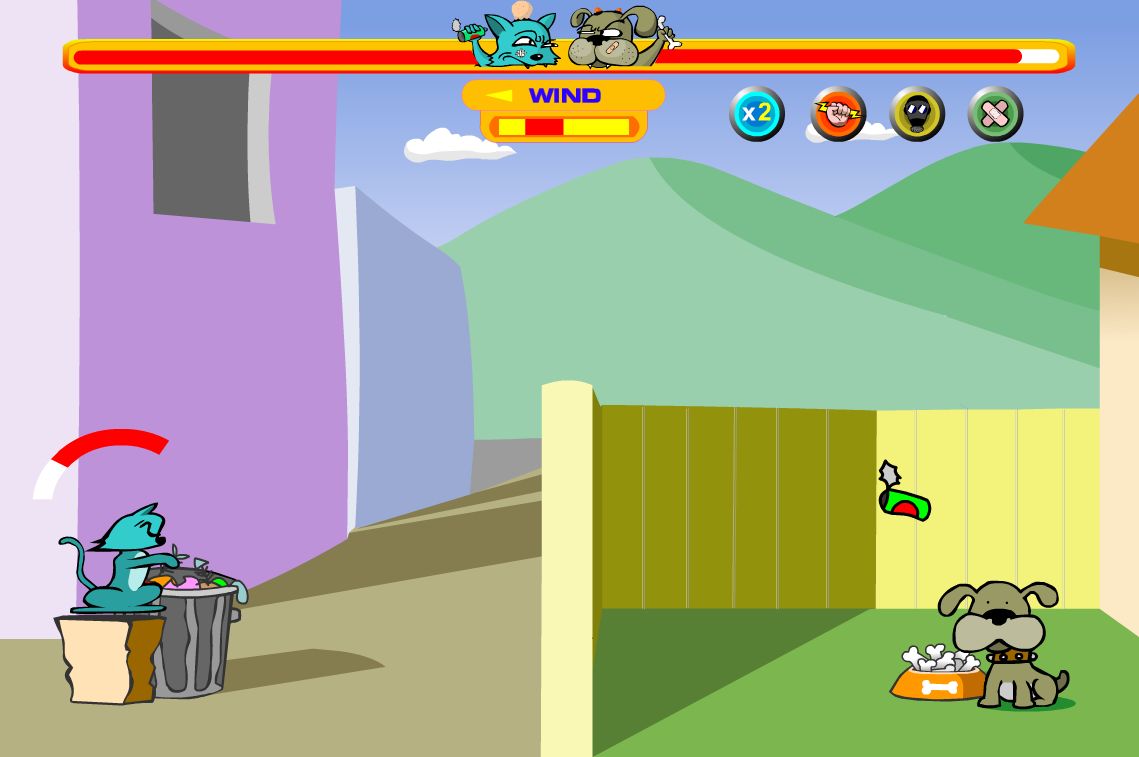
今章要制作的,是類似上面的Artillery Simulator和貓狗大戰的回合制遊戲。
0. 本章重點
- 向量(vector)(求大小與方向)
- 加速度與拋物線
- 用歐拉方法求積分解
- 函數(Function)應用複習
1. 加速度與拋物線
1.1 自由落體
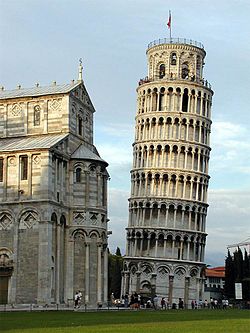
傳說1590年伽利略曾在義大利比薩斜塔上做自由落體實驗,將兩個重量不同的球體從相同的高度同時扔下,結果兩個鉛球同時落地,伽利略在比薩斜塔做自由落體實驗的故事,記載在他的學生維維亞尼在1654年寫的《伽利略生平的歷史故事》(1717年出版)一書中,但伽利略、比薩大學和同時代的其他人都沒有關於這次實驗的的記載。對於伽利略是否在比薩斜塔做過自由落體實驗,歷史上一直存在著支持和反對兩種不同的看法。
1971年,阿波羅15號太空人在月球上同時丟下獵鷹羽毛與鐵鎚,證明伽利略理論正確。
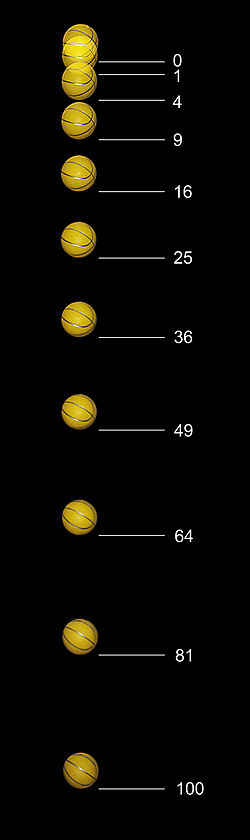
在真空(無空氣阻力)的狀況下,一個物體自由落體的距離,受著重力影響,落下距離與時間的平方成正比。舉例說,在下圖是用攝影機拍攝跨度為半秒的相片(半秒20幀),在首0.05秒落下的距離為1個單位(約12mm),在0.1秒時,其落下距離為4個單位,在0.15秒時距離為9個單位,如此類推。
1.2 拋物運動
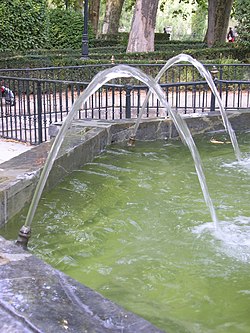
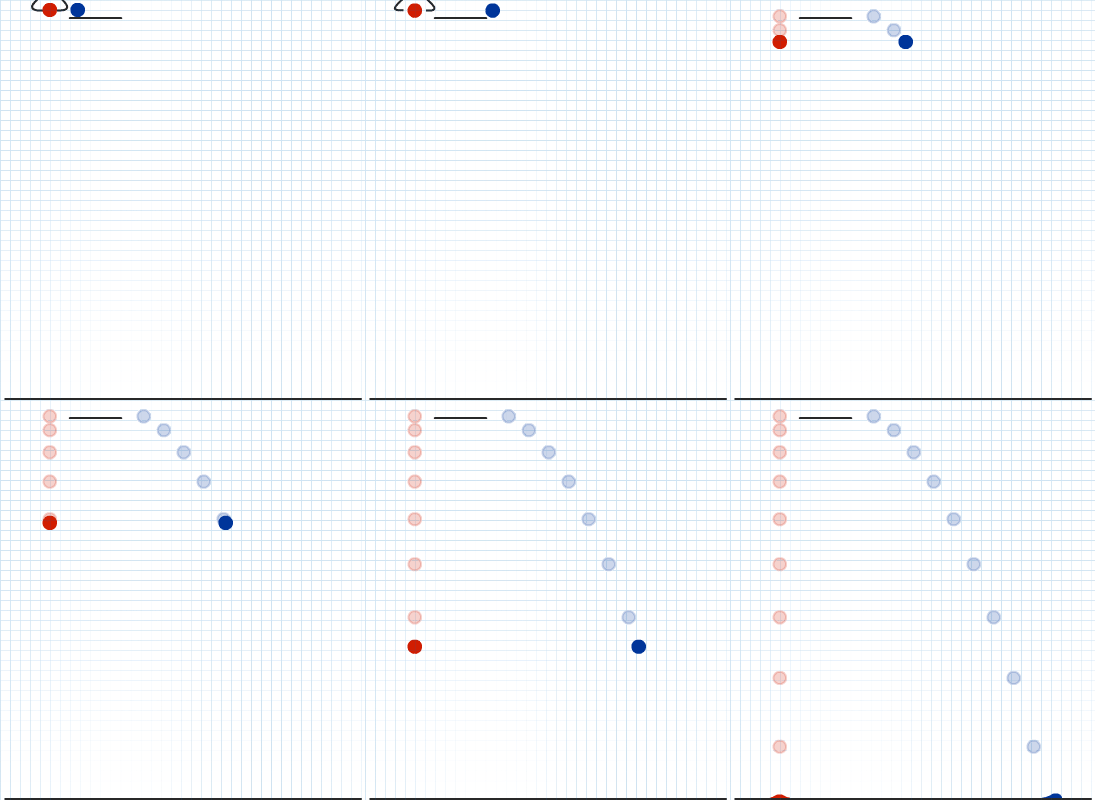
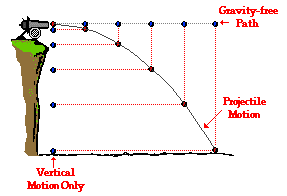
由於受到重力的影響,物體在被拋出後,垂直(向下)的速度會不停加速,而水平的速度則不受影響,型成的曲線就叫拋物線(Parabola)。拋物線(Parabola)在數學上是一條二次方曲線。
等等等,不要走,我知道你快要頭腦爆炸了!!!!!!
這裡不想帶出更多的數學和物理,令事情更複雜,你唯一需要知道的是:
- 重力影響會令落下距離與時間的平方成正比,簡言之,落下的速度與時間成正比,地球自由落體加速度大約是10,即在物體自由落體時,1秒後的速度大約是10,2秒後的速度大約是20,3秒後的速度大約是30,如此類推。
- 計算拋物線時,水平和垂直的距離和速度是可以分開計算的,互相獨立;
2. 建立兩個玩家
player1Height = 0
player2Height = 0

tankSize = 20 #the size of rect of the tanks

def setup():
    global player1Height, player2Height

    size(800, 600)

    player1Height = random(height*0.2, height*0.8)
    player2Height = height - player1Height


def draw():
    background(30)

    # draw the tanks
    rectMode(CENTER)
    noStroke()  #沒有框線
    fill(255, 0, 0)
    rect(100, player1Height, tankSize, tankSize)
    fill(0, 0, 255)
    rect(width - 100, player2Height, tankSize, tankSize)

    # draw the ground
    rectMode(CORNERS)  #use corner to corner mode
    noStroke()  #沒有框線
    fill(0, 255, 0)
    rect(0, player1Height + tankSize/2, width/2, height)
    rect(width/2, player2Height + tankSize/2, width, height)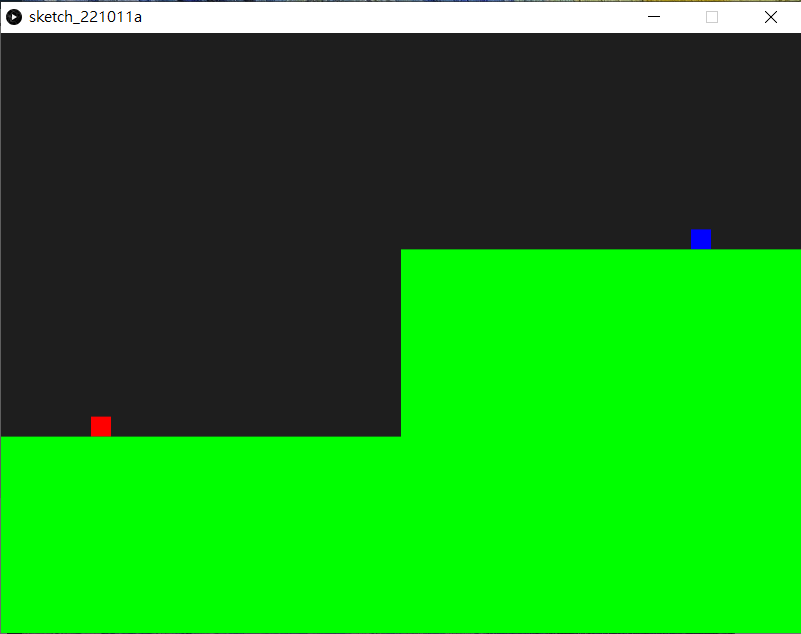
player1Height = random(height*0.2, height*0.8)
player2Height = height - player1Height在setup()中,加入這兩句來初始化兩個玩家一開始的高度。由於想加一點遊戲性,盡量兩個玩家是一高一低。
3. 繪畫控制的投射速度線
player1Height = 0
player2Height = 0

Round = 0 			#player1 or player2
ballPos = PVector() # position of cannonball
ballVec = PVector() # velocity of cannonball

tankSize = 20 #the size of rect of the tanks

def setup():
    global player1Height, player2Height, Round, ballPos, ballVec

    size(800, 600)

    player1Height = random(height*0.2, height*0.8)
    player2Height = height - player1Height

    Round = 1 #一開始為player1回合
    ballPos = PVector(100, player1Height) #一開始設定為player1的位置
    ballVec = PVector(2.5, 0) #一開始指向水平右方,速度為2.5


def draw():
    global ballPos, ballVec, Round

    background(30)

    # draw the velocity arrow
    stroke(255, 255, 0) #框線顏色
    strokeWeight(3)  #框線粗度度
    line(100, player1Height, 100 + ballVec.x * 50, player1Height + ballVec.y *50)

    # draw the tanks
    rectMode(CENTER)
    noStroke()  #沒有框線
    fill(255, 0, 0)
    rect(100, player1Height, tankSize, tankSize)
    fill(0, 0, 255)
    rect(width - 100, player2Height, tankSize, tankSize)

    # draw the ground
    rectMode(CORNERS)  #use corner to corner mode
    noStroke()  #沒有框線
    fill(0, 255, 0)
    rect(0, player1Height + tankSize/2, width/2, height)
    rect(width/2, player2Height + tankSize/2, width, height)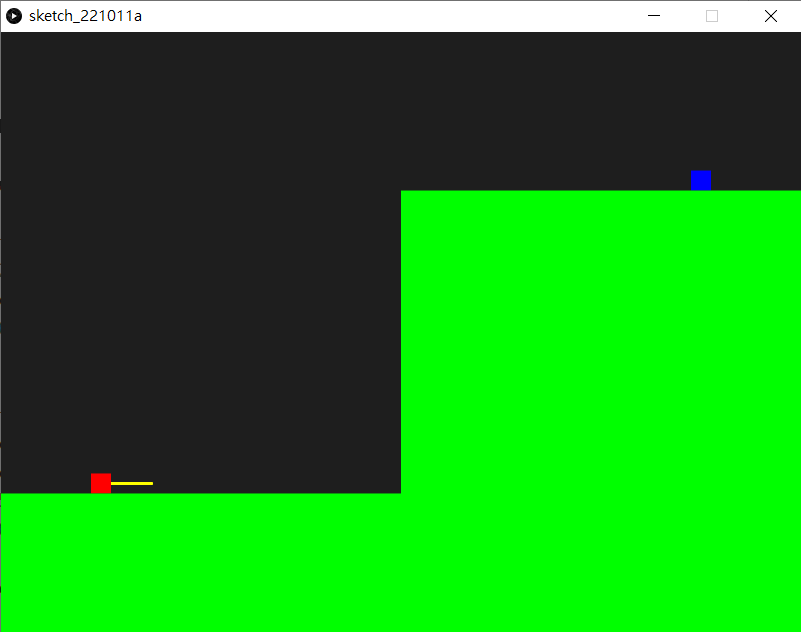
Round = 0 #player1 or player2
ballPos = PVector() # position of cannonball
ballVec = PVector() # velocity of cannonball在宣告區,開設一個變數叫Round紀錄現在這個回合是player1還是player2(記得Round要大寫, round是processing.py原本的指令,是用來使四捨五入的)。另外開設兩個向量變數,用來紀錄炮彈的位置和速度。
Round = 1 #一開始為player1回合
ballPos = PVector(100, player1Height) #一開始設定為player1的位置
ballVec = PVector(2.5, 0) #一開始指向水平右方,速度為2.5同樣地,在setup()區中,初始化這三個數的值,方便之後可以一鍵重啟這個遊戲。ballPos的值設定在player1相同的位置。而ballVec的初始值則設成。
4. 控制投射速度線
player1Height = 0
player2Height = 0

Round = 0 #player1 or player2
ballPos = PVector() # position of cannonball
ballVec = PVector() # velocity of cannonball

tankSize = 20 #the size of rect of the tanks

def setup():
    global player1Height, player2Height, Round, ballPos, ballVec

    size(800, 600)

    player1Height = random(height*0.2, height*0.8)
    player2Height = height - player1Height

    Round = 1 #一開始為player1回合
    ballPos = PVector(100, player1Height) #一開始設定為player1的位置
    ballVec = PVector(2.5, 0) #一開始指向水平右方,速度為2.5


def draw():
    global ballPos, ballVec, Round

    background(30)

    # draw the velocity arrow
    stroke(255, 255, 0) #框線顏色
    strokeWeight(3)  #框線粗度度
    line(100, player1Height, 100 + ballVec.x * 10, player1Height + ballVec.y * 10)

    # draw the tanks
    rectMode(CENTER)
    noStroke()  #沒有框線
    fill(255, 0, 0)
    rect(100, player1Height, tankSize, tankSize)
    fill(0, 0, 255)
    rect(width - 100, player2Height, tankSize, tankSize)

    # draw the ground
    rectMode(CORNERS)  #use corner to corner mode
    noStroke()  #沒有框線
    fill(0, 255, 0)
    rect(0, player1Height + tankSize/2, width/2, height)
    rect(width/2, player2Height + tankSize/2, width, height)

def keyPressed():
    global ballVec
    if Round == 1:
        if key == 'W' or key == 'w':
            ballVec = ballVec.mult(1.1)
            ballVec.limit(10)
        if key == 'S' or key == 's':
            ballVec = ballVec.mult(0.9)
        if key == 'A' or key == 'a':
            ballVec = ballVec.rotate(radians(-5))
        if key == 'D' or key == 'd':
            ballVec = ballVec.rotate(radians(5))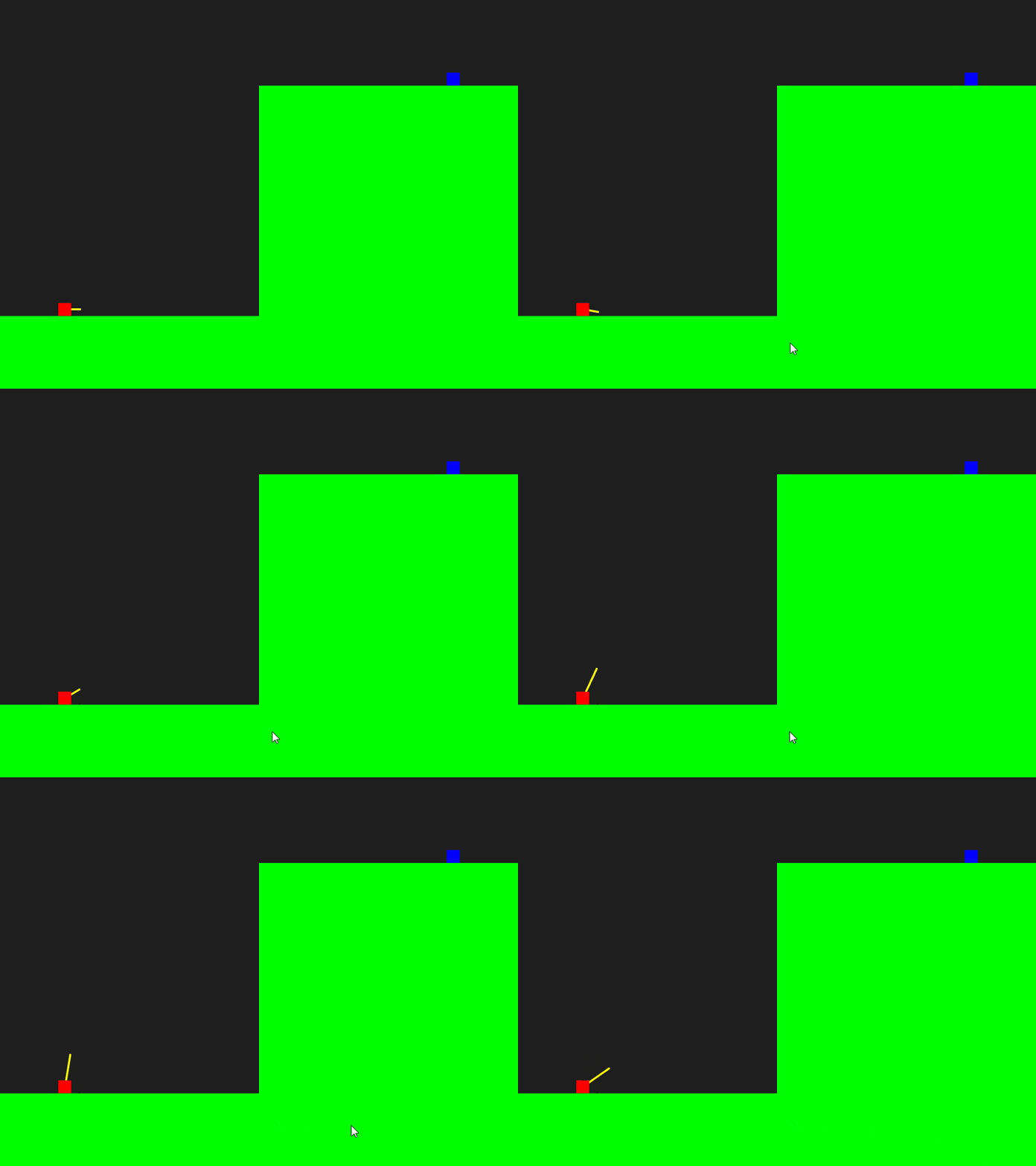
def keyPressed():
    global ballVec
    if Round == 1:
        if key == 'W' or key == 'w':
            ballVec = ballVec.mult(1.1)
            ballVec.limit(10)
        if key == 'S' or key == 's':
            ballVec = ballVec.mult(0.9)
        if key == 'A' or key == 'a':
            ballVec = ballVec.rotate(radians(-5))
        if key == 'D' or key == 'd':
ballVec = ballVec.rotate(radians(5))在setup()和draw()加入第三個內置的函數叫做keyPressed()。當Round == 1,即現在的玩家時player1時,按下w和s鍵,則是控制速度向量的大小,利用PVector內置的乘法,就可以將向量乘大或者乘小;當按下a或者d時鍵,則控制其方向的變化,同樣地,PVector內置了功能,可以將向量旋轉,不用自己做數學運算。值得一提是,processing.py所有的角度,預設都是radians(弧度)的,要用指令radians()將輸入的角度轉換成弧度。有關甚麼是弧度可以參考這裡,而有關甚麼是向量乘法可以參考這裡,最後向量旋轉則較為複雜,可以參考這裡。
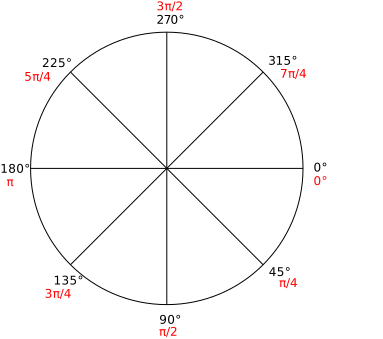
processing的旋轉角度跟數學不同,是順時針而非逆時針的
player1Height = 0
player2Height = 0

Round = 0 #player1 or player2
ballPos = PVector() # position of cannonball
ballVec = PVector() # velocity of cannonball

tankSize = 20 #the size of rect of the tanks

trigger = False

def setup():
    global player1Height, player2Height, Round, ballPos, ballVec, trigger

    size(800, 600)

    player1Height = random(height*0.2, height*0.8)
    player2Height = height - player1Height

    Round = 1 #一開始為player1回合
    ballPos = PVector(100, player1Height) #一開始設定為player1的位置
    ballVec = PVector(2.5, 0) #一開始指向水平右方,速度為2.5

    trigger = False

def draw():
    global ballPos, ballVec

    background(30)

    # draw the velocity arrow
    stroke(255, 255, 0) #框線顏色
    strokeWeight(3)  #框線粗度度
    line(100, player1Height, 100 + ballVec.x * 10, player1Height + ballVec.y * 10)

    # draw the tanks
    rectMode(CENTER)
    noStroke()  #沒有框線
    fill(255, 0, 0)
    rect(100, player1Height, tankSize, tankSize)
    fill(0, 0, 255)
    rect(width - 100, player2Height, tankSize, tankSize)

    # draw the cannonball
    if trigger:
        # update the cannonball
        ballPos = ballPos.add(ballVec)

        # draw the cannonball
        noStroke() #無框線
        fill(127)  #灰色
        ellipse(ballPos.x, ballPos.y, 20, 20)

    # draw the ground
    rectMode(CORNERS)  #use corner to corner mode
    noStroke()  #沒有框線
    fill(0, 255, 0)
    rect(0, player1Height + tankSize/2, width/2, height)
    rect(width/2, player2Height + tankSize/2, width, height)

def keyPressed():
    global ballVec, trigger
    if Round == 1:
        if key == 'W' or key == 'w':
            ballVec = ballVec.mult(1.1)
            ballVec.limit(10)
        if key == 'S' or key == 's':
            ballVec = ballVec.mult(0.9)
        if key == 'A' or key == 'a':
            ballVec = ballVec.rotate(radians(-5))
        if key == 'D' or key == 'd':
            ballVec = ballVec.rotate(radians(5))

	if key == ' ':
        trigger = not trigger
	if key == 'R' or key == 'r':
		setup()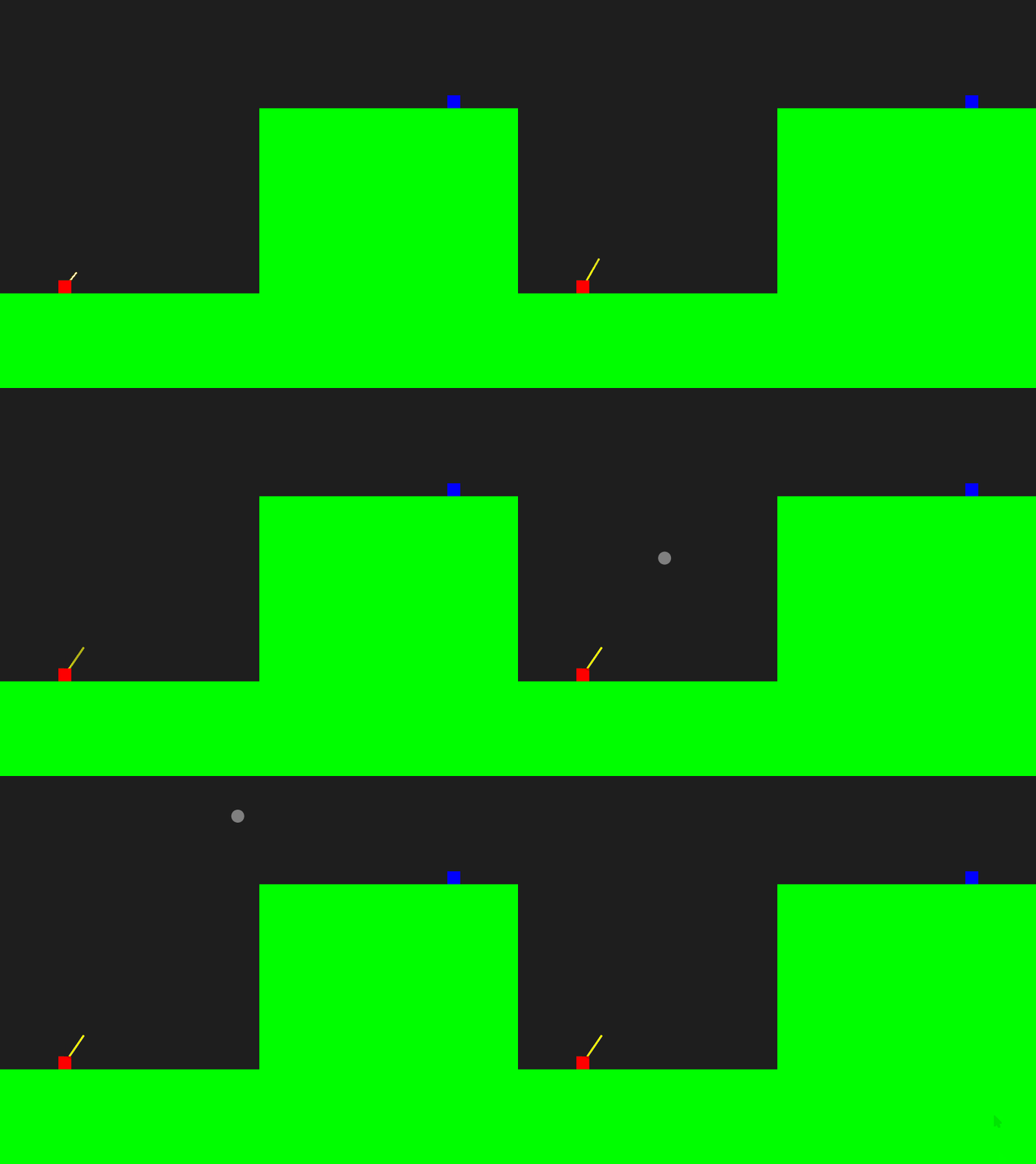
trigger = False在宣告區加多一個變數名為trigger,用來在確認航道時發射炮彈的。記得在setup()區中也需要初始化一次,方便之後restart遊戲。
# draw the cannonball
if trigger:
    # update the cannonball
    ballPos = ballPos.add(ballVec)

    # draw the cannonball
    noStroke() #無框線
    fill(127)  #灰色
ellipse(ballPos.x, ballPos.y, 20, 20)在draw()中,加入,如果trigger是True的話(下面的keyPressed()函數控制),即準備好要發射;跟之前彈珠一樣,每次draw()更新時,都將ballVec這個向量,累加到ballPos這個向量中,就會見到炮彈向著直線發射。
if key == ' ':
	trigger = not trigger
if key == 'R' or key == 'r':
setup()在最下的keyPressed()函數中,加多兩個鍵盤按鍵,一個是空白鍵,用來發射;另一個跟之前一樣,用r鍵用來重設遊戲。
6. 加入重力(加速度)
player1Height = 0
player2Height = 0

Round = 0 #player1 or player2
ballPos = PVector() # position of cannonball
ballVec = PVector() # velocity of cannonball
ballAccel = PVector(0, 0.1) # acceleration of cannonball
                          #由於processing.py的y軸是向下的, 所以不需要轉成負數

tankSize = 20 #the size of rect of the tanks

trigger = False

def setup():
    global player1Height, player2Height, Round, ballPos, ballVec, trigger

    size(800, 600)

    player1Height = random(height*0.2, height*0.8)
    player2Height = height - player1Height

    Round = 1 #一開始為player1回合
    ballPos = PVector(100, player1Height) #一開始設定為player1的位置
    ballVec = PVector(2.5, 0) #一開始指向水平右方,速度為2.5

    trigger = False

def draw():
    global ballPos, ballVec

    background(30)

    # draw the velocity arrow
    if not trigger:
        stroke(255, 255, 0) #框線顏色
        strokeWeight(3)  #框線粗度度
        line(100, player1Height, 100 + ballVec.x * 10, player1Height + ballVec.y * 10)

    # draw the tanks
    rectMode(CENTER)
    noStroke()  #沒有框線
    fill(255, 0, 0)
    rect(100, player1Height, tankSize, tankSize)
    fill(0, 0, 255)
    rect(width - 100, player2Height, tankSize, tankSize)

    # draw the cannonball
    if trigger:
        # update the cannonball
        ballVec = ballVec.add(ballAccel)
        ballPos = ballPos.add(ballVec)

        # draw the cannonball
        noStroke() #無框線
        fill(127)  #灰色
        ellipse(ballPos.x, ballPos.y, 20, 20)

    # draw the ground
    rectMode(CORNERS)  #use corner to corner mode
    noStroke()  #沒有框線
    fill(0, 255, 0)
    rect(0, player1Height + tankSize/2, width/2, height)
    rect(width/2, player2Height + tankSize/2, width, height)

def keyPressed():
    global ballVec, trigger
    if Round == 1 and not trigger:
        if key == 'W' or key == 'w':
            ballVec = ballVec.mult(1.1)
            ballVec.limit(10)
        if key == 'S' or key == 's':
            ballVec = ballVec.mult(0.9)
        if key == 'A' or key == 'a':
            ballVec = ballVec.rotate(radians(-5))
        if key == 'D' or key == 'd':
            ballVec = ballVec.rotate(radians(5))

	if key == ' ':
		trigger = not trigger
	if key == 'R' or key == 'r':
		setup()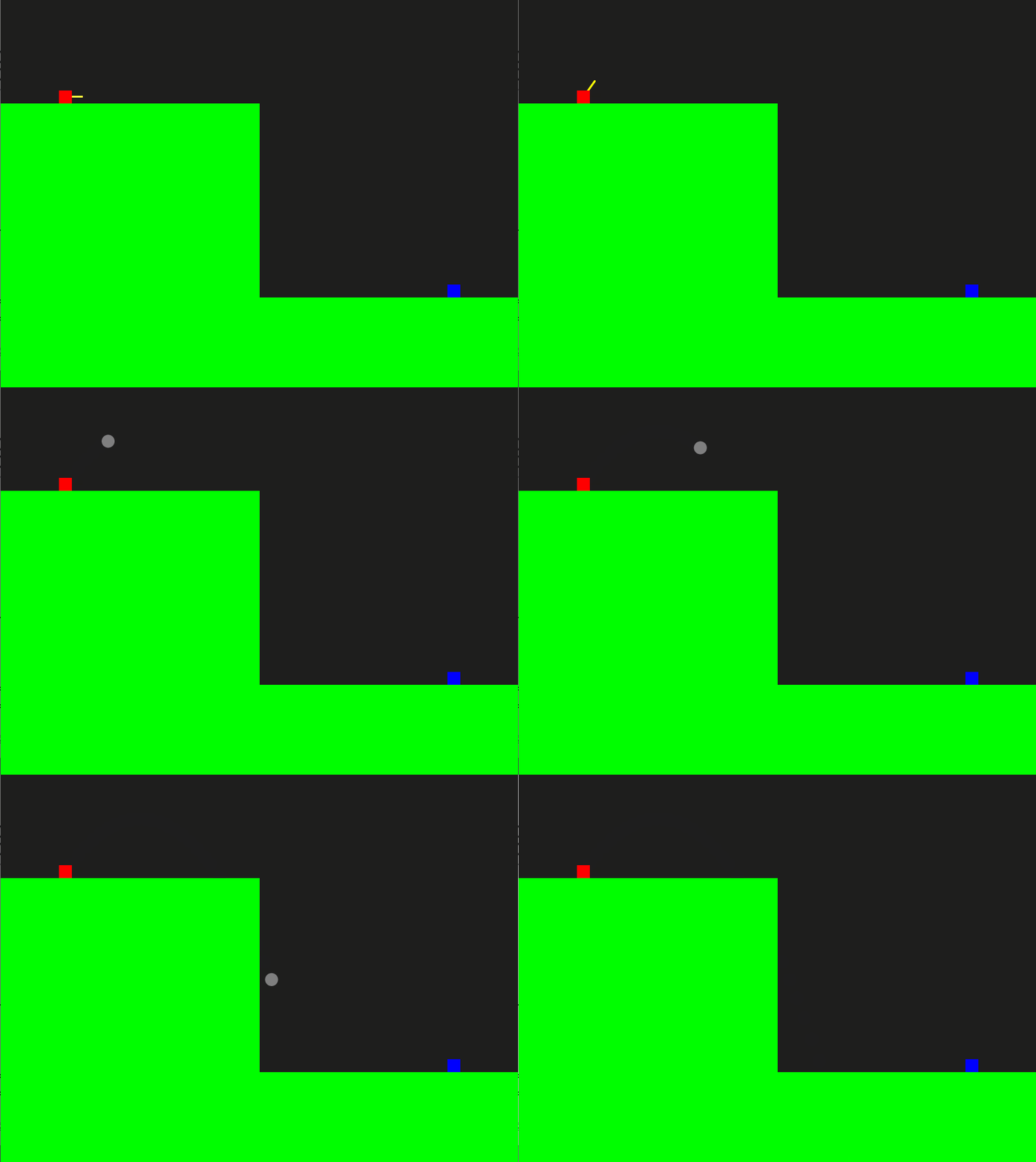
ballAccel = PVector(0, 0.1) # acceleration of cannonball
#由於processing.py的y軸是向下的, 所以不需要轉成負數在宣告區中,加入球的加速度,今次不用在setup()中再初始化,因加速度是保持不變的。由於processing.py的y軸是向下的,所以不需要像物理一樣,將加速度設成負數。
# draw the velocity arrow
if not trigger:
    stroke(255, 255, 0) #框線顏色
    strokeWeight(3)  #框線粗度度
line(100, player1Height, 100 + ballVec.x * 10, player1Height + ballVec.y * 10)在draw()中,將原本繪畫速度箭頭的位置,加入發射後就會消失,否則一改變速度向量,你就會見到速度箭頭會跟著向下,會有點奇怪。
def keyPressed():
    global ballVec, trigger
    if Round == 1 and not trigger:
        if key == 'W' or key == 'w':
            ballVec = ballVec.mult(1.1)
            ballVec.limit(10)
        if key == 'S' or key == 's':
            ballVec = ballVec.mult(0.9)
        if key == 'A' or key == 'a':
            ballVec = ballVec.rotate(radians(-5))
        if key == 'D' or key == 'd':
            ballVec = ballVec.rotate(radians(5))

	if key == ' ':
		trigger = not trigger
	if key == 'R' or key == 'r':
setup()同樣地,在keyPressed()函數中,原本的if Round == 1:,要額外加上if Round == 1 and not trigger:,否則在開炮後,也能"遙控"炮彈。
# draw the cannonball
if trigger:
    # update the cannonball
    ballVec = ballVec.add(ballAccel)
    ballPos = ballPos.add(ballVec)

    # draw the cannonball
    noStroke() #無框線
    fill(127)  #灰色
ellipse(ballPos.x, ballPos.y, 20, 20)回到draw()中,要做到拋物線效果,其實很簡單,也很"物理",加速度的意思是每一秒的速度也在累加,而球的位置則是初始位置再累加速度,所以只要在每次draw()更新時,將向量ballAccel加上向量ballVec,之後再將向量ballVec,加上向量ballPos,就可以模擬到拋線的效果。
7. 加入風速
這類型的炮彈遊戲,為增加可玩性和模糊真實環境,會加入風速的選項。
player1Height = 0
player2Height = 0

Round = 0 #player1 or player2
ballPos = PVector() # position of cannonball
ballVec = PVector() # velocity of cannonball
ballAccel = PVector(0, 0.1) # acceleration of cannonball
                          #由於processing.py的y軸是向下的, 所以不需要轉成負數

windAccel = PVector()

tankSize = 20 #the size of rect of the tanks

trigger = False

def setup():
    global player1Height, player2Height, Round, ballPos, ballVec, trigger, windAccel

    size(800, 600)

    player1Height = random(height*0.2, height*0.8)
    player2Height = height - player1Height

    Round = 1 #一開始為player1回合
    ballPos = PVector(100, player1Height) #一開始設定為player1的位置
    ballVec = PVector(2.5, 0) #一開始指向水平右方,速度為2.5

    trigger = False

    windAccel = PVector(random(-0.01, 0.01), 0)

def draw():
    global ballPos, ballVec

    background(30)

    # draw the velocity arrow
    if not trigger:
        stroke(255, 255, 0) #框線顏色
        strokeWeight(3)  #框線粗度度
        line(100, player1Height, 100 + ballVec.x * 10, player1Height + ballVec.y * 10)

    # draw the tanks
    rectMode(CENTER)
    noStroke()  #沒有框線
    fill(255, 0, 0)
    rect(100, player1Height, tankSize, tankSize)
    fill(0, 0, 255)
    rect(width - 100, player2Height, tankSize, tankSize)

    # draw the cannonball
    if trigger:
        # update the cannonball
        ballVec = ballVec.add(ballAccel)
        ballVec = ballVec.add(windAccel)
        ballPos = ballPos.add(ballVec)

        # draw the cannonball
        noStroke() #無框線
        fill(127)  #灰色
        ellipse(ballPos.x, ballPos.y, 20, 20)

    # draw the ground
    rectMode(CORNERS)  #use corner to corner mode
    noStroke()  #沒有框線
    fill(0, 255, 0)
    rect(0, player1Height + tankSize/2, width/2, height)
    rect(width/2, player2Height + tankSize/2, width, height)

def keyPressed():
    global ballVec, trigger
    if Round == 1 and not trigger:
        if key == 'W' or key == 'w':
            ballVec = ballVec.mult(1.1)
            ballVec.limit(10)
        if key == 'S' or key == 's':
            ballVec = ballVec.mult(0.9)
        if key == 'A' or key == 'a':
            ballVec = ballVec.rotate(radians(-5))
        if key == 'D' or key == 'd':
            ballVec = ballVec.rotate(radians(5))

	if key == ' ':
		trigger = not trigger
	if key == 'R' or key == 'r':
		setup()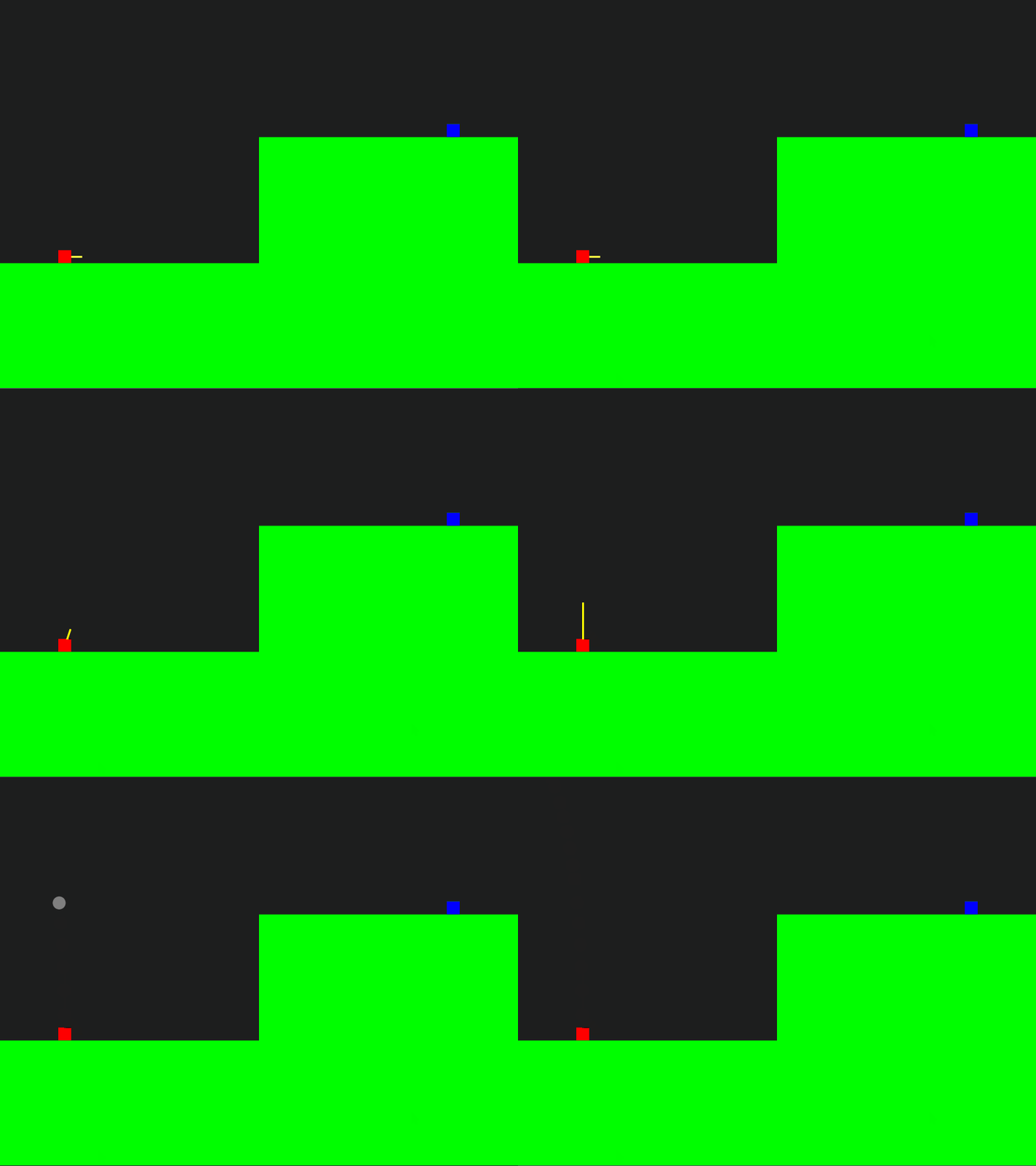
windAccel = PVector()在最上方的宣告區中,宣告一個global的變數叫windAccel。
windAccel = PVector(random(-0.01, 0.01), 0)在setup()區中,初始化這個值。
# draw the cannonball
if trigger:
    # update the cannonball
    ballVec = ballVec.add(ballAccel)
    ballVec = ballVec.add(windAccel)
    ballPos = ballPos.add(ballVec)

    # draw the cannonball
    noStroke() #無框線
    fill(127)  #灰色
ellipse(ballPos.x, ballPos.y, 20, 20)之後在draw()區中,在更新球的位置時,除了y軸的地心加速度,額外加入水平的x軸加速度。
之後就可以先試一試是否成功才進行下一步。將炮彈發射方向指向天來發射,就可以很清楚地看得到,如果風速沒有成功,炮彈會直上直下,但如果風速成功的話,就會被次向左邊或者右邊。
8. 判斷是否落地
player1Height = 0
player2Height = 0

Round = 0 #player1 or player2
ballPos = PVector() # position of cannonball
ballVec = PVector() # velocity of cannonball
ballAccel = PVector(0, 0.1) # acceleration of cannonball
                          #由於processing.py的y軸是向下的, 所以不需要轉成負數

windAccel = PVector()

tankSize = 20 #the size of rect of the tanks

trigger = False

def setup():
    global player1Height, player2Height, Round, ballPos, ballVec, trigger, windAccel

    size(800, 600)

    player1Height = random(height*0.2, height*0.8)
    player2Height = height - player1Height

    Round = 1 #一開始為player1回合
    ballPos = PVector(100, player1Height) #一開始設定為player1的位置
    ballVec = PVector(2.5, 0) #一開始指向水平右方,速度為2.5

    trigger = False

    windAccel = PVector(random(-0.01, 0.01), 0)


def draw():
    global ballPos, ballVec

    background(30)

    # draw the velocity arrow
    if not trigger:
        stroke(255, 255, 0) #框線顏色
        strokeWeight(3)  #框線粗度度
        line(100, player1Height, 100 + ballVec.x * 10, player1Height + ballVec.y * 10)

    # draw the tanks
    rectMode(CENTER)
    noStroke()  #沒有框線
    fill(255, 0, 0)
    rect(100, player1Height, tankSize, tankSize)
    fill(0, 0, 255)
    rect(width - 100, player2Height, tankSize, tankSize)

    # draw the cannonball
    if trigger:
        # update the cannonball
        ballVec = ballVec.add(ballAccel)
        ballVec = ballVec.add(windAccel)
        ballPos = ballPos.add(ballVec)

        # draw the cannonball
        noStroke() #無框線
        fill(127)  #灰色
        ellipse(ballPos.x, ballPos.y, 20, 20)

    # draw the ground
    rectMode(CORNERS)  #use corner to corner mode
    noStroke()  #沒有框線
    fill(0, 255, 0)
    rect(0, player1Height + tankSize/2, width/2, height)
    rect(width/2, player2Height + tankSize/2, width, height)

    # cannonball hit the player1 ground
    hitP1Ground = isHitGround(ballPos, PVector(0, player1Height), PVector(width/2, height))
    # cannonball hit the player1 ground
    hitP2Ground = isHitGround(ballPos, PVector(width/2, player2Height), PVector(width, height))
    # cannonball hit player1 ground or player2 ground
    if hitP1Ground or hitP2Ground:
        print("something")

def keyPressed():
    global ballVec, trigger
    if Round == 1 and not trigger:
        if key == 'W' or key == 'w':
            ballVec = ballVec.mult(1.1)
            ballVec.limit(10)
        if key == 'S' or key == 's':
            ballVec = ballVec.mult(0.9)
        if key == 'A' or key == 'a':
            ballVec = ballVec.rotate(radians(-5))
        if key == 'D' or key == 'd':
            ballVec = ballVec.rotate(radians(5))

	if key == ' ':
		trigger = not trigger
	if key == 'R' or key == 'r':
		setup()

def isHitGround(_ballPos, _topLeftCorner, _bottomRightCorner):
    if _ballPos.x > _topLeftCorner.x and _ballPos.y > _topLeftCorner.y and _ballPos.x < _bottomRightCorner.x  and _ballPos.y < _bottomRightCorner.y:
        return True
    else:
return Falsedef isHitGround(_ballPos, _topLeftCorner, _bottomRightCorner):
if _ballPos.x > _topLeftCorner.x and _ballPos.y > _topLeftCorner.y and _ballPos.x < _bottomRightCorner.x and _ballPos.y < _bottomRightCorner.y:
return True
else:
return False跟之前一樣,在setup()和draw()之後,額外開一個函數(function),方便我們將功能相似但重覆的功能組合在一起。
今次函數有3個輸入,分別為_ballPos, _topLeftCorner和_bottomRightCorner,顧名思意,是球的座標,左上角的座標和右下角的座標。內容也很簡單,如果球落入這個範圍就傳回True,否則就傳回False。
# cannonball hit the player1 ground
hitP1Ground = isHitGround(ballPos, PVector(0, player1Height), PVector(width/2, height))
# cannonball hit the player1 ground
hitP2Ground = isHitGround(ballPos, PVector(width/2, player2Height), PVector(width, height))
# cannonball hit player1 ground or player2 ground
if hitP1Ground or hitP2Ground:
print("something")之後在draw()的最後,加入這一段:開兩個變數,如果打中player1的地下範圍或打中player2的地下範圍,則print("something"),用來測試一下程式是否正確。
9. 判斷是否打中P1或P2
player1Height = 0
player2Height = 0
Round = 0 #player1 or player2
ballPos = PVector() # position of cannonball
ballVec = PVector() # velocity of cannonball
ballAccel = PVector(0, 0.1) # acceleration of cannonball
#由於processing.py的y軸是向下的, 所以不需要轉成負數
windAccel = PVector()
tankSize = 100 #the size of rect of the tanks
trigger = False
def setup():
global player1Height, player2Height, Round, ballPos, ballVec, trigger, windAccel
size(800, 600)
player1Height = random(height*0.2, height*0.8)
player2Height = height - player1Height
Round = 1 #一開始為player1回合
ballPos = PVector(100, player1Height) #一開始設定為player1的位置
ballVec = PVector(2.5, 0) #一開始指向水平右方,速度為2.5
trigger = False
windAccel = PVector(random(-0.01, 0.01), 0)
def draw():
global ballPos, ballVec
background(30)
# draw the velocity arrow
if not trigger:
stroke(255, 255, 0) #框線顏色
strokeWeight(3) #框線粗度度
line(100, player1Height, 100 + ballVec.x * 10, player1Height + ballVec.y * 10)
# draw the tanks
rectMode(CENTER)
noStroke() #沒有框線
fill(255, 0, 0)
rect(100, player1Height, tankSize, tankSize)
fill(0, 0, 255)
rect(width - 100, player2Height, tankSize, tankSize)
# draw the cannonball
if trigger:
# update the cannonball
ballVec = ballVec.add(ballAccel)
ballVec = ballVec.add(windAccel)
ballPos = ballPos.add(ballVec)
# draw the cannonball
noStroke() #無框線
fill(127) #灰色
ellipse(ballPos.x, ballPos.y, 20, 20)
# draw the ground
rectMode(CORNERS) #use corner to corner mode
noStroke() #沒有框線
fill(0, 255, 0)
rect(0, player1Height + tankSize/2, width/2, height)
rect(width/2, player2Height + tankSize/2, width, height)
# cannonball hit the player1 ground
hitP1Ground = isHitGround(ballPos, PVector(0, player1Height+ tankSize/2), PVector(width/2, height))
# cannonball hit the player1 ground
hitP2Ground = isHitGround(ballPos, PVector(width/2, player2Height+ tankSize/2), PVector(width, height))
# cannonball hit player1 ground or player2 ground
if hitP1Ground or hitP2Ground:
print("something")
hitP1 = isHitPlayer(ballPos, PVector(100, player1Height), tankSize)
if hitP1:
print("P1 hit")
hitP2 = isHitPlayer(ballPos, PVector(width-100, player2Height), tankSize)
if hitP2:
print("P2 hit")
def keyPressed():
global ballVec, trigger
if Round == 1 and not trigger:
if key == 'W' or key == 'w':
ballVec = ballVec.mult(1.1)
ballVec.limit(10)
if key == 'S' or key == 's':
ballVec = ballVec.mult(0.9)
if key == 'A' or key == 'a':
ballVec = ballVec.rotate(radians(-5))
if key == 'D' or key == 'd':
ballVec = ballVec.rotate(radians(5))
if key == ' ':
trigger = not trigger
if key == 'R' or key == 'r':
setup()
def isHitGround(_ballPos, _topLeftCorner, _bottomRightCorner):
    if _ballPos.x > _topLeftCorner.x and _ballPos.y > _topLeftCorner.y and _ballPos.x < _bottomRightCorner.x  and _ballPos.y < _bottomRightCorner.y:
        return True
    else:
        return False
def isHitPlayer(_ballPos, _tankCenter, _tankSize):
    if _ballPos.x > _tankCenter.x-_tankSize/2 and _ballPos.y > _tankCenter.y-_tankSize/2 and _ballPos.x < _tankCenter.x+_tankSize/2 and _ballPos.y < _tankCenter.y+_tankSize/2:
        return True
    else:
        return False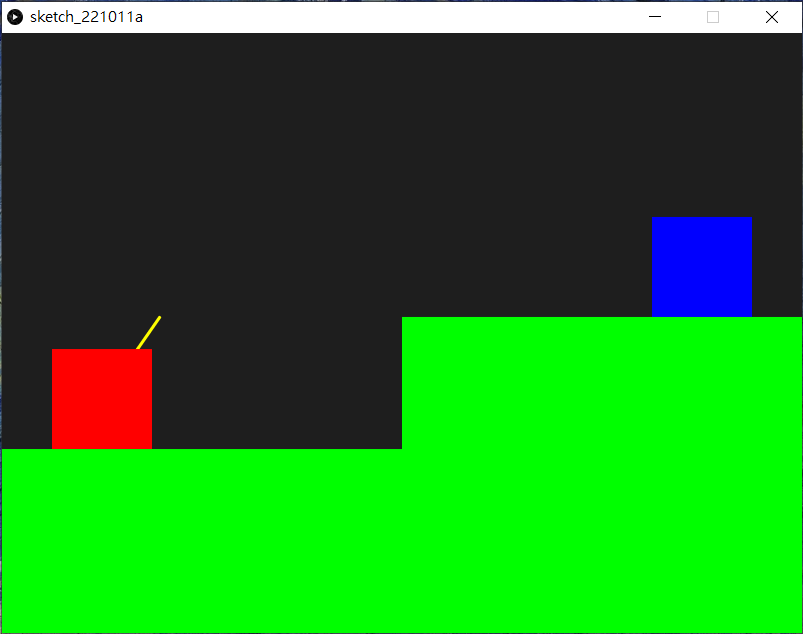
def isHitPlayer(_ballPos, _tankCenter, _tankSize):
if _ballPos.x > _tankCenter.x-_tankSize/2 and _ballPos.y > _tankCenter.y-_tankSize/2 and _ballPos.x < _tankCenter.x+_tankSize/2 and _ballPos.y < _tankCenter.y+_tankSize/2:
return True
else:
return False在程式的最後面,除了之前的setup(),draw()和isHitGround()之後,額外再加一個函數名為isHitPlayer()。isHitGround()和isHitPlayer()其實十分相似,但前者第二和第三個輸入是方型的兩個對角,而後者由於player一開始繪畫時是先定義方型的中心,再定義方型大小的,故分開兩個函數方便運用。
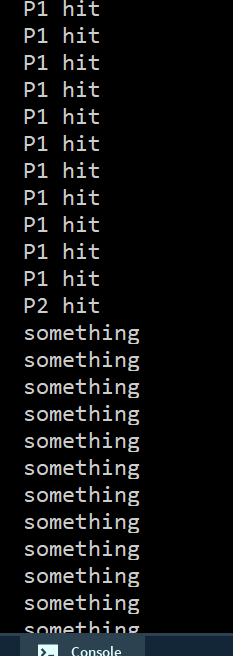
我特意放大了兩部坦克的大小,方便測試一下是否正確,由於一開始球的初始位置就是在player1的中心點,所以程式一運行,就會不停彈出P1 hit,之後如常調試和發射(你可能要測試好幾次才能成功),炮彈先是擊中player2, 之後再打到地面。
10. 打中地面後變成對方回合
player1Height = 0
player2Height = 0

Round = 0 #player1 or player2
ballPos = PVector() # position of cannonball
ballVec = PVector() # velocity of cannonball
ballAccel = PVector(0, 0.1) # acceleration of cannonball
                          #由於processing.py的y軸是向下的, 所以不需要轉成負數

windAccel = PVector()

tankSize = 100 #the size of rect of the tanks

trigger = False

def setup():
    global player1Height, player2Height, Round, ballPos, ballVec, trigger, windAccel

    size(800, 600)

    player1Height = random(height*0.2, height*0.8)
    player2Height = height - player1Height

    Round = 1 #一開始為player1回合
    ballPos = PVector(100, player1Height) #一開始設定為player1的位置
    ballVec = PVector(2.5, 0) #一開始指向水平右方,速度為2.5

    trigger = False

    windAccel = PVector(random(-0.01, 0.01), 0)


def draw():
    global ballPos, ballVec, Round, trigger, windAccel

    background(30)

    # draw the velocity arrow
    if not trigger:
        if Round == 1:
            stroke(255, 255, 0) #框線顏色
            strokeWeight(3)  #框線粗度度
            line(100, player1Height, 100 + ballVec.x * 10, player1Height + ballVec.y * 10)
        elif Round == 2:
            stroke(255, 255, 0) #框線顏色
            strokeWeight(3)  #框線粗度度
            line(width-100, player2Height, width-100 + ballVec.x * 10, player2Height + ballVec.y * 10)

    # draw the tanks
    rectMode(CENTER)
    noStroke()  #沒有框線
    fill(255, 0, 0)
    rect(100, player1Height, tankSize, tankSize)
    fill(0, 0, 255)
    rect(width - 100, player2Height, tankSize, tankSize)

    # draw the cannonball
    if trigger:
        # update the cannonball
        ballVec = ballVec.add(ballAccel)
        ballVec = ballVec.add(windAccel)
        ballPos = ballPos.add(ballVec)

        # draw the cannonball
        noStroke() #無框線
        fill(127)  #灰色
        ellipse(ballPos.x, ballPos.y, 20, 20)

    # draw the ground
    rectMode(CORNERS)  #use corner to corner mode
    noStroke()  #沒有框線
    fill(0, 255, 0)
    rect(0, player1Height + tankSize/2, width/2, height)
    rect(width/2, player2Height + tankSize/2, width, height)

    # cannonball hit the player1 ground
    hitP1Ground = isHitGround(ballPos, PVector(0, player1Height+ tankSize/2), PVector(width/2, height))
    # cannonball hit the player1 ground
    hitP2Ground = isHitGround(ballPos, PVector(width/2, player2Height+ tankSize/2), PVector(width, height))
    # cannonball hit player1 ground or player2 ground
    if hitP1Ground or hitP2Ground:
        if Round == 1:
            ballPos = PVector(width-100, player2Height)
            Round = 2
            ballVec = PVector(-2.5, 0) #一開始指向水平右方,速度為-2.5
            trigger = False
            windAccel = PVector(random(-0.01, 0.01), 0)
        elif Round == 2:
            ballPos = PVector(100, player1Height)
            Round = 1
            ballVec = PVector(2.5, 0) #一開始指向水平右方,速度為2.5
            trigger = False
            windAccel = PVector(random(-0.01, 0.01), 0)

    hitP1 = isHitPlayer(ballPos, PVector(100, player1Height), tankSize)
    if hitP1:
        print("P1 hit")
    hitP2 = isHitPlayer(ballPos, PVector(width-100, player2Height), tankSize)
    if hitP2:
        print("P2 hit")

def keyPressed():
    global ballVec, trigger
    if Round == 1 and not trigger:
        if key == 'W' or key == 'w':
            ballVec = ballVec.mult(1.1)
            ballVec.limit(10)
        if key == 'S' or key == 's':
            ballVec = ballVec.mult(0.9)
        if key == 'A' or key == 'a':
            ballVec = ballVec.rotate(radians(-5))
        if key == 'D' or key == 'd':
            ballVec = ballVec.rotate(radians(5))

    if Round == 2 and not trigger and key == CODED:
        if keyCode == UP:
            ballVec = ballVec.mult(1.1)
            ballVec.limit(10)
        if keyCode == DOWN:
            ballVec = ballVec.mult(0.9)
        if keyCode == LEFT:
            ballVec = ballVec.rotate(radians(-5))
        if keyCode == RIGHT:
            ballVec = ballVec.rotate(radians(5))

    if key == ' ':
        trigger = not trigger
    if key == 'R' or key == 'r':
        setup()

def isHitGround(_ballPos, _topLeftCorner, _bottomRightCorner):
    if _ballPos.x > _topLeftCorner.x and _ballPos.y > _topLeftCorner.y and _ballPos.x < _bottomRightCorner.x  and _ballPos.y < _bottomRightCorner.y:
        return True
    else:
        return False

def isHitPlayer(_ballPos, _tankCenter, _tankSize):
    if _ballPos.x > _tankCenter.x-_tankSize/2 and _ballPos.y > _tankCenter.y-_tankSize/2 and _ballPos.x < _tankCenter.x+_tankSize/2 and _ballPos.y < _tankCenter.y+_tankSize/2:
        return True
    else:
        return False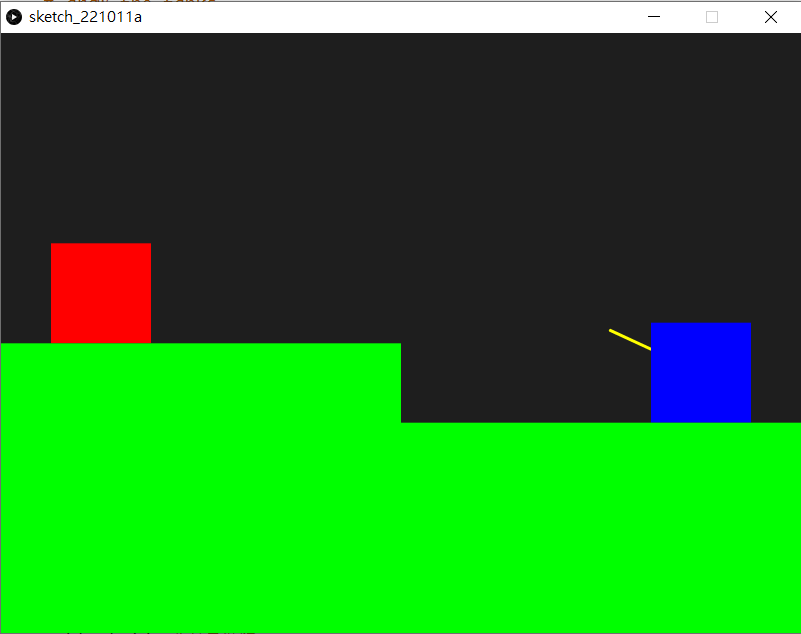
接著,就可以更新一下當炮彈打到地下後該發生甚麼事。
# cannonball hit the player1 ground
hitP1Ground = isHitGround(ballPos, PVector(0, player1Height+ tankSize/2), PVector(width/2, height))
# cannonball hit the player1 ground
hitP2Ground = isHitGround(ballPos, PVector(width/2, player2Height+ tankSize/2), PVector(width, height))
# cannonball hit player1 ground or player2 ground
if hitP1Ground or hitP2Ground:
	if Round == 1:
        ballPos = PVector(width-100, player2Height)
        Round = 2
        ballVec = PVector(-2.5, 0) #一開始指向水平右方,速度為-2.5
        trigger = False
        windAccel = PVector(random(-0.01, 0.01), 0)
    elif Round == 2:
        ballPos = PVector(100, player1Height)
        Round = 1
        ballVec = PVector(2.5, 0) #一開始指向水平右方,速度為2.5
        trigger = False
windAccel = PVector(random(-0.01, 0.01), 0)當打中地面後,之前我們簡單測試時就只print一此文字出來測試效果,現在要告訴程式該發生甚麼事。打中地面後,如果現在是player1的回合,那麼就要變成player2的回合,反之亦然。球的初始位置也是,如果是player1的回合, 初始位置就是player1的位置, 如果是player2的回合就是player2的位置。接著重置球的初速ballVec和trigger變回False表示未發射,最後重置每回合的風速。(記得在draw()的設定這些變數做global變數)
def keyPressed():
    global ballVec, trigger
    if Round == 1 and not trigger:
        if key == 'W' or key == 'w':
            ballVec = ballVec.mult(1.1)
            ballVec.limit(10)
        if key == 'S' or key == 's':
            ballVec = ballVec.mult(0.9)
        if key == 'A' or key == 'a':
            ballVec = ballVec.rotate(radians(-5))
        if key == 'D' or key == 'd':
            ballVec = ballVec.rotate(radians(5))

    if Round == 2 and not trigger and key == CODED:
        if keyCode == UP:
            ballVec = ballVec.mult(1.1)
            ballVec.limit(10)
        if keyCode == DOWN:
            ballVec = ballVec.mult(0.9)
        if keyCode == LEFT:
            ballVec = ballVec.rotate(radians(-5))
        if keyCode == RIGHT:
            ballVec = ballVec.rotate(radians(5))

    if key == ' ':
        trigger = not trigger
    if key == 'R' or key == 'r':
setup()另一個要更新的地方是keyPressed(),之前我們只設定了player1是用W, A, S, D四個鍵,而現在要設定player2用鍵盤的方向鍵。比較特別的是,方向鍵為特別鍵,如果按下了,之前的變數key就會變成特別變數CODED,這些CODED特別鍵除了方向鍵外,也包括了ALT,CONTROL和SHIFT這些不在ASCII編碼[^1]的鍵盤按鍵。
而要讀取這些不在ASCII編碼的鍵盤接鍵,就要用另一個特別變數叫keyCode,當按下這些接鍵時,key會變成CODED,而keyCode也會相應地變成這些特別按鍵。
[^1]:ASCII(發音: /ˈæski/ ASS-kee,American Standard Code for Information Interchange,美國標準資訊交換碼)是基於拉丁字母的一套電腦編碼系統。
11. 設定擊中對方後加分和進入下一回合
player1Height = 0
player2Height = 0

Round = 0 #player1 or player2
ballPos = PVector() # position of cannonball
ballVec = PVector() # velocity of cannonball
ballAccel = PVector(0, 0.1) # acceleration of cannonball
                          #由於processing.py的y軸是向下的, 所以不需要轉成負數

windAccel = PVector()

tankSize = 100 #the size of rect of the tanks

trigger = False

score1 = 0
score2 = 0

def setup():
    global player1Height, player2Height, score1, score2

    size(800, 600)

    player1Height = random(height*0.2, height*0.8)
    player2Height = height - player1Height

    score1 = 0
    score2 = 0

    reset(2)

def draw():
    global ballPos, ballVec, score1, score2

    background(30)

    # draw the velocity arrow
    if not trigger:
        if Round == 1:
            stroke(255, 255, 0) #框線顏色
            strokeWeight(3)  #框線粗度度
            line(100, player1Height, 100 + ballVec.x * 10, player1Height + ballVec.y * 10)
        elif Round == 2:
            stroke(255, 255, 0) #框線顏色
            strokeWeight(3)  #框線粗度度
            line(width-100, player2Height, width-100 + ballVec.x * 10, player2Height + ballVec.y * 10)

    # draw the tanks
    rectMode(CENTER)
    noStroke()  #沒有框線
    fill(255, 0, 0)
    rect(100, player1Height, tankSize, tankSize)
    fill(0, 0, 255)
    rect(width - 100, player2Height, tankSize, tankSize)

    # draw the cannonball
    if trigger:
        # update the cannonball
        ballVec = ballVec.add(ballAccel)
        ballVec = ballVec.add(windAccel)
        ballPos = ballPos.add(ballVec)

        # draw the cannonball
        noStroke() #無框線
        fill(127)  #灰色
        ellipse(ballPos.x, ballPos.y, 20, 20)

    # draw the ground
    rectMode(CORNERS)  #use corner to corner mode
    noStroke()  #沒有框線
    fill(0, 255, 0)
    rect(0, player1Height + tankSize/2, width/2, height)
    rect(width/2, player2Height + tankSize/2, width, height)

    # cannonball hit the player1 ground
    hitP1Ground = isHitGround(ballPos, PVector(0, player1Height+ tankSize/2), PVector(width/2, height))
    # cannonball hit the player1 ground
    hitP2Ground = isHitGround(ballPos, PVector(width/2, player2Height+ tankSize/2), PVector(width, height))
    # cannonball hit player1 ground or player2 ground
    if hitP1Ground or hitP2Ground:
    	reset(Round)

    hitP1 = isHitPlayer(ballPos, PVector(100, player1Height), tankSize)
    if hitP1 and Round == 2:
        score2 += 1
        reset(2)
    hitP2 = isHitPlayer(ballPos, PVector(width-100, player2Height), tankSize)
    if hitP2 and Round == 1:
        score1 += 1
        reset(1)

    textSize(50)
    textAlign(CENTER, CENTER)
    if Round == 1:
        fill(255, 0, 0)
    elif Round == 2:
        fill(0, 0, 255)
    text(score1, width/4, 50)
    text(score2, width*3/4, 50)

def keyPressed():
    global ballVec, trigger
    if Round == 1 and not trigger:
        if key == 'W' or key == 'w':
            ballVec = ballVec.mult(1.1)
            ballVec.limit(10)
        if key == 'S' or key == 's':
            ballVec = ballVec.mult(0.9)
        if key == 'A' or key == 'a':
            ballVec = ballVec.rotate(radians(-5))
        if key == 'D' or key == 'd':
            ballVec = ballVec.rotate(radians(5))

    if Round == 2 and not trigger and key == CODED:
        if keyCode == UP:
            ballVec = ballVec.mult(1.1)
            ballVec.limit(10)
        if keyCode == DOWN:
            ballVec = ballVec.mult(0.9)
        if keyCode == LEFT:
            ballVec = ballVec.rotate(radians(-5))
        if keyCode == RIGHT:
            ballVec = ballVec.rotate(radians(5))

    if key == ' ':
        trigger = not trigger
    if key == 'R' or key == 'r':
        setup()

def isHitGround(_ballPos, _topLeftCorner, _bottomRightCorner):
    if _ballPos.x > _topLeftCorner.x and _ballPos.y > _topLeftCorner.y and _ballPos.x < _bottomRightCorner.x  and _ballPos.y < _bottomRightCorner.y:
        return True
    else:
        return False

def isHitPlayer(_ballPos, _tankCenter, _tankSize):
    if _ballPos.x > _tankCenter.x-_tankSize/2 and _ballPos.y > _tankCenter.y-_tankSize/2 and _ballPos.x < _tankCenter.x+_tankSize/2 and _ballPos.y < _tankCenter.y+_tankSize/2:
        return True
    else:
        return False

def reset(_Round):
    global ballPos, ballVec, Round, trigger, windAccel
    if _Round == 1:
        ballPos = PVector(width-100, player2Height)
        Round = 2
        ballVec = PVector(-2.5, 0) #一開始指向水平右方,速度為-2.5
    elif _Round == 2:
        ballPos = PVector(100, player1Height)
        Round = 1
        ballVec = PVector(2.5, 0) #一開始指向水平右方,速度為2.5

    trigger = False
    windAccel = PVector(random(-0.01, 0.01), 0)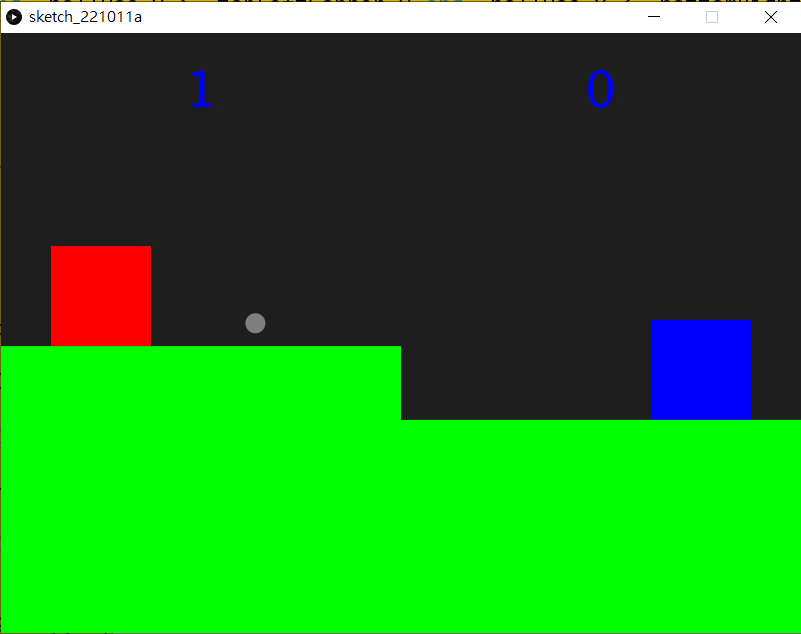
def reset(_Round):
    global ballPos, ballVec, Round, trigger, windAccel
    if _Round == 1:
        ballPos = PVector(width-100, player2Height)
        Round = 2
        ballVec = PVector(-2.5, 0) #一開始指向水平右方,速度為-2.5
    elif _Round == 2:
        ballPos = PVector(100, player1Height)
        Round = 1
        ballVec = PVector(2.5, 0) #一開始指向水平右方,速度為2.5

    trigger = False
windAccel = PVector(random(-0.01, 0.01), 0)開始寫之前,你會發現,每次球擊中對方或者球落地時,其實來來去去重設都是那幾句,不停地重覆,但每次都有少許不同,對,這時候就非常適合用函數了。開一個函數叫reset(),將原本擊中地下時重設的幾句都複製進去,唯一不同的是,今次函數有一個輸入,判斷現在回合不同作出不同反應。
def setup():
    global player1Height, player2Height, score1, score2

    size(800, 600)

    player1Height = random(height*0.2, height*0.8)
    player2Height = height - player1Height

    score1 = 0
    score2 = 0

reset(2)現在setup()就簡潔很多了,當初好幾句設定初始的球位置、球速和風速的程式碼只需要化簡成一句就可以了。(記得是要設定為reset(2),告訴程式現在是player2的回合,它才會在下一步設定為player1的回合)。而且你會發覺,當初一大堆global的變數,由於現在都不在setup()中設定變更,所以可以刪除,只剩4個。(同樣情況,在draw()中也是,只需要剩下這4個global變數需要變更)
# cannonball hit the player1 ground
hitP1Ground = isHitGround(ballPos, PVector(0, player1Height+ tankSize/2), PVector(width/2, height))
# cannonball hit the player1 ground
hitP2Ground = isHitGround(ballPos, PVector(width/2, player2Height+ tankSize/2), PVector(width, height))
# cannonball hit player1 ground or player2 ground
if hitP1Ground or hitP2Ground:
	reset(Round)

hitP1 = isHitPlayer(ballPos, PVector(100, player1Height), tankSize)
if hitP1 and Round == 2:
    score2 += 1
    reset(2)
hitP2 = isHitPlayer(ballPos, PVector(width-100, player2Height), tankSize)
if hitP2 and Round == 1:
    score1 += 1
    reset(1)

textSize(50)
textAlign(CENTER, CENTER)
if Round == 1:
	fill(255, 0, 0)
elif Round == 2:
	fill(0, 0, 255)
text(score1, width/4, 50)
text(score2, width*3/4, 50)開設兩個變數score1和score2,在宣告區宣告和在setup()中設定初始值。接著在draw()中,將之前球擊到在地時的幾句化簡成reset(Round),打中地後現在是哪個回合就重設哪個回合。
而之前打中對方時,只是print是否打中來測試,現在可以補回了,如果打中player1而現在又是player2的回合時,就為player2加分,否則,打中player2而且是player1的回合,就為player1加分。
最後將分數顯示在畫面上方。我在測試時發現很難即時判斷現在回合是player1還是player2,所以在分數的顏色上加了效果,會用紅色和藍色代表回合。
12. 考考你
當你測試時,你會發現有一個問題,就是當炮彈打不中地,又打不中對方,而飛出了畫面左邊或右邊時,是不會進入下一回合的(超出畫面上方不進入下一回合是刻意為之的)。我們修改一下遊戲,原遊戲設計並沒有這個設定,當球打中左邊或右邊畫面時,會反彈轉變方向,就像player1和player2身後有一面牆一樣。
原遊戲的風速有一個箭頭和文字顯示,方便用家跟據風速決定修正。請你幫遊戲加入這個風速箭頭,並將原來風速random的上下限加大一點,令遊戲更受風速的影響。