Vibe Coding: A Crash Course in AI-Assisted Programming
“Vibe coding” is a development style in which an AI assistant or agent does much of the implementation in response to natural-language instructions. The emphasis shifts from typing syntax to expressing a clear intention and iterating quickly towards a minimum viable product, while tests and review keep the risks under control. Andrej Karpathy helped popularise the term, and mainstream platforms such as Replit and Microsoft Learn now offer introductory material. At the same time, commentators rightly question the practice of relying on the “vibe” without reviewing the code.
What Is Vibe Coding?
💡 Definition
Vibe coding does not mean writing software purely by intuition. It is a modern workflow built around collaboration with an AI agent or large language model (LLM):
- The human role: explain the requirements, define constraints and write acceptance criteria.
- The AI role: generate, modify or test code from those descriptions.
In other words, vibe coding is a description- and acceptance-driven development process, rather than the traditional practice of writing every line of syntax from scratch.
⚠️ Risks and Professional Responsibility
Vibe coding has become a popular term, but it is also easy to misunderstand.
🚫 Misconception 1: Vibe coding means you never need to read the program.
Wrong. AI-generated code is a draft and still requires human reading, understanding and testing. Professional judgement means deciding whether it is safe, sensible and maintainable.
🔍 Misconception 2: AI-generated programs are always correct.
LLMs can hallucinate, select the wrong pins or introduce logical flaws. Every result therefore needs three gates:
- ✅ Testing: verify that behaviour and logic are correct.
- ✅ Review: inspect the program, comments and pin assignments manually.
- ✅ Licence check: establish whether external code or an open-source library has been incorporated and under what terms.
⚙️ Misconception 3: AI can completely replace an engineer.
Current AI still depends on humans to provide precise requirements. A vague prompt can produce incorrect or dangerous code. Vibe coding is co-creation, not full automation.
Method: PRD → Prompt → Agent
🧩 Prompt Comparison: Weak vs Professional
🚫 A Weak Prompt
Make a breathing LED.
❌ What Is Wrong with It?
| Problem | Why it matters |
|---|---|
| 🎯 The objective is vague | “Make a breathing LED” has many interpretations: ESP32 or Arduino? PWM or delay()? The AI cannot know. |
| ⚙️ Technical details are missing | There is no pin assignment, brightness range, cycle time or requirement for smooth transitions. |
| 🧪 There are no acceptance criteria | The AI has no measurable definition of the breathing speed or quality. |
| 📦 There are no constraints | It may use blocking delay() calls or unnecessary external libraries. |
| 🔁 Iteration is difficult | Without an initial specification, a follow-up such as “make it slower” only invites arbitrary adjustment. |
🧨 The result may be an ordinary blinking LED rather than a genuinely smooth breathing effect. It can look plausible while being logically wrong.
✅ A Structured Prompt You Can Use Directly
You are an embedded-systems engineer.
Generate a program for an ESP32 that runs in the Arduino IDE.
It must meet these requirements:
- Control an LED connected to GPIO 2.
- Change its brightness smoothly from dim to bright and back again, producing a breathing effect.
- One complete cycle should take approximately two seconds.
- Use PWM (
analogWrite) to control brightness and do not usedelay().- Use
millis()for timing so that the main program can keep running.- Do not use external libraries; keep everything in one
.inofile.- Add clear comments explaining each part of the logic.
- Finally, add a test function that changes the breathing speed and prints the result.
✅ Why Is This Better?
| Key element | Explanation |
|---|---|
| Clear role | Telling the AI that it is an embedded-systems engineer establishes the appropriate context and style. |
| Specific objective | “Smooth change” and a “two-second cycle” are measurable and testable. |
| Defined I/O | A specified GPIO prevents arbitrary pin selection. |
| Explicit constraints | delay() and external libraries are ruled out. |
| Acceptance criteria | The result can be measured, checked and debugged. |
| Structured thinking | A segmented list encourages a logically organised program. |
PRD (Prompt Requirements Document)
Prompt Requirements Document (PRD): A New Concept for the Vibe Coding Era
The linked article proposes a new kind of Prompt Requirements Document (PRD) for human–AI software development in the vibe-coding era.
💡 Core Idea
- Traditional PRD: largely organises unstructured information to align one group of humans with another.
- Prompt PRD: focuses on creating, editing and managing structured prompts—including text, images and video—that both humans and AI can understand and use effectively.
- Purpose: provide a shared understanding of the project and act as the single source of truth.
🛠 Three Pillars
A well-written prompt PRD normally contains three parts:
- Guidelines: shared human–AI understanding
- A comprehensive knowledge base covering project context, technical principles and architectural decisions.
- It gives assistants and human team members the same foundation, much like a traditional PRD aligns stakeholders.
- Guidance: a method for evolving prompts
- A structured method for turning abstract ideas into precise instructions that an AI system can interpret and execute.
- Annotated examples, pattern libraries, contextual best practices and warnings about common mistakes help beginners produce effective prompts.
- Guardrails: AI-assisted code review
- Explicit evaluation criteria and quality checkpoints aimed at known project risks and recurring problems.
- They let AI perform a preliminary review before a human inspection, reducing workload and improving consistency.
🧩 Components of a Structured PRD Prompt
| Component | What to include | Why it matters | ESP32 breathing-LED example |
|---|---|---|---|
| 1. 🎭 Role | The AI's identity and professional role | Establishes the right voice and knowledge framework, reducing hallucinations | “You are an embedded-systems engineer.” |
| 2. 🎯 Goal | The purpose and desired outcome | Keeps the AI focused on the final result rather than isolated actions | “Generate an ESP32 breathing-LED program for Arduino IDE.” |
| 3. 🔌 Input / Output | Input sources, data types and output format | Defines what the system reads and produces | “Input: none; output: PWM LED brightness from 0 to 255.” |
| 4. ⚙️ Constraints | Development conditions, prohibitions and technical boundaries | Narrows the solution to something safe, testable and reproducible | “No delay() or external libraries; one .ino file.” |
| 5. 🧪 Acceptance tests | Three to five PASS/FAIL criteria | Makes quality verifiable | “One smooth two-second cycle, no visible flicker, with explanatory comments.” |
| 6. 🔁 Iteration rule | How the AI should correct or improve the result | Reinforces that vibe coding normally needs multiple rounds | “If the transition is abrupt, adjust the PWM increment or update interval.” |
| 7. 🧷 Licence / comments | AI tool, author, licensing and program comments | Encourages transparent, ethical development | “Record the author and generation tool at the end of the program.” |
- A prompt is not merely a sentence; it is a structure. Learn to communicate clearly, not simply at greater length.
- Role + Goal = Context; Constraints + Tests = Guardrails. A structured prompt gives the AI a clear task boundary.
- The same task with a different structure produces a different result. Compare weak prompts with structured ones.
Very Important
- Vibe coding does not mean “not writing programs.” It redirects human effort towards defining the problem, acceptance testing and risk management, while an agent handles repetitive low-level work.
- A reliable real-world deliverable depends on a clear PRD, repeatable tests and review habits, not on accepting every suggestion.
🧾 Structured-Prompt Exercises
ESP32 breathing LED
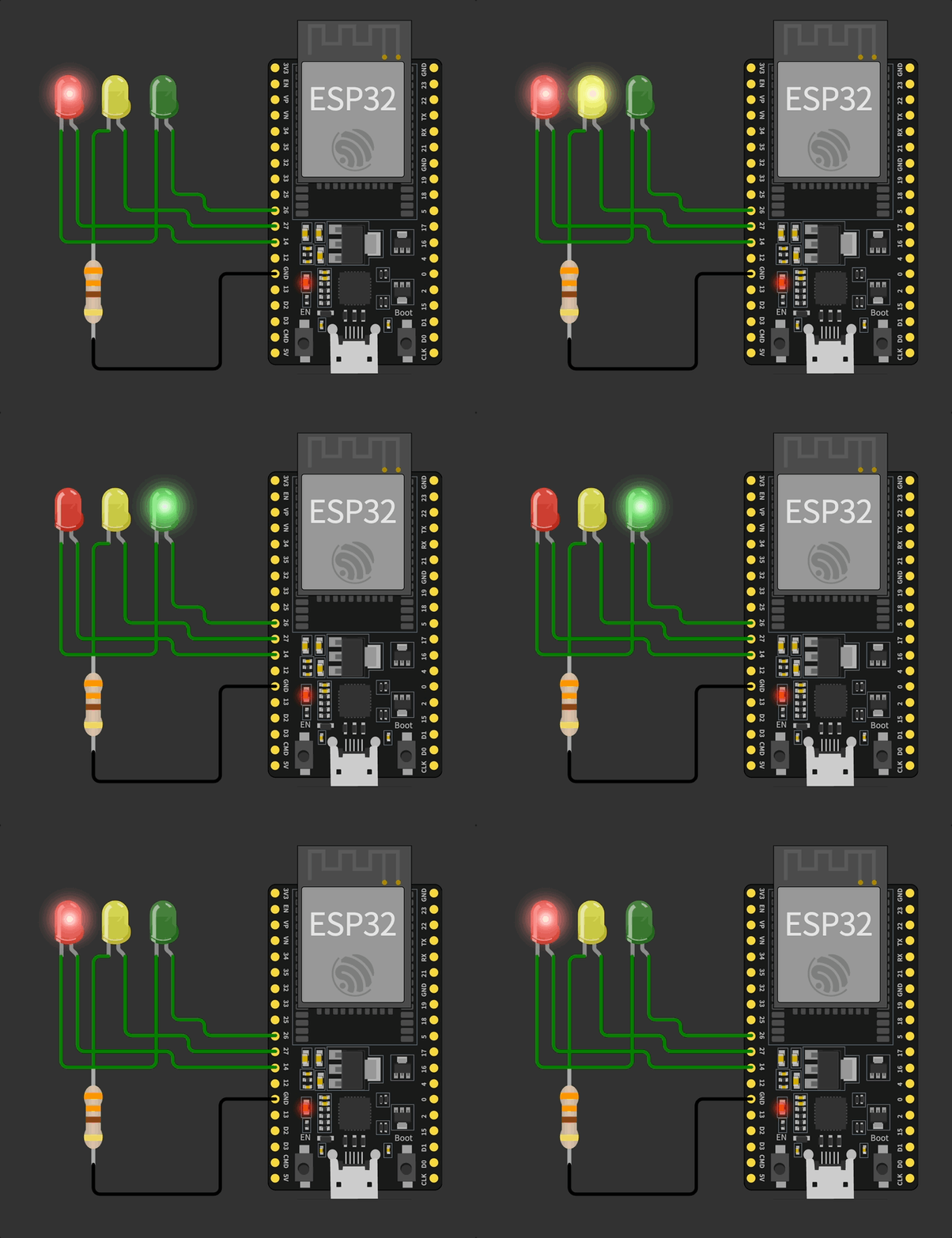
Create an ESP32 traffic-light program
ESP32 wired quiz buzzer
Bonus: add a buzzer to the wired quiz system without preventing Reset or the next round of answering while a sound plays
Worksheet
Translation notice: This English page was generated automatically by AI and has not yet been reviewed by a human. It will be checked and revised page by page when time permits.