🕒 Where Does Time Come From? ESP32 × NTP × Wi-Fi Synchronisation
⏰ 1. What Is an RTC When There Is No Network?
Early or offline systems such as the Arduino UNO, STM32 and Raspberry Pi Pico do not necessarily include network access. To know the current time, they need a separate RTC (real-time clock) module.
🔹 The RTC's Role
An RTC contains a miniature crystal oscillator, usually 32.768 kHz, and normally uses a CR2032 coin cell to keep time while the main device is off.
| Component | Function |
|---|---|
| Crystal oscillator | Produces a stable 1 Hz clock pulse |
| Registers | Store seconds, minutes, hours, date and related values |
| Battery | Preserves the time when the main power is removed |
🧩 Common Models
- DS1307: an easy-to-use entry-level RTC with an I²C interface, but only moderate accuracy.
- DS3231: a temperature-compensated, high-accuracy RTC with error below ±2 ppm.
When using an RTC, the controller must read the time from the module during startup. If its battery is exhausted or it has not been initialised, it may return to 2000-01-01 00:00:00.
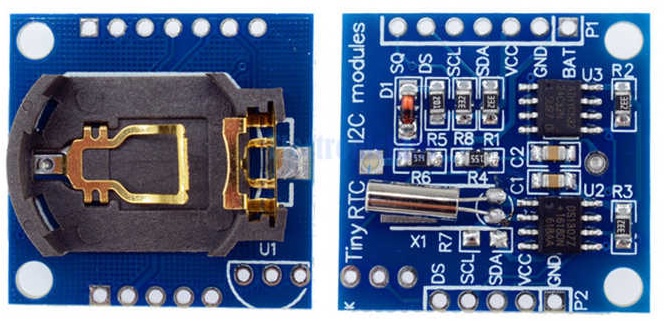
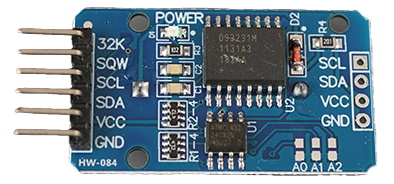
Left: DS1307. Right: DS3231.
🌐 2. How Does a Modern Network Work?
The ESP32's Wi-Fi hardware lets it access a network, but “going online” does not mean that data arrives automatically. Modern networks depend on transmitting data packets and requests.
📦 What Is a Data Packet?
Imagine the internet as a global postal system. Every transmitted item—an image, some text or a time message—is divided into packets. Each has two main parts:
| Part | Contents | Analogy |
|---|---|---|
| Header (envelope) | Source and destination IP addresses | Addresses written on an envelope |
| Payload (letter) | The actual data, such as “the time is 14:35:22” | The letter's contents |
Each internet router acts like a post office, forwarding packets towards the correct destination.
💬 What Is a Request?
A request is a device actively asking a server for something. Most network activity follows a question-and-answer pattern:
ESP32: “What time is it?”
NTP server: “It is 2025-10-29 14:35:02 UTC.”
This is the request–response model:
- the ESP32 sends a request packet;
- the server returns a response packet; and
- the ESP32 extracts the required data from that response.
📶 3. Wi-Fi Is the Bridge to the Network
This ESP32 has no Ethernet socket, so it connects through Wi-Fi. One important limitation applies:
⚠️ This ESP32 Supports Only the 2.4 GHz Band
| Band | Characteristics | Supported? |
|---|---|---|
| 2.4 GHz | Stable, longer range and better penetration, but slower | ✅ Yes |
| 5 GHz | Faster and less congested, but shorter range | ❌ No |
Many phone hotspots default to 5 GHz, in which case the ESP32 cannot find them. An iPhone hotspot may need additional compatibility settings. If necessary, try an Android hotspot or enable a computer's 2.4 GHz hotspot.
🌍 4. NTP: The International Standard for Synchronising Devices
Modern connected systems do not rely solely on an RTC. NTP (Network Time Protocol) is a worldwide standard for synchronising clocks.
🔹 What NTP Does
- Provides a consistent global reference time in UTC.
- Keeps servers, computers and microcontrollers synchronised.
- Normally achieves accuracy within approximately one second for a simple internet-connected device.
🔹 ESP32 Synchronisation Process
sequenceDiagram
    participant U as User
    participant E as ESP32
    participant W as Wi-Fi Router (2.4 GHz)
    participant N as NTP Server
    participant S as Serial Monitor

    U->>E: Start device
    E->>W: Connect using SSID and password
    W-->>E: Assign IP address
    E->>N: Send NTP time request
    N-->>E: Return UTC time
    E->>E: Convert to local time (UTC+8)
    E->>S: Print time
S-->>U: Display time🔹 Common Public NTP Servers
| Name | Address |
|---|---|
| NTP Pool Project | pool.ntp.org |
| Google NTP | time.google.com |
| NIST NTP | time.nist.gov |
5. Key Operations
Connecting to Wi-Fi
Set the SSID and password:
cppconst char* ssid = "MyWiFi"; const char* password = "mypassword"; WiFi.begin(ssid, password);Check the connection with
WiFi.status().Print the assigned IP address after connecting.
Only then call the NTP functions to synchronise the clock.
Typical NTP Configuration
configTime(8 * 3600, 0, "pool.ntp.org", "time.nist.gov");- The first argument is the UTC offset in seconds; this example uses UTC+8.
- The second is the daylight-saving offset; Macau normally uses
0. - The remaining arguments are one or more NTP servers.
- After synchronisation,
getLocalTime(&timeinfo)retrieves a time structure.
🧭 6. Summary
| Concept | Key point |
|---|---|
| NTP | A network protocol that supplies standard time worldwide |
| ESP32 Wi-Fi | Supports 2.4 GHz only; the SSID and password must be correct |
WiFi.begin() | AI cannot read your mind: enter the correct SSID and password yourself |
configTime() | Sets the time zone and NTP servers, then maintains system time |
getLocalTime() | Reads the time structure for formatted output |
🧪 7. Learning Task
| PRD element | Guiding questions |
|---|---|
| 🎯 Goal | Where should the device display the time—Serial Monitor, OLED or LEDs? How often should it update? What could be added later? |
| 🔌 I/O | What output device will you use? Does the board have Wi-Fi? Is an input module required? |
| ⚙️ Constraints | Does it need 2.4 or 5 GHz Wi-Fi? What does configTime() do, and how will you specify Macau time? What would happen if you used delay()? |
| 🧪 Acceptance criteria | Does it show local time? How far is Macau from UTC? How often should it make a network request? How does it report a failed Wi-Fi connection? |
Building on Computational Thinking × Vibe Coding, should you attempt the whole task at once, or decompose it into smaller tasks and solve them individually?
🚀 8. Optional Extensions
Advanced students may choose one extension. Hint: test the RGB LED independently first, then bring its confirmed pin information back to the earlier AI conversation.
- Colour clock
- 06:00–11:59 → yellow for morning
- 12:00–17:59 → white for afternoon
- 18:00–23:59 → purple for evening
- 00:00–05:59 → blue for late night
- Error-status indicator
- Wi-Fi not connected → rapidly flash red.
- NTP synchronisation failed → slowly flash yellow.
- Your own innovation
- Add sensors or actuators. Besides time, what value do you regularly need and could retrieve online? Could you combine it with time in one device? Preview the next chapter for ideas.
💡 9. Further Reading
10. Tools
Translation notice: This English page was generated automatically by AI and has not yet been reviewed by a human. It will be checked and revised page by page when time permits.