🔧 From APIs to IoT: Letting an ESP32 Upload Its Own Data
After learning to ask the world questions through an API, an ESP32 can also become a source of information. Connect a DHT11 or DHT22 sensor, measure temperature and humidity, package the readings as JSON, and upload them to a cloud service such as Google Sheets.
Prove the complete route with random data first, then replace it with temperature and humidity.
🧠 Conceptual Flow
Sensor → ESP32 → HTTP POST → Google Apps Script → Google Sheet
The ESP32 measures temperature and humidity and packages them as JSON. Google Apps Script (GAS) acts as a bridge: the ESP32 sends JSON to its URL, and GAS writes the data into the sheet.
0. Preparation
- Use a Google account and create a spreadsheet.
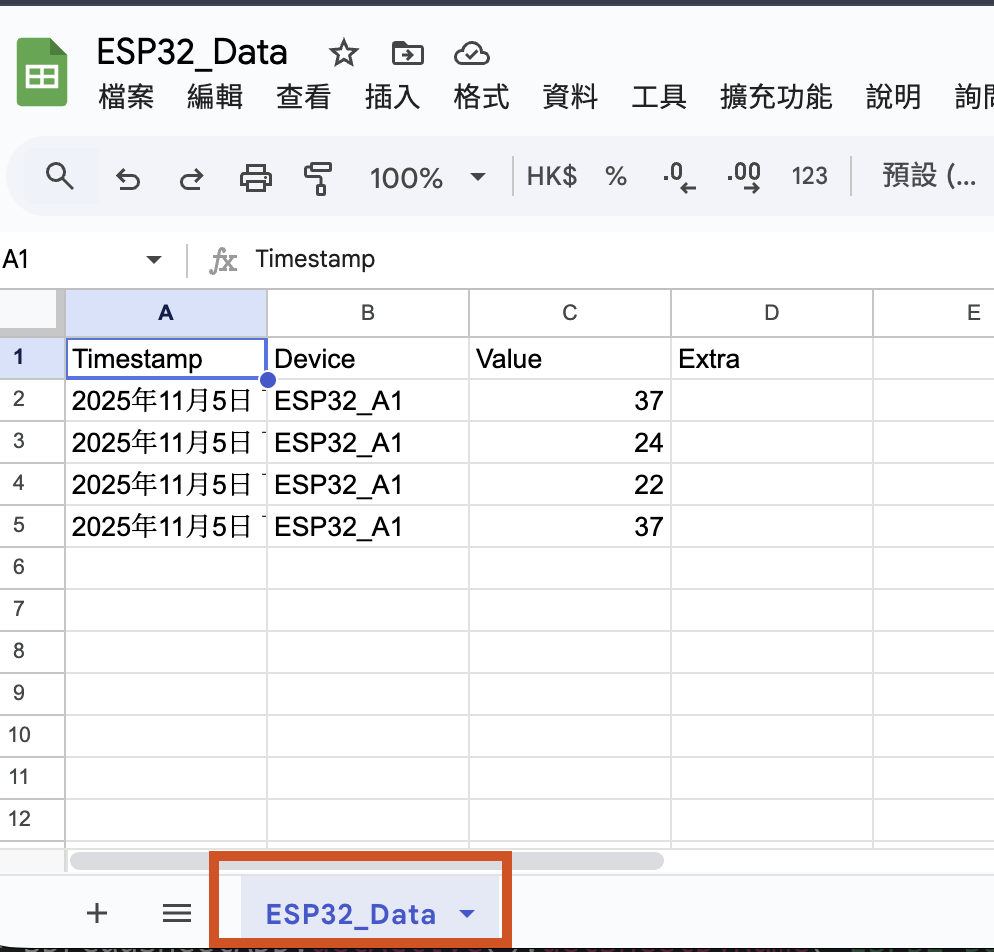
- Name the worksheet tab at the bottom, not merely the spreadsheet file,
ESP32_Data. - Add these headings to the first row:
Timestamp | Device | Value | Extra. TheExtracolumn can hold humidity later.
1. Create the Google Apps Script Bridge
In the sheet, select Extensions → Apps Script and replace the default Code.gs with:
function doPost(e) {
    try {
        const sheet = SpreadsheetApp.getActive().getSheetByName('ESP32_Data');
        const raw = e && e.postData ? e.postData.contents : '{}';
        const data = JSON.parse(raw);
        // Optional: simple token validation for a real deployment
        // if (data.token !== 'YOUR_TOKEN') return ContentService.createTextOutput('DENIED').setMimeType(ContentService.MimeType.TEXT);

        const now = new Date();
        const device = data.device || 'ESP32';
        const value = data.value;
        const extra = data.extra || '';

        sheet.appendRow([now, device, value, extra]);
        return ContentService.createTextOutput('OK').setMimeType(ContentService.MimeType.TEXT);
    } catch (err) {
        // For debugging: inspect this in Apps Script's Executions view
        console.error(err);
        return ContentService.createTextOutput('ERROR').setMimeType(ContentService.MimeType.TEXT);
    }
}Deploy as a Web App: Required
- Select Deploy → Manage deployments → New deployment.
- Set Type to Web app.
- Set Execute as to Me, so the script writes as you.
- For a demonstration, set Who has access to Anyone.
- Grant the requested permission and copy the URL ending in
/exec.
After changing the script, publish the new version with New deployment or Edit deployment.
2. ESP32 Stage A: Upload Random Data to Test the Route
Focus on four parts: the Wi-Fi connection, target URL, JSON body and Content-Type: application/json header.
#include <WiFi.h>
#include <HTTPClient.h>

const char* ssid = "YOUR_WIFI";
const char* pass = "YOUR_PASS";
const char* GAS_URL = "https://script.google.com/macros/s/XXXXXXXX/exec"; // Your /exec URL

void setup() {
    Serial.begin(115200);
    WiFi.begin(ssid, pass);
    while (WiFi.status() != WL_CONNECTED) { delay(300); Serial.print('.');}

    HTTPClient http;
    http.begin(GAS_URL);
    http.addHeader("Content-Type", "application/json");

    String payload = String("{\"device\":\"ESP32_A1\", \"value\":") + String(random(20, 41)) + "}";
    // Random integer from 20 to 40
    int code = http.POST(payload);
    Serial.printf("HTTP %d", code);
    Serial.println(payload);
    Serial.println(http.getString());
    http.end();
}

void loop() {}Never give your Wi-Fi password or GAS_URL to an AI service.
Success criterion: the sheet gains one row; Value contains a number from 20 to 40 and Timestamp is filled automatically.
Send once first by leaving loop() empty. Only after it works should you upload every ten seconds.
3. ESP32 Stage B: Replace Random Data with Temperature and Humidity
Replace only the payload construction. Keep Wi-Fi, URL and POST logic unchanged.
Key points:
- You may use a
DHT,SHT31or similar sensor; this example uses a DHT11. - Install
DHT sensor libraryby Adafruit andAdafruit Unified Sensor. - Consider opening a new conversation or separate file and testing the sensor by itself first.
#include <DHT.h>
#define DHTPIN 4
#define DHTTYPE DHT11
DHT dht(DHTPIN, DHTTYPE);

void setup(){
    Serial.begin(115200);
    /* Wi-Fi connection and http.begin(...) omitted */
    dht.begin();
    sendOnce();
}

void loop() {}

void sendOnce(){
    float t = dht.readTemperature();
    float h = dht.readHumidity();
    // Replace random data with JSON; Extra can hold additional fields
    String payload = String("{\"device\":\"ESP32_A1\", \"value\":" ) + String(t, 1) +
    ", \"extra\": \"humi=" + String(h, 1) + "%\"}";
    // Then call http.POST(payload) as before
}The sheet stores temperature in Value and text such as humi=65.3% in Extra. Later, you can use two distinct columns or send Value as a JSON string for GAS to split.
Initially, call sendOnce() at the end of setup() so that a bug cannot flood the endpoint. After successful testing, ask the AI to move the call into loop() and upload every ten seconds; real applications commonly use intervals from 5 to 60 seconds.
4. Frequency and Reliability
| Item | Recommendation | Reason |
|---|---|---|
| Upload interval | At least 10 seconds for the lesson; 5–60 seconds in a real application | Apps Script execution quotas and sheet refresh cost |
| Retry after failure | Exponential backoff: 1 s → 2 s → 4 s, capped at 60 s | Prevents an endless storm of POST requests |
| Payload size | Preferably below 5 KB | Oversized JSON may trigger limits |
| Access | Anyone for a demo; token validation for real use | Prevents unauthorised use |
| Approximate row limit | About 50,000 | Very large sheets become slow |
5. Student Task Cards
Task A: Test the Route with Random Data
- Paste your
GAS_URLinto the program. - Locate
http.addHeader("Content-Type", "application/json")andhttp.POST(payload). - Check whether a new row appears in the sheet.
Task B: Replace It with Temperature and Humidity
- Change only the payload construction; preserve the
device,valueandextrafields. - Print both the outgoing payload and returned response in Serial Monitor.
- If the sheet does not display the values correctly, verify that the payload is valid JSON.
6. Common Errors
| Symptom | Likely cause | Solution |
|---|---|---|
HTTP 405 | Used GET, or the URL does not end in /exec | Use POST and verify the /exec URL |
HTTP 401/403 | Incorrect web-app permissions | Select Anyone for the demo, or implement token validation |
GAS execution says TypeError: e.postData is undefined | Missing Content-Type: application/json | Add http.addHeader(...) on the ESP32 |
| Sheet cannot be written | Wrong worksheet name or too many formulas in the target area | Confirm ESP32_Data and write into a worksheet without formulas |
💬 Further Thought
✅ Previously, the ESP32 asked questions about the weather or time.
✅ Now it answers a question by telling the world what it has measured.
Without necessarily noticing it, you have started building a database. What will you do with that database next?
Translation notice: This English page was generated automatically by AI and has not yet been reviewed by a human. It will be checked and revised page by page when time permits.